How I Tested Loomly
I went into Loomly expecting the calendar to be the main attraction. It remains one of the product’s clearest strengths, but after exploring the platform, I found that what Loomly has built around the calendar is just as interesting.
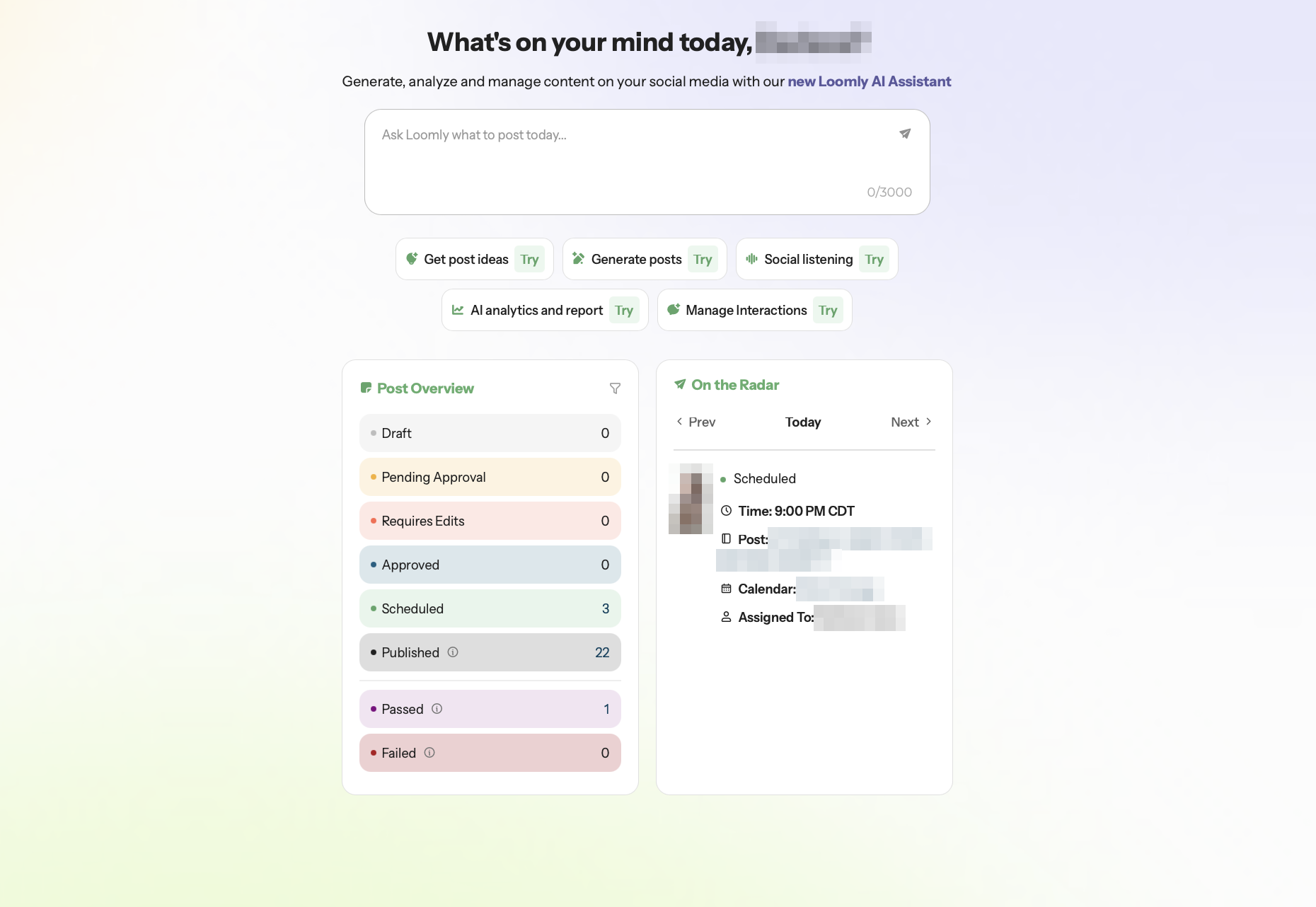
The Home dashboard brings together AI shortcuts, content statuses, and upcoming scheduled posts. I could see what had already been published, what still needed attention, and what was coming next without opening several screens. That made Loomly feel more like a content workflow dashboard than a basic social media scheduler.
For this review, I explored the Post Builder, calendar, AI Assistant, Ideas Board, workflow settings, Custom Fields, RSS-based post ideas, and collaboration features. I also tested AI analytics and reviewed Loomly’s documentation and third-party feedback to understand capabilities I couldn’t fully evaluate firsthand.
Some features were available for me to inspect but not test through a complete workflow. I’ll distinguish those observations from the features I actually used.
Home Made the Workflow Easy to Read at a Glance
Loomly calls its main dashboard Home, and I liked that it showed operational context rather than just account metrics. The Post Overview grouped content by workflow status, making it easy to see what still needed review, what was ready to go, and what had already been published. For a team, that is more useful than a dashboard focused only on performance metrics because it shows where work might be getting held up.
The On the Radar card worked like a small production reminder. It surfaced the next scheduled post with its publishing time, calendar, and assignee. If I were managing several campaigns or clients, that would give me a faster read on what was coming up.
The AI Assistant sits above both panels, with shortcuts for post generation, social listening, analytics, and interaction management. Rather than limiting AI to caption writing, Loomly presents it as an entry point into several parts of social media management.
Vista Social gave me a useful contrast here. Its AI layer reaches further across agency operations through Ask Vista, while Loomly keeps the experience more closely tied to content planning, collaboration, and scheduling. I preferred Loomly’s focus for teams that want AI support without making it the center of every workflow.
The Post Builder Is Where Loomly’s Workflow Comes Together
Creating a post starts in the Post Builder, one of Loomly’s strongest interfaces. The first step lets me create a shared version of the post, with scheduling, campaign labels, copy, and media handled in one place.
From there, Loomly offers a Fine-Tune Content step for customizing posts for individual social networks. I liked this two-stage approach because it keeps the initial setup simple while allowing teams to adapt content for different channels rather than using identical captions everywhere. When I later returned to ContentStudio, its composer felt more like a power console than Loomly’s guided two-step flow.
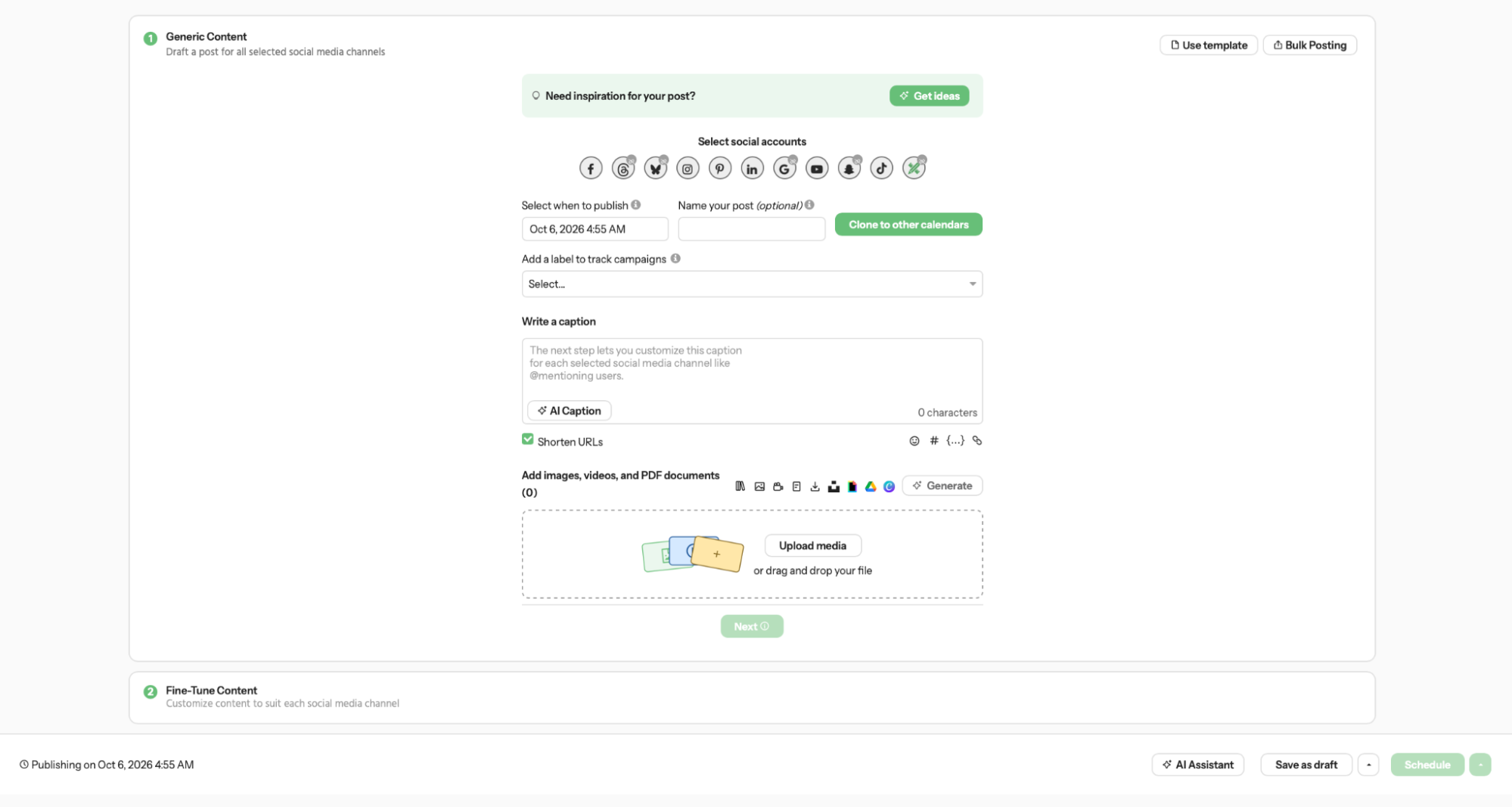
The structure is useful for campaigns that need to reach multiple platforms, including Facebook, Instagram, LinkedIn, Pinterest, TikTok, and YouTube. Instead of preparing each post separately, teams can start with shared content and make platform-specific adjustments.
The “Clone to other calendars” option also caught my attention. Combined with Custom Fields, it can help agencies reuse posts across multiple client or location calendars while replacing details such as phone numbers, addresses, and URLs. I could see the option in Post Builder, although I didn’t verify the full cloning and field-replacement process during testing.
The Calendar Stays Simple While Ideas Fill the Gaps
Loomly’s calendar looks like a standard monthly social calendar. I could see published and scheduled posts in their respective date cells, switch views, filter content, and navigate between months. The interface isn’t radically different from other schedulers, and I don’t think it needs to be.
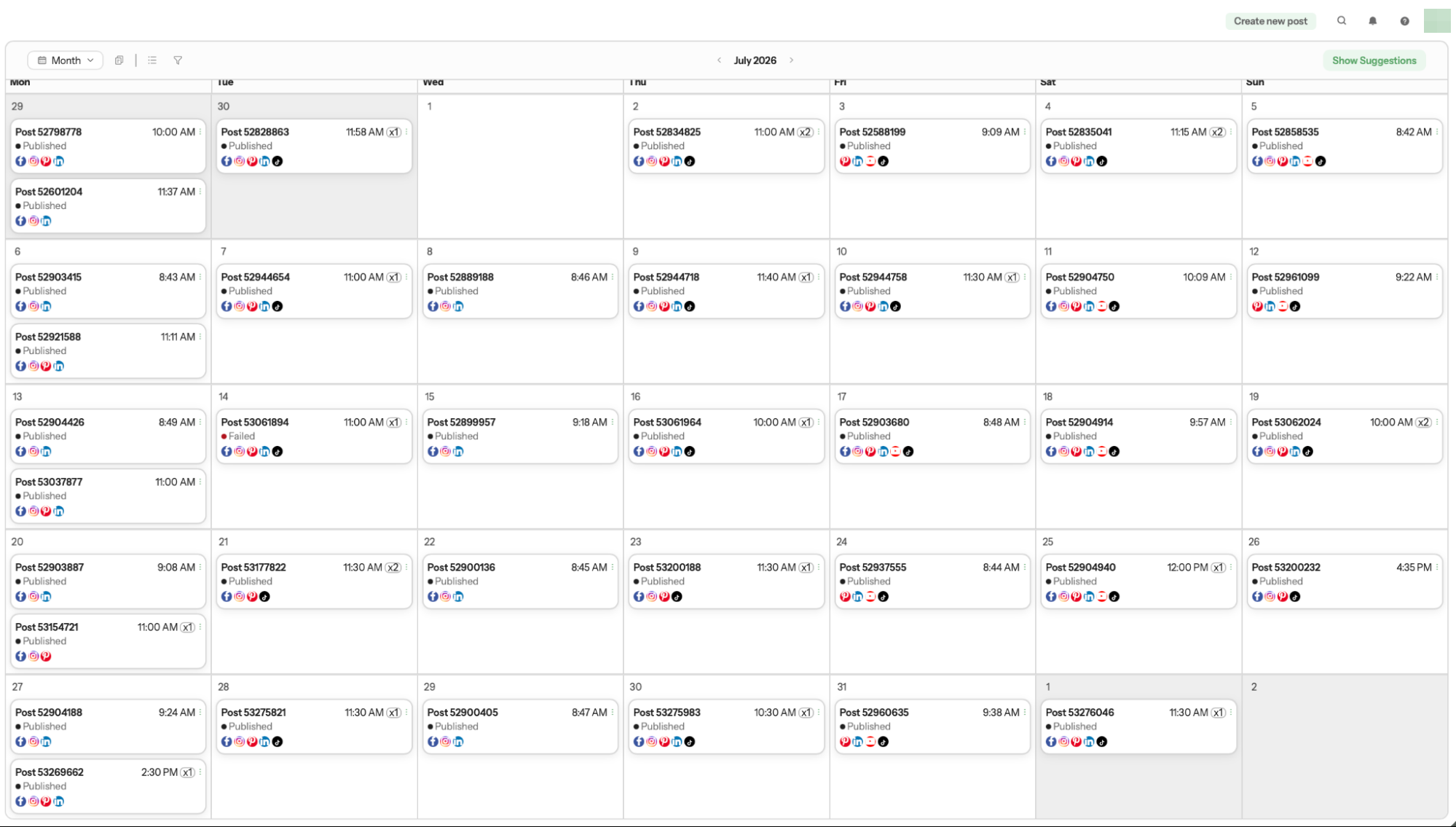
What makes the calendar more interesting is its connection to Post Ideas. Loomly offers content inspiration through date-based suggestions, RSS feeds, and custom ideas. These features extend into the Ideas Board and Post Builder, giving teams ways to plan content beyond manually filling calendar dates.
SocialBee approached scheduling differently in my earlier test, with categories and queues driving the content schedule. Loomly takes a more flexible approach. Its suggestions can help teams develop content ideas without requiring them to organize every post around a fixed category system.
Custom Fields Are Quietly One of the Better Agency Features
Custom Fields are not flashy, but they are exactly the kind of feature that becomes useful after the fifth or tenth client calendar.
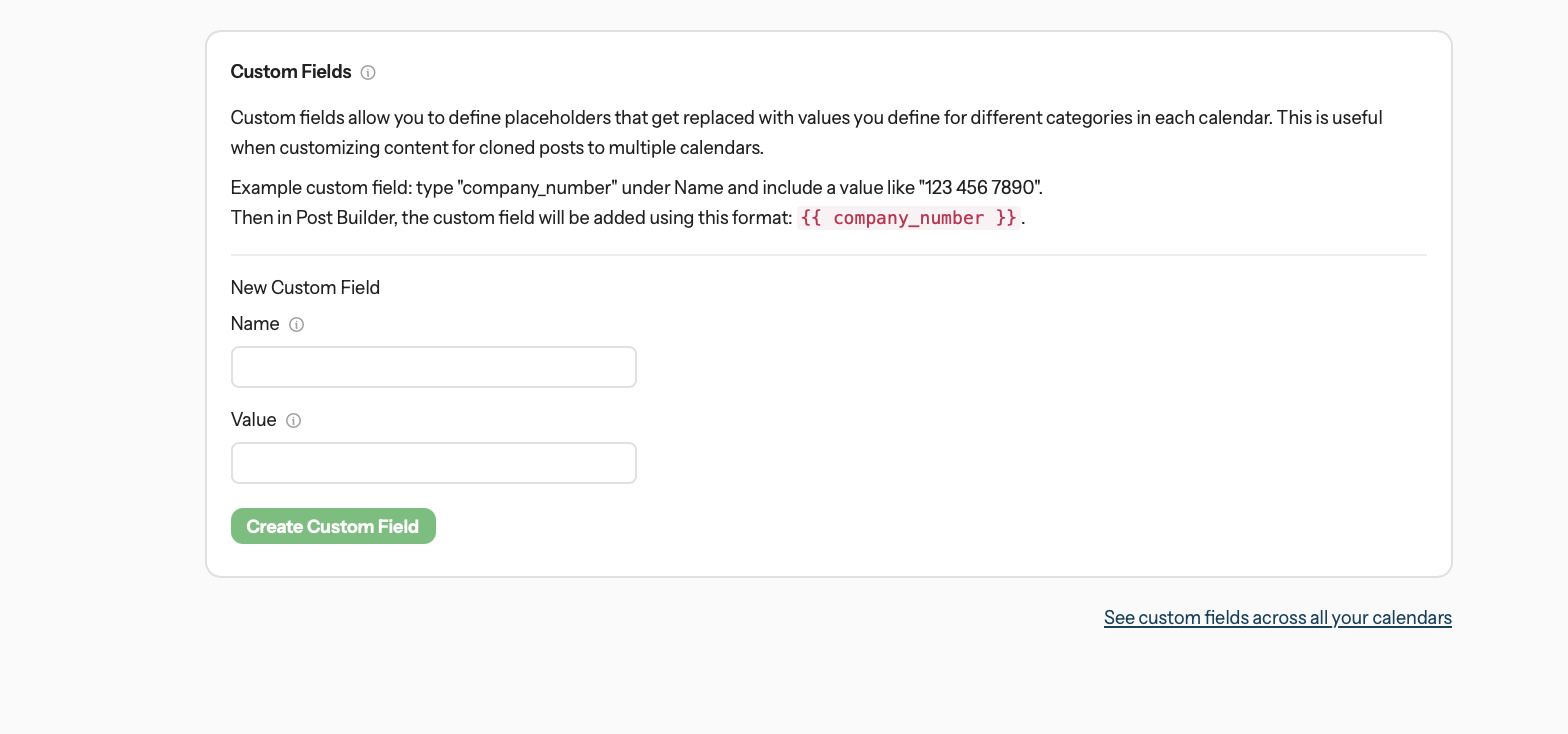
A field can act as a placeholder for a company phone number, store address, URL, or other repeating value. According to Loomly’s documentation, the platform can replace that placeholder with a different value for each calendar. The company positions Custom Fields and Calendar Groups as ways to reduce repetitive editing and keep multi-client content consistent.
For example, an agency could build one holiday post, clone it across several location calendars, and use Custom Fields to insert each location’s phone number or address automatically.
Custom Fields also stood out when I worked with SocialPilot, although Loomly connects them more directly to its calendar model. Here, reusable client-specific details can be applied to cloned content across calendars, making the feature feel less like an admin setting and more like part of everyday production.
Workflows Turn Review Into a Real Process
Loomly’s workflow settings were more detailed than I expected because they go beyond changing a post from one status to another. Custom workflows can automatically assign responsibility at different stages and restrict when content can move forward.
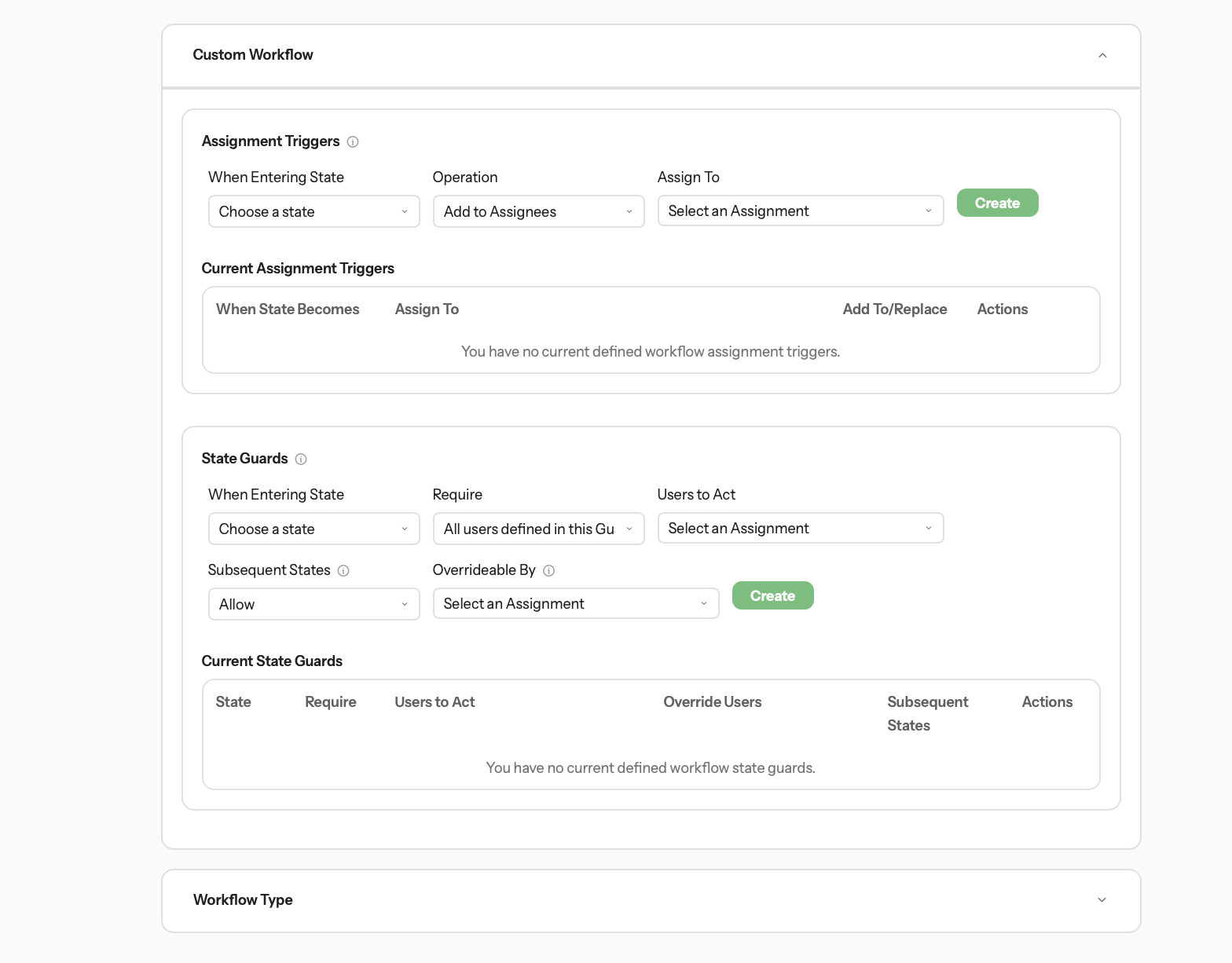
Assignment Triggers can automatically assign people when a post reaches a certain state. State Guards can restrict changes until designated users have reviewed or approved the content. Loomly’s documentation gives examples such as assigning a manager or client when a post becomes Pending Approval, or preventing scheduling until the required approvers have acted.
I could inspect these controls in the settings, although I didn’t run a complete automated approval workflow.
Loomly also offers three workflow types: Zero, Lite, and Original. Zero skips approvals, Lite uses one approver, and Original supports multiple approvers. I liked that teams could choose a process based on how much oversight their content requires.
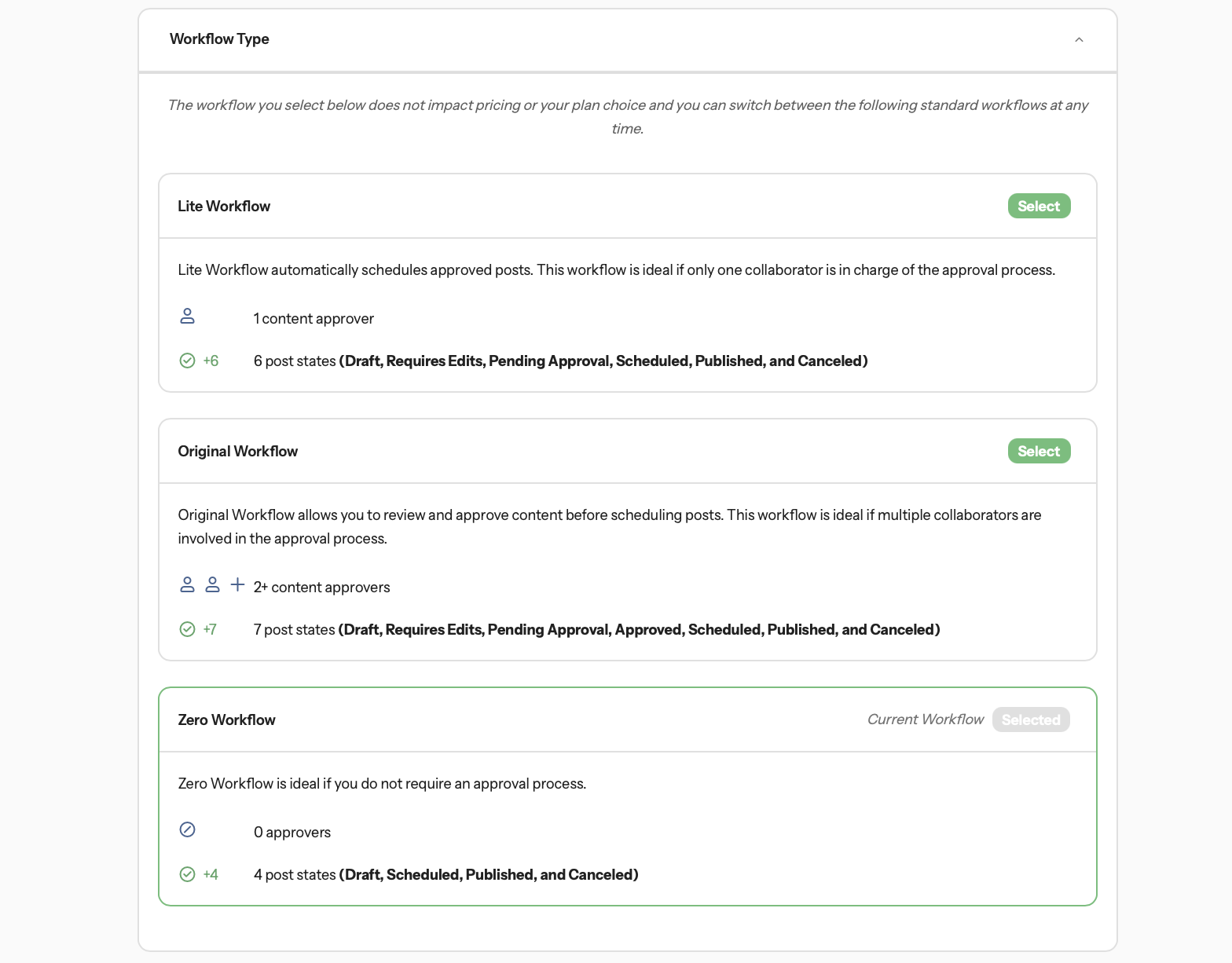
Planable put approvals much closer to the center of the experience when I tested it. Loomly takes a broader approach, placing review and approval alongside calendars, ideas, scheduling, and content management.
That makes Loomly worth considering for teams that need structured approvals as part of a wider content workflow.
Ideas Board Feels Like a Lightweight Production Pipeline
The Ideas Board was another feature that pushed Loomly beyond a basic scheduler. It uses simple stages such as Draft, To Do, In Progress, and Ready, giving teams a small Kanban-style space for content concepts before they become finished posts.
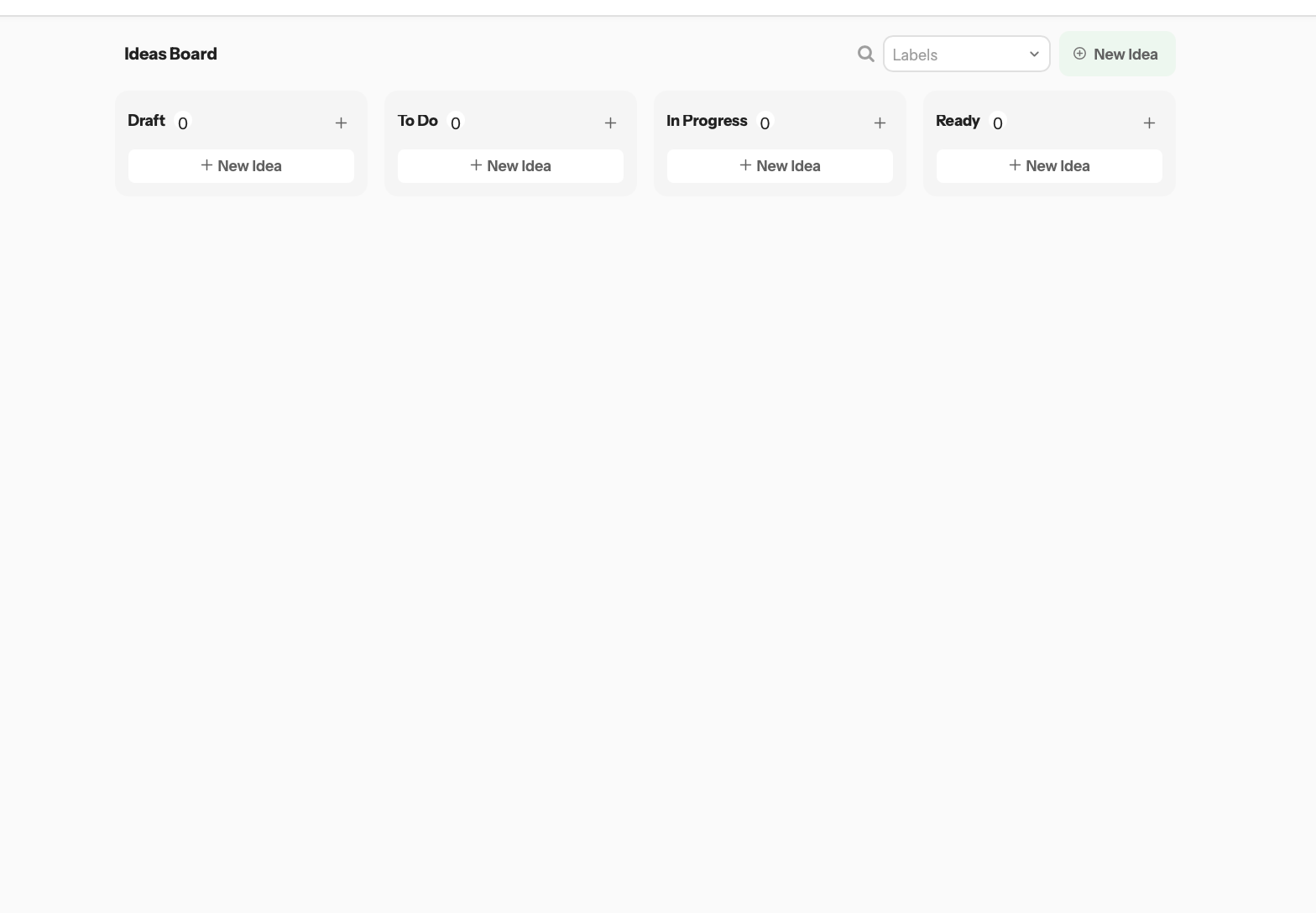
This is not as broad as Vista Work, which I tested as a more traditional project-management layer with tasks and several views. Loomly’s Ideas Board is narrower, and I think that is appropriate. It stays focused on the content pipeline rather than trying to replace an entire project-management suite.
The board also connects to Loomly’s Post Ideas system. Loomly offers inspiration through recurring prompts, events, holidays, RSS feeds, and custom ideas, while the Ideas Board gives those early concepts somewhere to live before they become posts.
For teams constantly asking, “What are we posting next week?” that creates a useful bridge between inspiration and production.
RSS Feeds Can Feed Ideas or Draft Posts Automatically
Loomly’s RSS settings go beyond a simple feed reader. A connected RSS feed can serve as a source of post ideas, and Loomly’s documentation also describes an assistive mode that can turn new RSS entries into draft posts automatically.
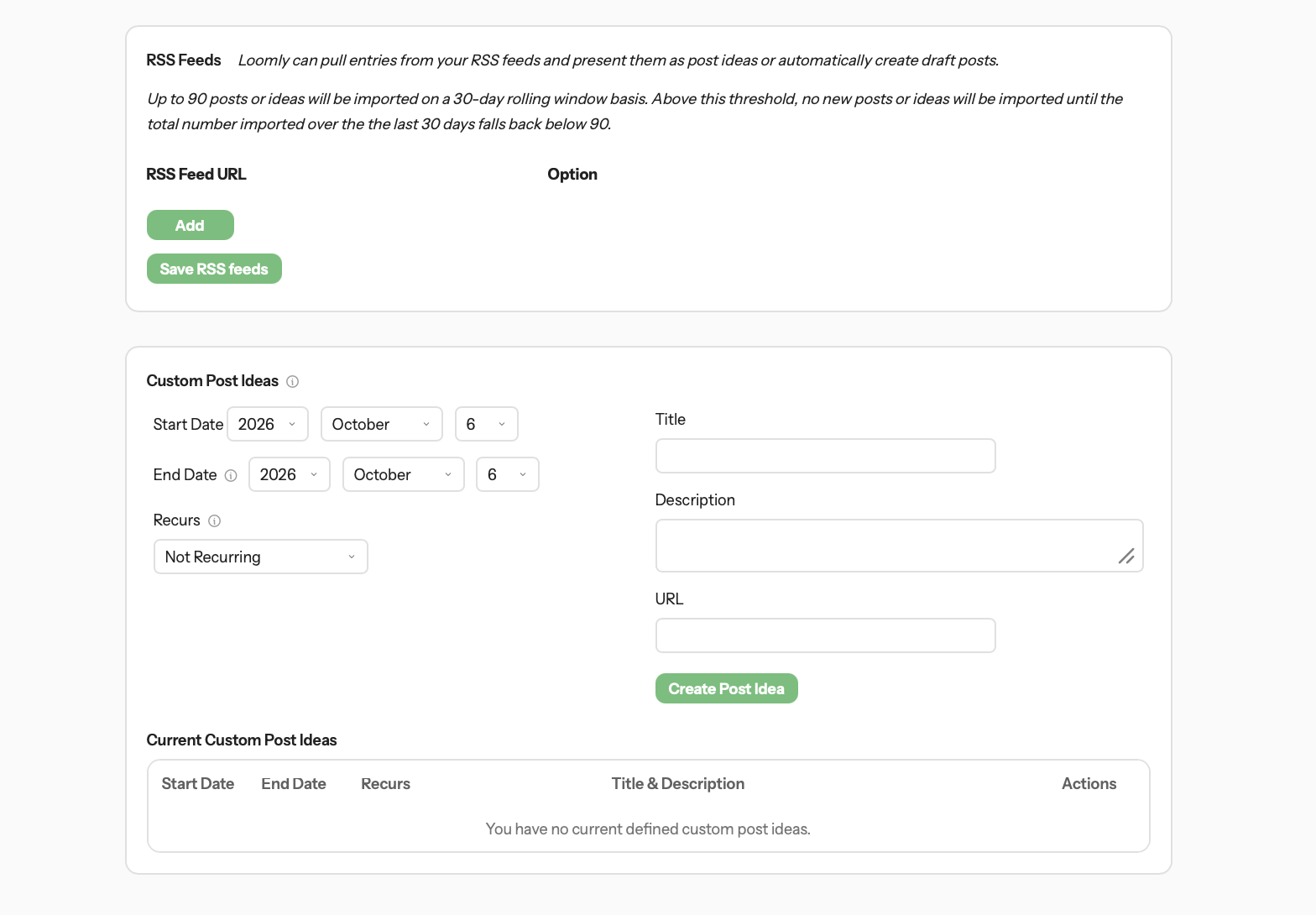
This could be useful for publishers, media brands, blogs, associations, and businesses with a steady stream of content. Instead of manually copying every new article into the social calendar, teams could use an RSS feed as part of their content pipeline.
I would still review every generated draft rather than treating RSS automation as finished publishing. An article may need a different hook on LinkedIn than on Facebook, and social copy shouldn’t read like an RSS headline dump. The value is in removing the repetitive first step.
AI Now Reaches Beyond Caption Writing
The AI Assistant is one of Loomly’s newer features, and the Home screen promotes it as a way to generate, analyze, and manage social content. Loomly’s pricing page lists AI Assistant chat, post generation, social listening, AI-assisted replies, and AI analytics across its paid plans, with different usage allowances depending on the tier.
What I liked during testing was that AI didn’t live in one isolated box. It appeared in the Home shortcuts, Post Builder, interaction management, and analytics.
That makes AI useful at different stages of the workflow, from generating ideas and writing captions to helping with responses and interpreting performance data.
The AI analytics feature was especially interesting because it interprets data instead of only displaying charts. In my test, I asked Loomly to analyze connected social channels and compare performance across two periods. It reported that Facebook generated more clicks and shares despite declines in impressions and other engagement metrics. It also identified a drop in total interactions from 50 to 47, or 6%.
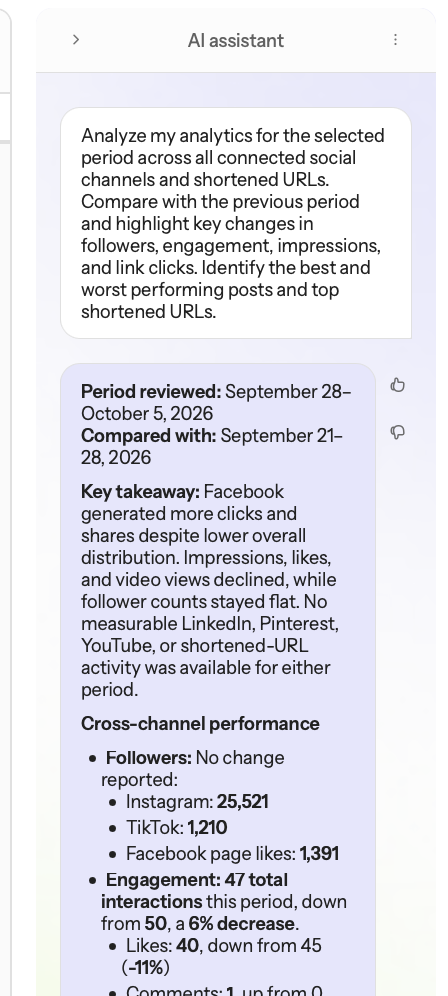
According to Loomly’s documentation, AI analytics can analyze data from Instagram, LinkedIn, TikTok, Facebook, YouTube, and Pinterest, identify performance patterns, and suggest next actions.
I like that direction because analytics dashboards often create work instead of removing it. A team still has to interpret the charts and decide what to change. An AI summary can shorten that step, but I would treat its recommendations as a starting point rather than a finished strategy. A drop in engagement can have several causes, and an AI assistant doesn’t automatically understand the business context behind every campaign.
Interactions Keep Engagement Close to the Content Calendar
Loomly also supports Interactions for comments, mentions, and messages across several connected networks. I would think of this as a lightweight community-management layer rather than a full social care suite. The value is that a team can keep routine engagement work close to the publishing calendar instead of constantly jumping back into each native app.
According to Loomly’s feature documentation, teams can assign ownership, update statuses, and use saved or AI-assisted replies. That gives Loomly a basic community-management workflow rather than forcing every response back into the native apps.
Agorapulse set a higher bar for dedicated Inbox management in my testing because community work sits much closer to the center of that platform. Loomly’s Interactions are more supportive than dominant.
For teams that need deep engagement operations, Agorapulse still feels more specialized. But for teams that mainly want planning, approvals, publishing, and enough interaction management to stay organized, Loomly feels more balanced.
What I Liked Most Was the Structure Around Content
The feature I kept appreciating was not the AI Assistant, the calendar, or the Ideas Board by itself. It was how Loomly gives content a clear path from rough idea to finished post.
Ideas can begin in the Ideas Board or come from RSS feeds and suggestions. From there, Post Builder handles content creation and platform-specific adjustments, while Custom Fields and calendar cloning can help teams reuse content across brands or locations.
Workflows add approval controls, the calendar keeps the schedule visible, and Interactions and analytics support the work that happens after publishing.
That sequence feels coherent.
Some of the other platforms I tested offered a broader feature list, but Loomly’s appeal comes from cohesion rather than sheer volume. Most of its tools feel connected to the same content-production process instead of sitting beside the calendar as unrelated extras.
What Frustrated Me Was the Gap Between Simplicity and Price
The interface itself is still one of Loomly’s strengths, but its pricing makes the value discussion more complicated.
Loomly’s pricing page lists Starter at $65 per month or $49 per month when billed yearly, covering 12 social accounts and three users. Beyond costs $332 per month or $249 per month when billed yearly, with 60 social accounts and unlimited users. Enterprise pricing is custom.
That is a different value equation from the older Loomly pricing many long-term users remember.
Recent G2 reviews include users who praise the workflow but feel the price has climbed too far. Reddit discussions also show frustration around pricing changes and the loss of X support.
I would not treat every Reddit complaint as a universal experience, but the feedback is worth considering. Loomly has grown into a more capable product, while some existing users still judge it against the simpler and cheaper tool they originally bought.
There are also reliability complaints in third-party reviews, including occasional account reconnections and failed posts that require manual attention. These were not problems I independently established during testing, but they are worth checking before committing to a paid plan.
For me, the value depends heavily on whether a team uses Loomly’s collaboration, workflow, AI, and analytics features rather than only its scheduler.
Who I Think Loomly Fits Best
Loomly feels strongest for small and midsize marketing teams, agencies, nonprofits, and businesses that want a structured content workflow without adopting a larger enterprise social media suite. G2’s category data also suggests its user base leans toward small businesses, with marketing managers and business owners among its users.
A solo creator can use Loomly, but its approval controls, roles, Custom Fields, and collaboration features become more valuable when several people are involved in content production.
Agencies can benefit from separate calendars, cloned posts, approval workflows, and role-based access. Multi-location brands can use Custom Fields to reuse content while preserving location-specific details.
Publishers may find the RSS integration useful for bringing new articles into their content pipeline. Internal marketing teams can use the Ideas Board, approvals, and Interactions to organize work without adopting a separate project-management system.
If a team only needs an inexpensive scheduler, Loomly is harder to justify at its current pricing. But for teams that need content planning, approvals, AI assistance, analytics, and collaboration in one place, it makes more sense.
Loomly Works Best as a Content Workflow, Not Just a Calendar
After testing it, I would not describe Loomly as the most ambitious social platform in our Hands-On Reviews. Vista Social is broader. Metricool goes further into measurement and ad-related workflows. Agorapulse has a stronger community-management focus. Planable is more deliberately centered on content review.
Loomly’s advantage is balance.
The calendar is easy to understand, but it connects to content ideas, AI assistance, collaboration, approvals, and analytics. Instead of feeling like separate tools, these features support different stages of the same content-production process.
That is why Loomly still feels relevant in 2026 despite a more crowded market.
The product works best when a team wants structure without turning every part of social media management into a separate specialist system. Its pricing makes it harder to recommend for basic scheduling alone, but the wider workflow offers more value to teams managing content together.
I would not choose Loomly because one feature is dramatically better than every competitor. I would choose it because the path from idea to approval to publishing to analysis stays unusually coherent.