ContentStudio Review 2026: I Came Back to a Much More AI-Driven Platform
I had used ContentStudio for a client before. Coming back, I found AI Studio, Brand Knowledge, listening and an API layered over the same Planner, categories and approvals, and a plan structure that decides how much of it you actually get.
Sourced from hands-on exploration of ContentStudio’s current interface by a former client user, plus ContentStudio’s pricing page, feature pages, help documentation and changelog for the premium modules an inactive subscription could not open
How I Tested ContentStudio
I had used ContentStudio before for a client, so this test felt different from opening a completely unfamiliar platform. I already knew the product as a place for social publishing, scheduling, content planning, and client work. When I logged back in with an inactive subscription, ContentStudio still recognized the account and welcomed me back, but the product itself no longer looked like the version I remembered.
The biggest change was obvious almost immediately: AI is now woven through the platform instead of sitting off to the side.
The old dashboard has become Home, the AI Assistant is now AI Studio, and ContentStudio is pushing much harder toward AI-generated posts, images, videos, brand-aware copy, automated publishing, listening, and even API or agent-based workflows.
Its 2026 changelog describes the new Home experience as an AI-first starting point and says Brand Voice now flows through AI-generated captions, ideas, and responses. ContentStudio also promotes access to 35+ AI models for text, image, and video generation from one workspace.
That made this a much more interesting retest than I expected.
I did not want to judge ContentStudio only by whether it could still schedule a post. I wanted to see what had changed since I last used it, whether the newer AI layer could improve the workflow, and whether the platform still made sense for the agencies, brands, and social teams it has traditionally served.
For this review, I explored AI Studio, the Post Composer, Planner, Content Categories, social-account settings, Brand Knowledge, approval workflows, integrations, API access, the Content Library, Listening, and Analytics.
I also drew on my previous client use to understand the difference between a returning user’s perspective and a first-time test. Where my inactive subscription limited access, I researched the current feature set and recent user feedback rather than pretending I had tested every premium module.
Returning to ContentStudio Made the Changes Obvious
The most useful perspective I had during this review was not just “what features does ContentStudio have?” It was “what does the product seem to care about now?”
When I used ContentStudio for a client before, the platform already had strong scheduling and content-management features. Those are still there, including the Planner, Content Categories, bulk scheduling, recycled posts, RSS automation, approvals, and analytics.
What changed is the layer sitting above them.
AI Studio now acts as a more visible entry point. Brand Knowledge can draw on websites, uploaded files, brand information, and previous social posts. The company also offers AI-generated text, images, videos, API access, MCP integration, and expanded Social Listening capabilities.
In other words, ContentStudio has moved beyond content planning and scheduling toward a broader platform for AI-assisted creation and workflow automation.
Recent G2 reviews also discuss the platform’s AI capabilities alongside its established strengths in scheduling, automation, and content planning. The question for me is whether those additions make the existing workflow more useful or simply introduce more features to learn.
AI Studio Is Now at the Center of the Experience
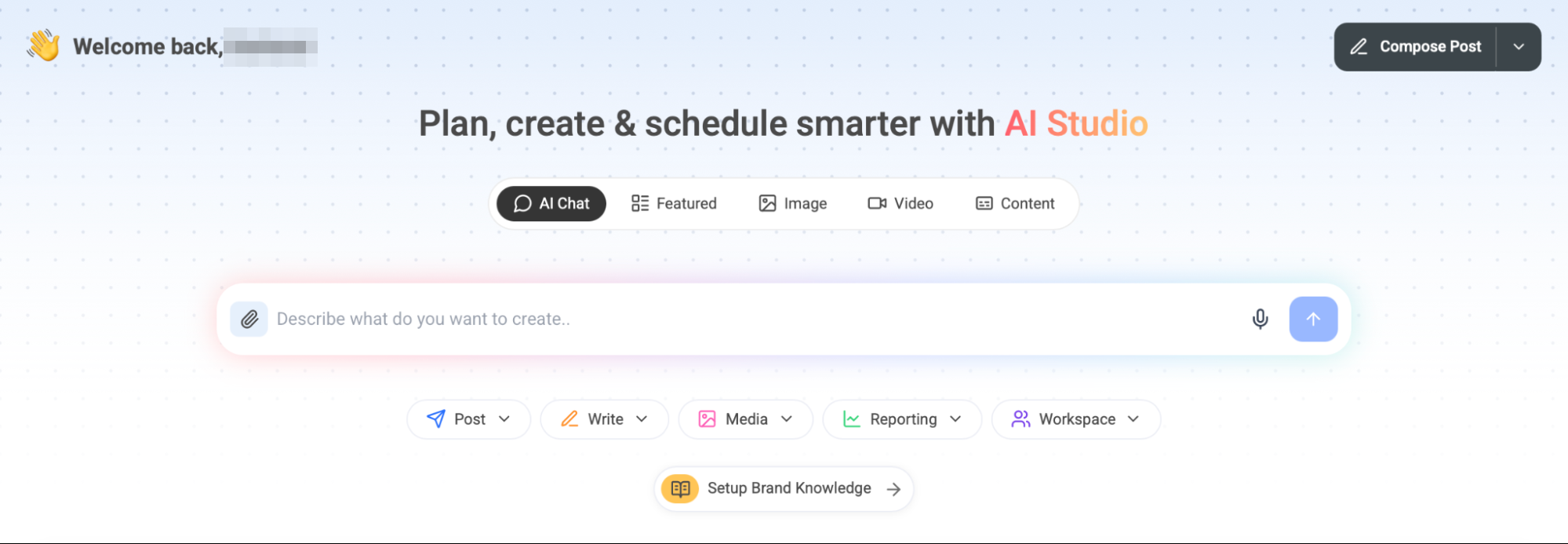
AI Studio is no longer just a caption helper inside the composer. ContentStudio now positions it as a workspace for generating social content with text, image, and video models, revisiting prompts, building campaign ideas, and moving AI-generated content into scheduling.
That is a meaningful difference because almost every tool I have tested now has an AI writing button. Simply generating a caption is no longer interesting on its own.
ContentStudio’s more compelling idea is the connection between AI and the rest of the workflow. According to the company, AI Studio can move from an idea to scheduled posts without leaving chat. Its feature pages also describe AI captions, hashtags, image and video generation, clip making, and brand-aware content creation.
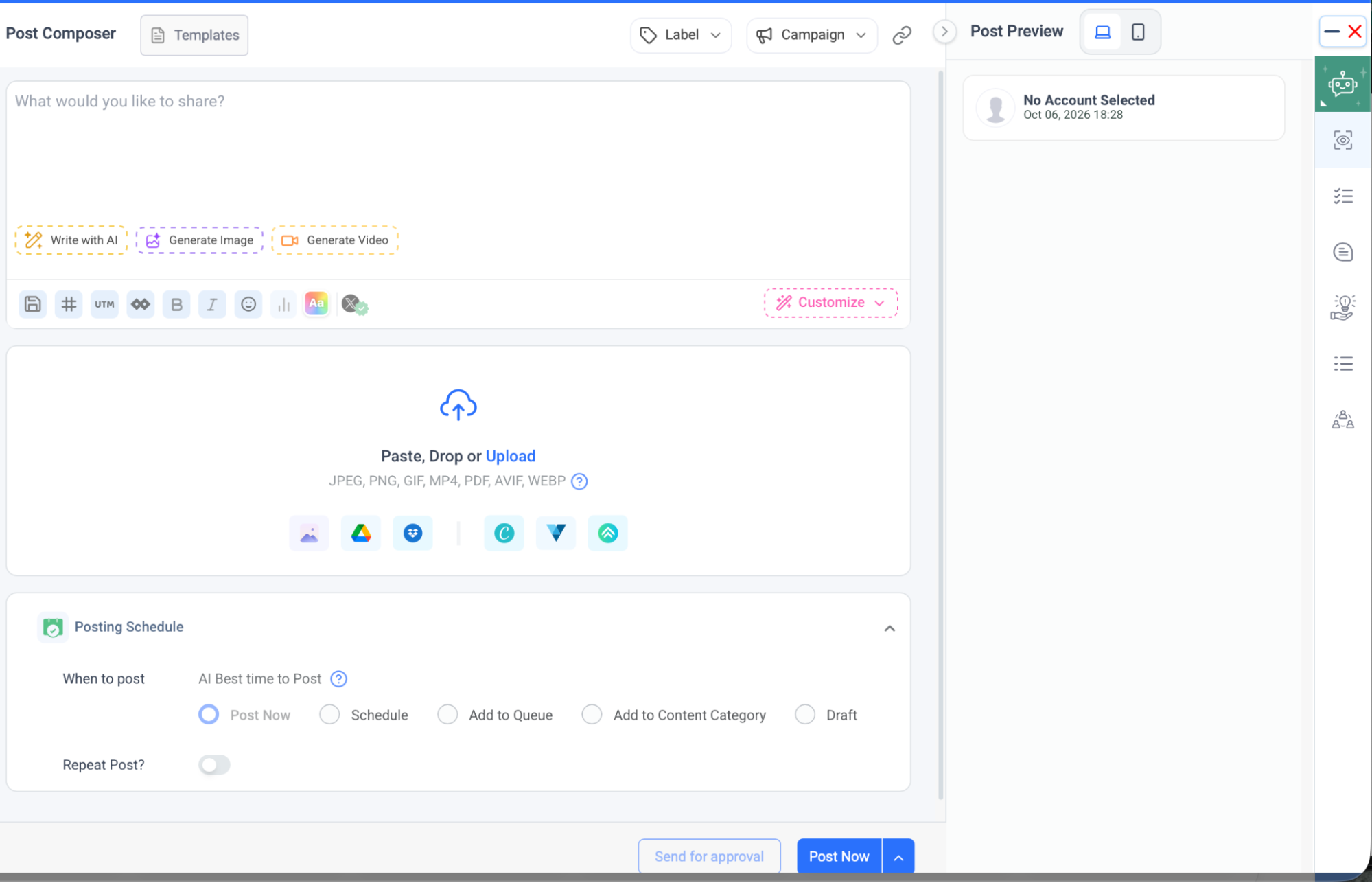
The Post Composer reflects that approach. I could see options for AI writing, image and video generation, campaign organization, media, and approvals in the same interface.
That feels more useful than an AI feature that generates something and then leaves me to manually move the result elsewhere.
Brand Knowledge Is Where the AI Becomes More Useful
The feature I would pay more attention to for agency work is Brand Knowledge.
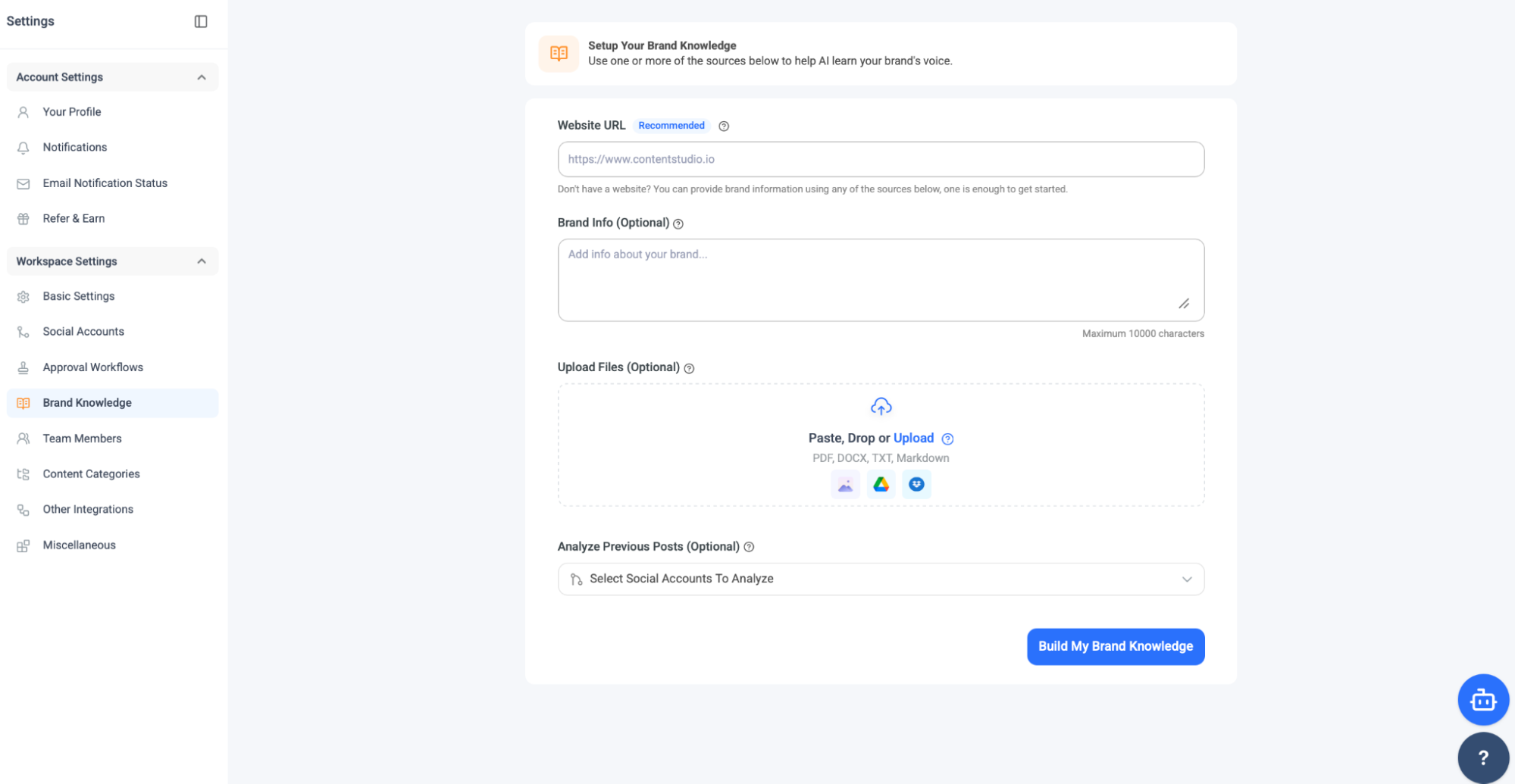
ContentStudio can build a brand profile using a website, brand information, uploaded files, and previous social posts. Its documentation describes this as a “living profile” of the brand’s voice, look, and personality so AI-generated content can stay aligned more consistently.
This is a better long-term use of AI than simply asking for “five Instagram captions.”
For an agency, every client has different language, claims, tone, offers, and visual expectations. If Brand Knowledge works well, the team can reduce how much context has to be re-entered every time someone asks AI Studio for content.
I also like that ContentStudio offers the option to analyze previous posts. That gives the AI another potential source of brand context beyond a short manually written description.
I would still review every AI output before publishing. Brand training may improve consistency, but it does not automatically guarantee accuracy, legal compliance, or strategic judgment. The potential advantage is that the first draft has more context than a generic AI prompt.
The Composer Still Feels Built for Real Social Operations
ContentStudio’s Post Composer is feature-rich, but the stronger point is not how many buttons it contains. The workflow combines creation, publishing, approvals, categorization, AI, media, and scheduling in one place.
Posts can move into a queue, schedule, draft, content category, or approval process. ContentStudio also offers AI Best Time to Post recommendations, campaign and label organization, network-specific settings, first comments, and UTM tracking.
That operational layer is one reason the platform appeals to teams managing several accounts. It is not just a text box with a date picker attached.
I also tested Loomly, where the Post Builder felt deliberately structured around a master version and then network-specific fine-tuning. ContentStudio feels a little more like a power console: more options are visible around the post itself, while Loomly’s strength was the sense of a guided production flow.
Neither approach is automatically better. Loomly felt cleaner for step-by-step content production, while ContentStudio felt more flexible for teams that already know what they want to configure.
The Planner Connects Scheduling With Campaign Structure
The Planner is another area where ContentStudio’s current direction is visible.
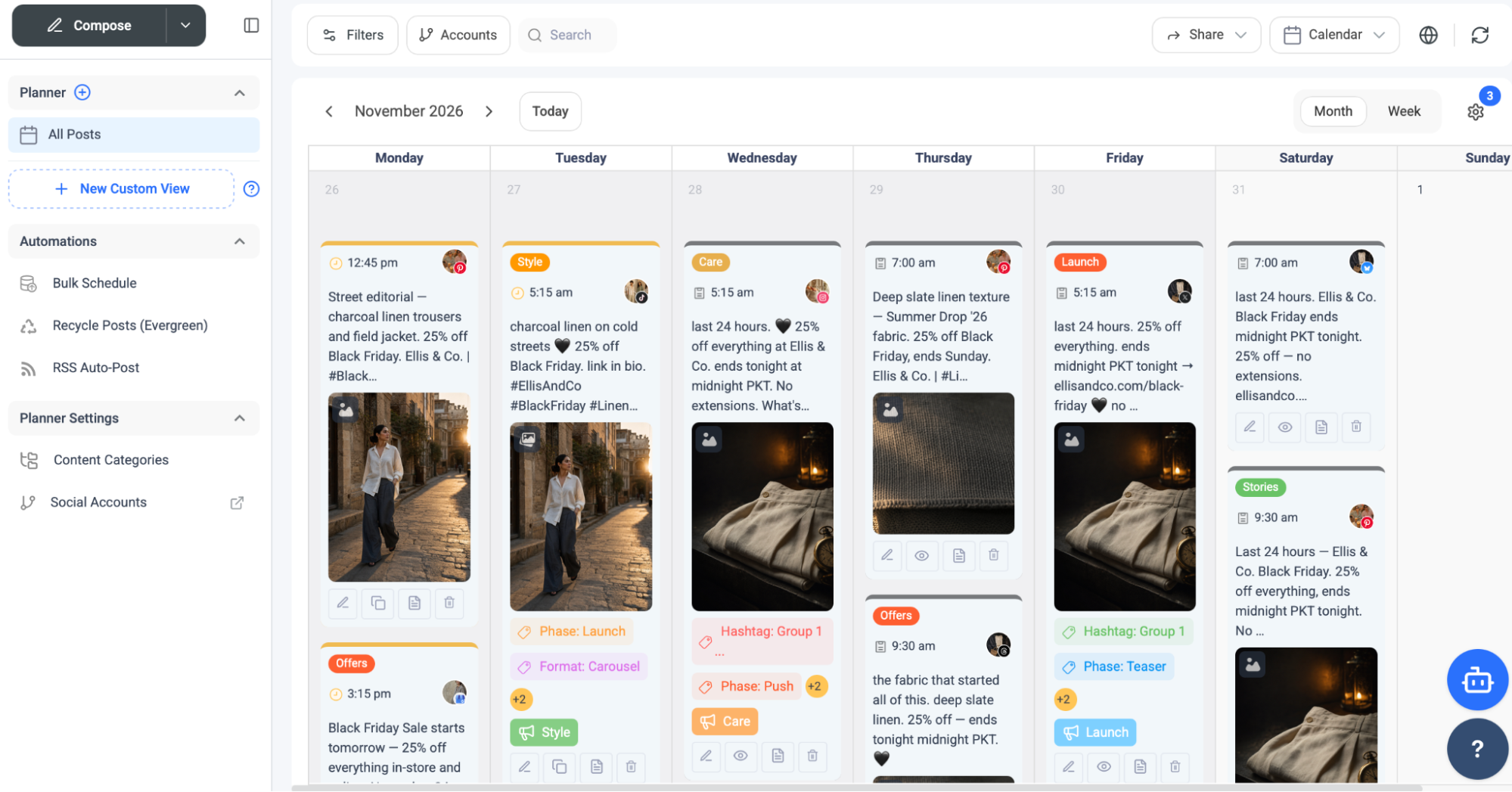
The visual calendar still does the familiar job of showing what is scheduled and when, but the surrounding structure is more useful for teams. Posts can carry labels, campaign information, content categories, and other context that makes the calendar easier to scan at scale.
ContentStudio’s current feature page says the Planner supports Calendar, Grid, and Feed views, shareable calendars, live previews, and centralized media. These options could be useful for both internal planning and client-facing review.
For agencies, the shareable-calendar feature is especially interesting because external stakeholders do not always need full platform access just to understand the content plan.
Content Categories Bring an Evergreen System Into the Planner
Content Categories were one of the features that reminded me why ContentStudio has always appealed to content-heavy teams.
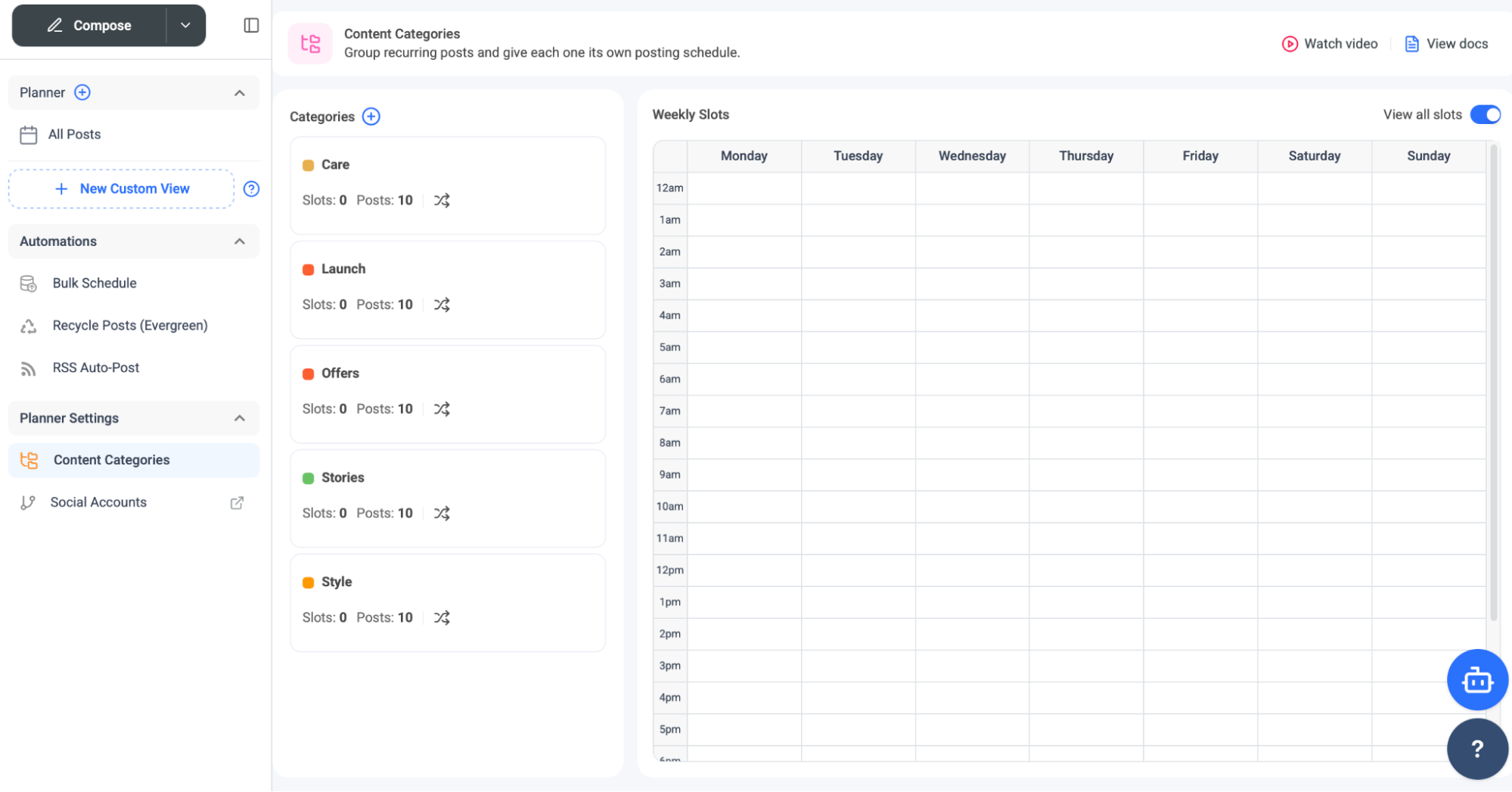
A category can group recurring posts around themes such as educational content, promotions, launches, or stories, then connect those themes to recurring publishing slots. ContentStudio also supports post recycling and RSS Auto-Post, which pushes the product beyond one-time scheduling.
This gives the platform some overlap with SocialBee, another tool I tested where categories and evergreen queues were central to the product. The difference is that SocialBee made the category system feel like the main operating model. ContentStudio treats categories as one automation layer inside a much broader platform.
That flexibility may suit agencies better because not every client needs an evergreen queue. Some brands will use categories heavily, while others may rely more on campaign labels, manual scheduling, or bulk imports.
EasyConnect Is a Small Feature With Real Agency Value
The Social Accounts area includes EasyConnect, which lets teams create a secure link for clients to connect their own social accounts.
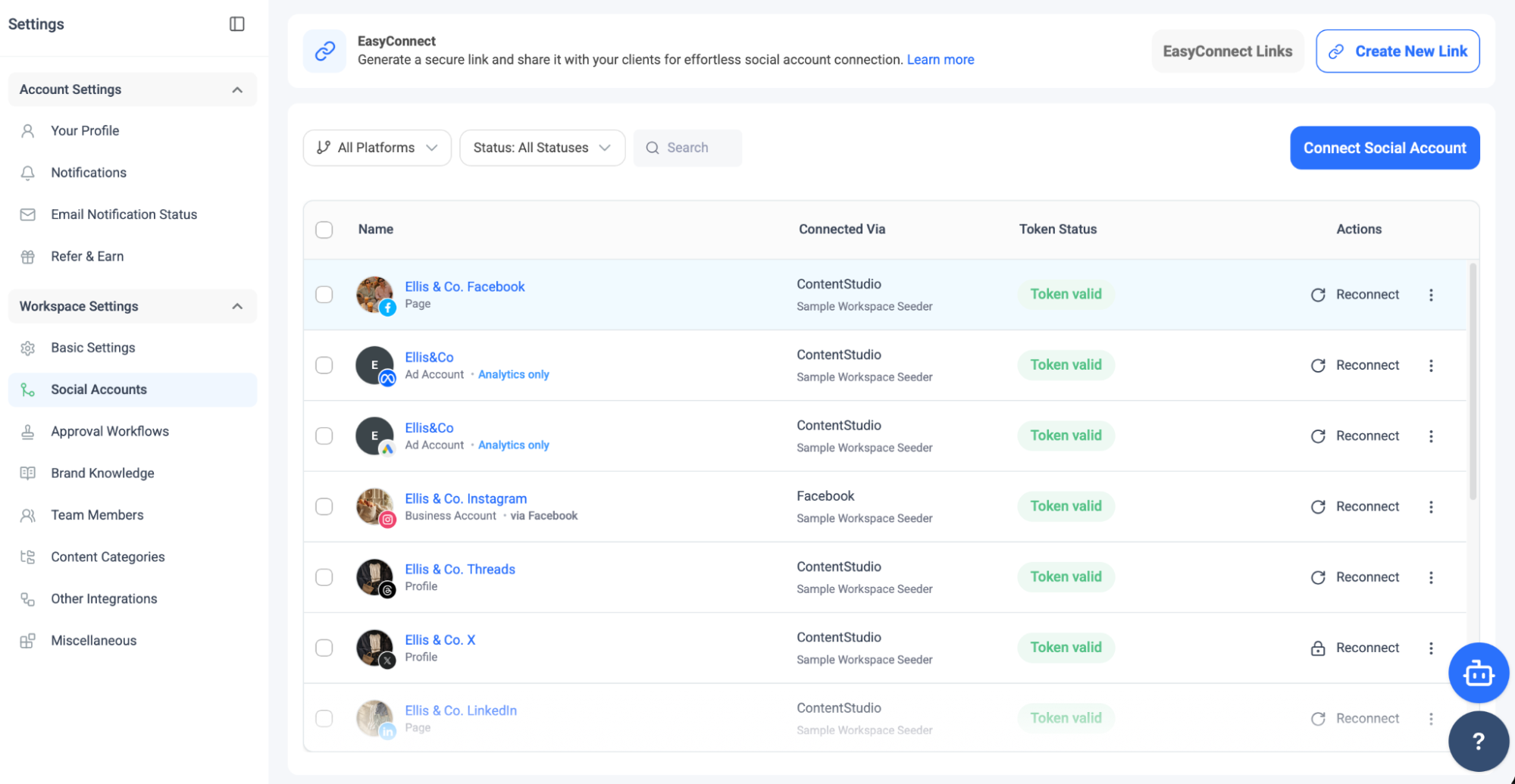
This is one of those features that is easy to underestimate if you only compare publishing capabilities.
Connecting client accounts can be one of the most awkward parts of onboarding. Asking a client to send passwords is bad practice, while arranging a screen share just to authenticate several networks wastes time. EasyConnect lets the client handle authentication without giving the agency their login credentials.
ContentStudio lists EasyConnect as an Agency Unlimited feature, which makes sense given the use case. Its agency pricing also includes unlimited users and workspaces, with social-account capacity scaling separately.
Approval Workflows Have Become More Sophisticated
ContentStudio has also moved beyond basic one-step approvals. Current documentation describes multi-level approval workflows with unlimited review stages. Each level can require approval from anyone assigned to that level or from everyone, and posts can move through those levels in sequence.
The platform also supports one-off approvals, public approval links for external stakeholders, internal notes, file attachments, and mobile approvals. Approvers can even be given permission to edit post text and media before approving.
That is much more sophisticated than a basic “approve/reject” button.
Approval also sits naturally inside the publishing workflow. The composer includes an option to send posts for approval alongside its creation, organization, and scheduling controls, making review feel like part of production rather than a separate administrative task.
Planable still gave me the most approval-centered experience during testing because review and collaboration felt like the organizing principle of the whole product. ContentStudio uses approvals differently. They support a broader agency workflow that also includes publishing, listening, analytics, client workspaces, EasyConnect, and white-label reporting.
That makes ContentStudio more of an agency operating platform than a specialized approval tool.
Integrations and Link Management Add More Flexibility Around Publishing
ContentStudio’s integration settings include link-shortening options and connected applications.
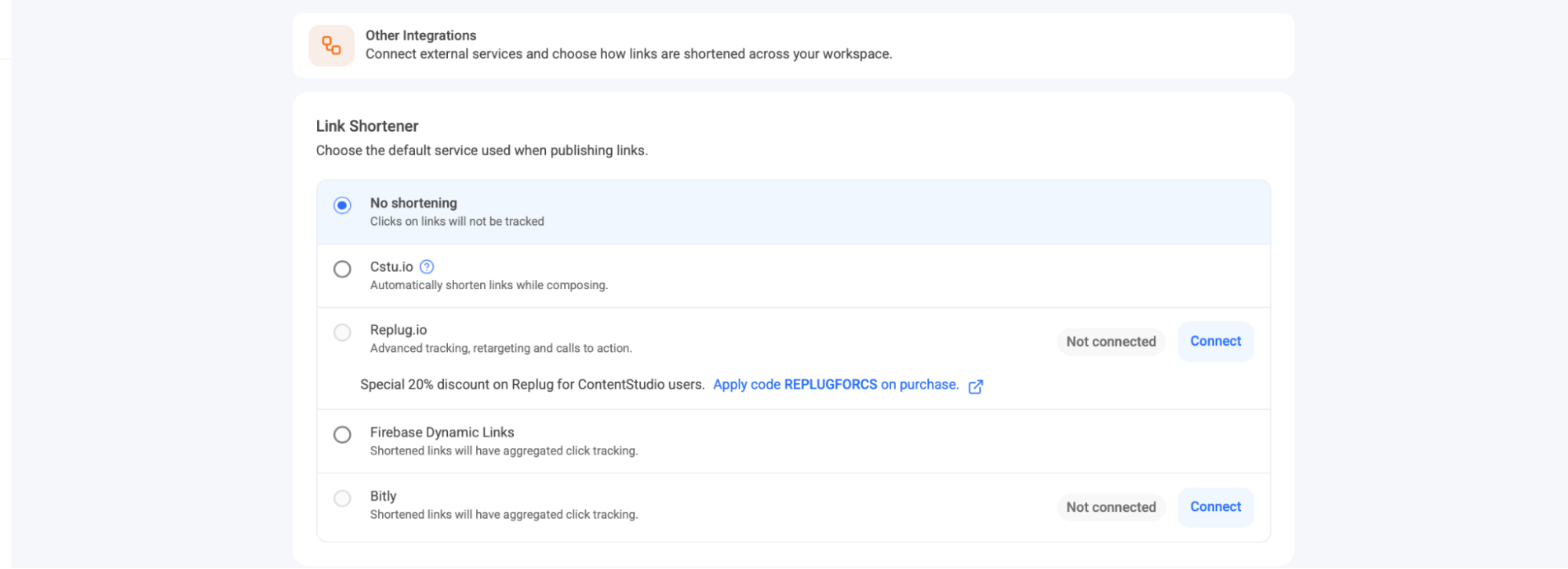
This is another area where ContentStudio’s content-marketing roots are still visible.
Feedly supports content discovery, Canva supports creative production, and tools such as Replug or Bitly extend link management.
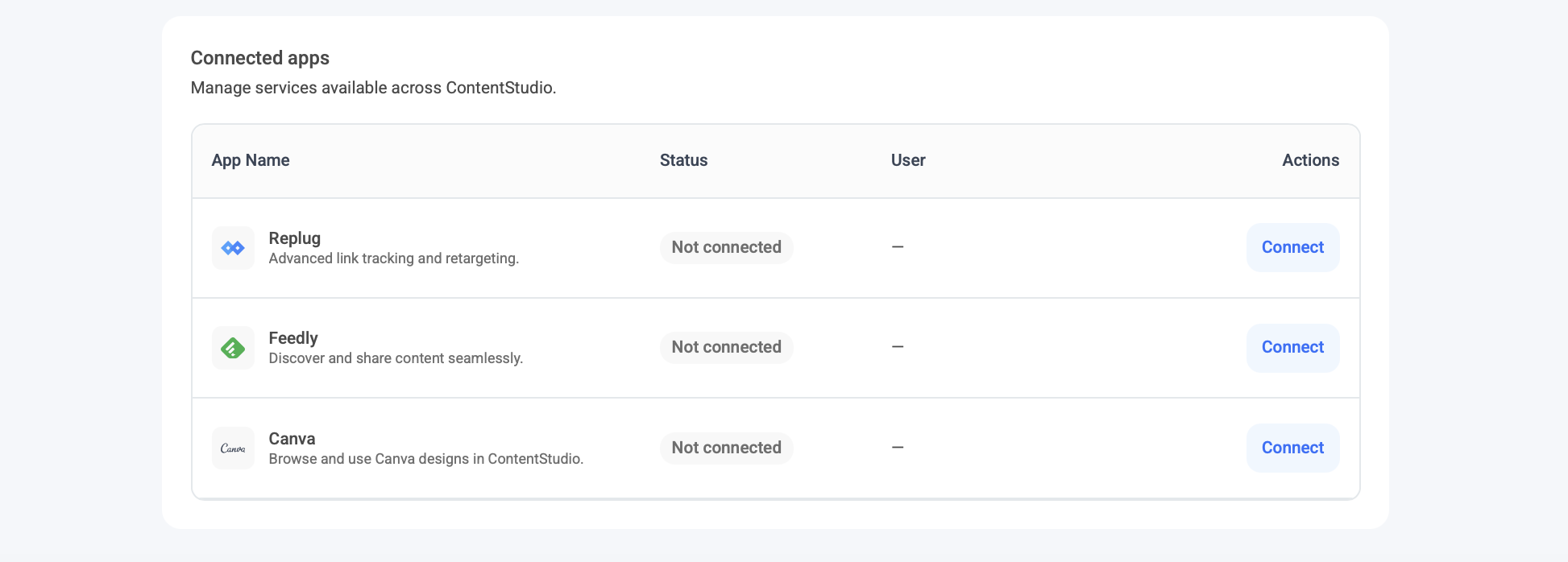
One detail caught my attention: Firebase Dynamic Links still appeared among the link-shortening options, even though Google shut down the service in August 2025. That raises a question about how recently this part of the integration settings has been updated.
ContentStudio also continues to emphasize content discovery and RSS sources on its product pages, even while newer AI tools get more attention.
The platform feels less like it abandoned its original content-discovery identity and more like it has layered AI and agency operations on top of it.
The API Changes Who ContentStudio Can Serve
One of the biggest changes from the version many longtime users remember is the API and automation layer.
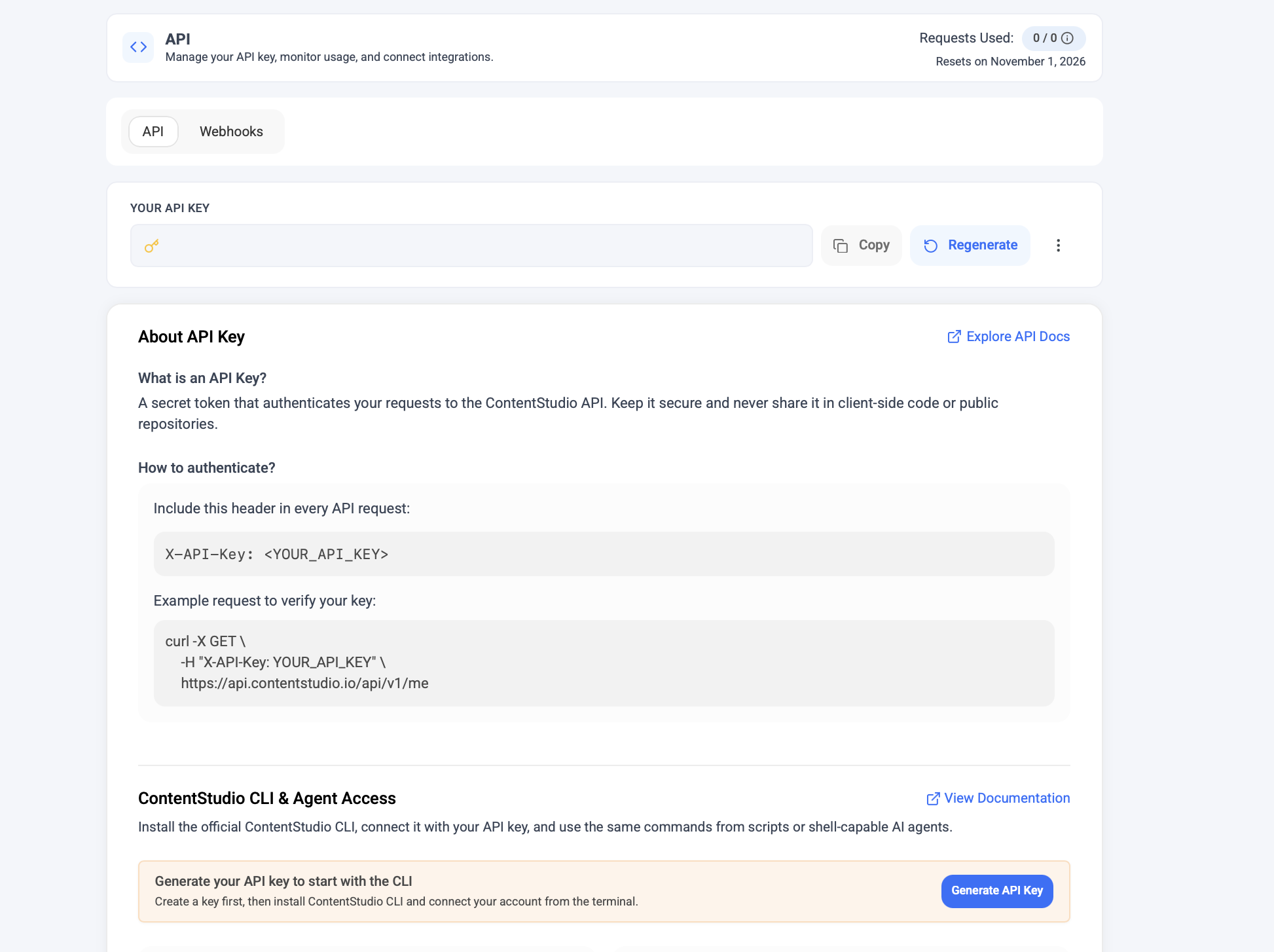
ContentStudio offers a REST API for workspaces, accounts, posting, approvals, and related social workflows. The company also advertises integrations with Zapier, Make, n8n, Pabbly, Claude, and other automation or AI systems, plus MCP support.
That is a meaningful expansion because the platform no longer has to be used only through its own dashboard.
A technical agency could connect ContentStudio to an internal workflow. A content pipeline could create drafts programmatically. An AI agent could interact with posting infrastructure. According to ContentStudio’s documentation, approvals can also be handled through the API.
ContentStudio advertises a separate API plan starting at $15 per month when billed annually, with request limits that scale across plans. That gives developers and automation-heavy teams a different entry point than the normal social-management plans.
The Content Library Is Better Organized for Asset-Heavy Teams
ContentStudio’s Content Library gives teams a centralized place for uploaded and AI-created media.
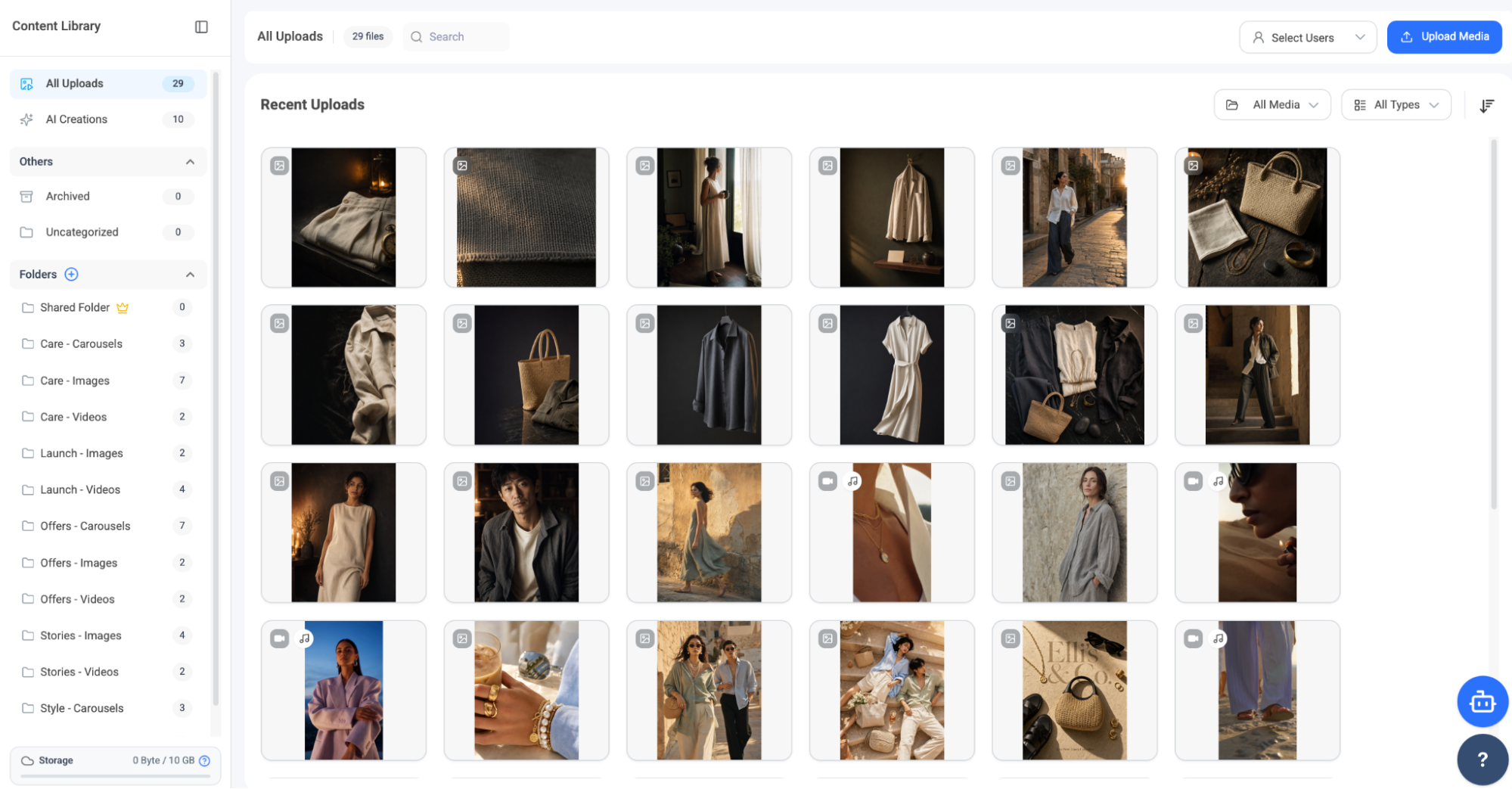
The library can be organized into folders by campaign or content type, which is exactly how I would expect an agency or creative team to structure reusable assets across multiple clients and recurring campaigns.
The AI-generated content library is also increasingly relevant now that ContentStudio offers image and video generation. Without a proper library, AI generation can quickly turn into a pile of assets that nobody can find later.
This is another example of where the newer AI layer works best when it is connected to existing operations rather than treated as a novelty.
Social Listening Expands ContentStudio Beyond Publishing
ContentStudio’s Listening product is one of the more significant additions because it moves the platform beyond publishing and owned-channel engagement. Its product page says Listening can monitor mentions, keywords, and hashtags, apply AI sentiment analysis, and compare sentiment against competitors.
In the interface I reviewed, the feed could also be organized into views such as Brand Love, Brand Monitoring, Buy Intent, Competitor Intel, and Crisis Management.
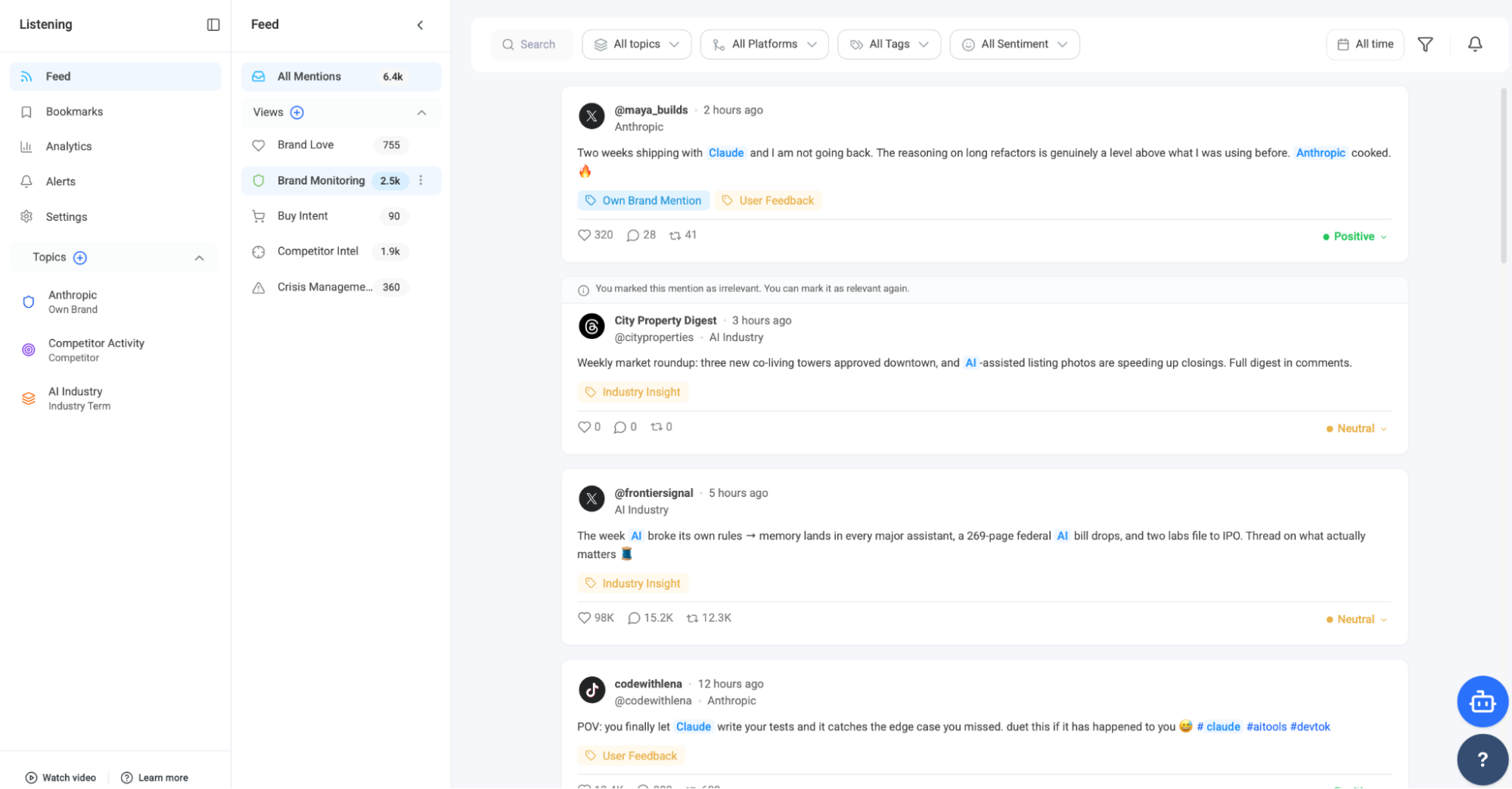
That makes the feature potentially more useful than a simple keyword stream.
The caveat is price. Social Listening is an add-on rather than part of the base Standard plan. ContentStudio’s pricing page lists it at $99 per month on Standard and Advanced for three topics and up to 5,000 mentions, while Agency Unlimited offers a larger $150-per-month package with five topics and up to 10,000 mentions.
So while ContentStudio has expanded into the territory of broader social media management suites, it also pushes the total cost higher once agencies start adding advanced modules.
Analytics Still Look Familiar, but the Scope Is Wider
The Analytics dashboard gives a cross-network view of followers, posting volume, engagements, engagement rate, impressions, and reach, while allowing teams to drill into individual platforms.
ContentStudio’s Advanced plan also lists competitor analytics, campaign and label analytics, Meta Ads Analytics, Google Ads Analytics, exports, and scheduled reports. Agency-focused plans add client-facing capabilities such as white-label reporting.
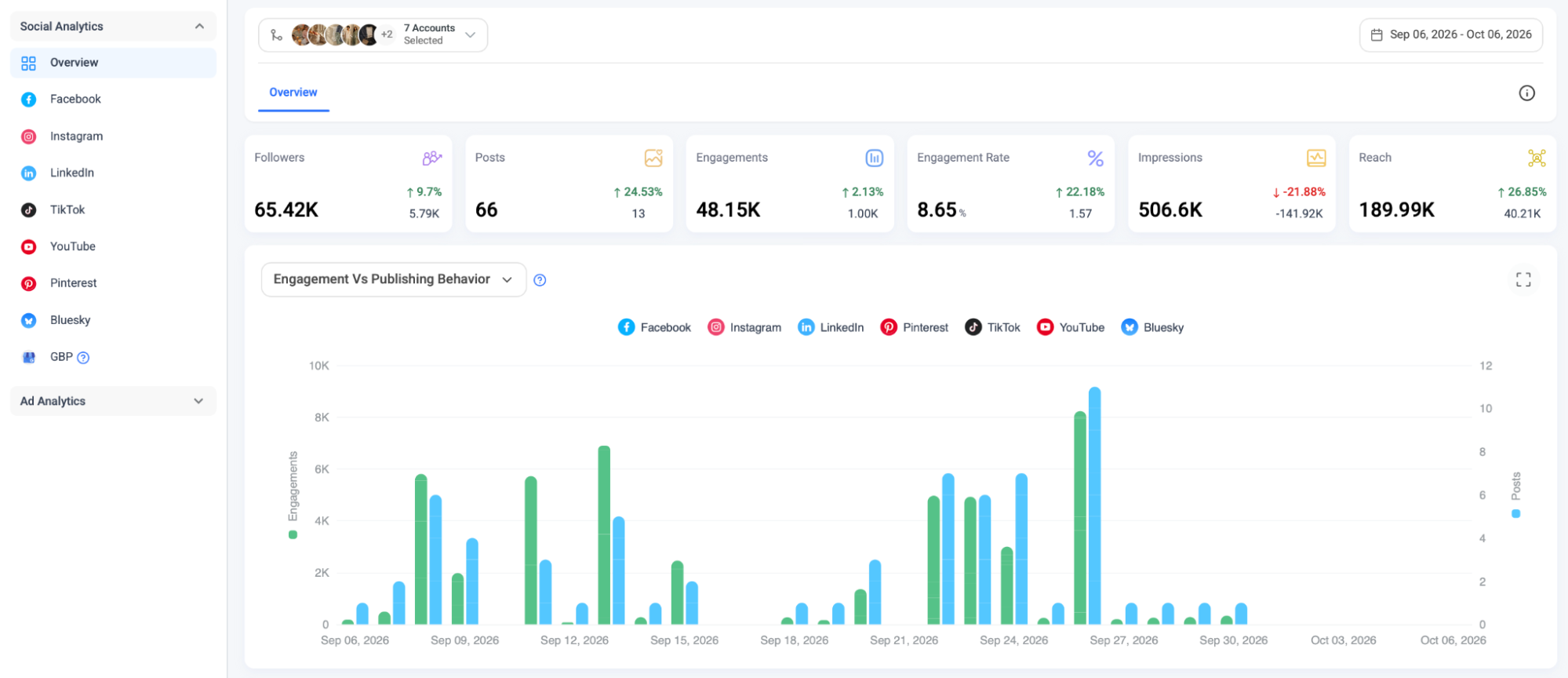
That breadth makes ContentStudio more comparable to Metricool than it used to be.
Metricool still felt more analytics-led when I tested it because reporting, ad data, Studio, SmartLinks, and performance analysis were central to the overall experience. ContentStudio’s analytics feel like one component of a larger agency and publishing system.
For teams that already use ContentStudio for planning and approvals, having analytics in the same workspace reduces another handoff. For teams buying primarily for deep measurement, I would still compare the reporting experience directly with Metricool before deciding.
Workspace Settings Show How Seriously ContentStudio Takes Agency Use
ContentStudio’s account menu is another small clue about its target audience. The platform separates account-level settings from workspace-level controls, which becomes important when multiple brands or clients are involved.
Agency Unlimited currently includes unlimited users and workspaces, with 25 social accounts at the base level and tiered pricing for additional accounts.
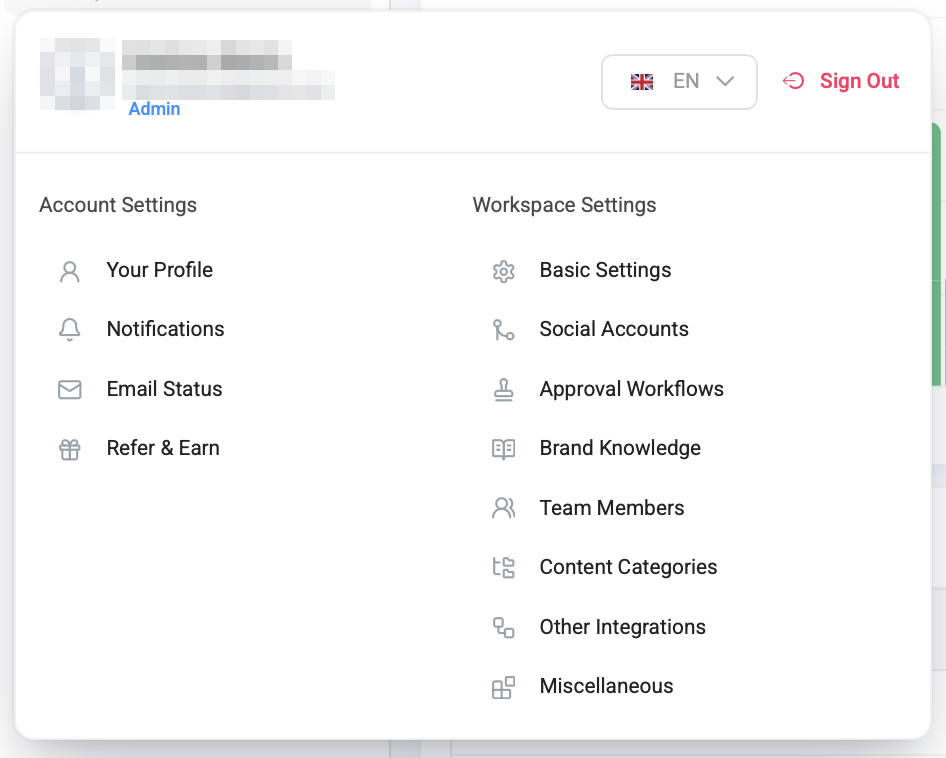
ContentStudio also advertises white-labeling, SSO, client management, priority support, onboarding, and a reseller program for agencies that want to present the platform under their own brand. This is a much stronger agency proposition than simply offering more social-account slots.
What I Liked Most Was Seeing the Old Strengths Survive the AI Shift
The easiest way for an established product to chase AI is to bolt a chatbot onto the interface and call it innovation.
ContentStudio has gone further than that.
AI Studio connects to publishing. Brand Knowledge provides context for generated content. AI creations have a place in the Content Library. Listening incorporates sentiment analysis, while the API and MCP capabilities open up more automation possibilities.
At the same time, the older strengths are still there: planning, content categories, RSS automation, evergreen recycling, approvals, analytics, and client workspaces. That continuity is what made the redesign convincing to me.
I came back expecting the product I had used before with a few AI additions. What I found was a platform trying to update its entire operating model without throwing away the systems that existing users already depended on.
What Frustrated Me Was How Quickly the “All-in-One” Story Becomes a Plan Question
The main friction is not that ContentStudio lacks features. It is deciding which plan actually gives you the combination you need.
The current annual pricing starts at $19 per month for Standard, $49 for Advanced, and $99 for Agency Unlimited. Standard already includes AI Studio, Brand Knowledge, publishing, analytics, the Planner, the Content Library, smart scheduling, MCP integration, and API access.
Advanced is where the product becomes much more useful for a team because it adds Social Inbox, approvals, competitor analytics, campaign analytics, paid analytics, post recycling, bulk scheduling, RSS Auto-Post, team collaboration, exports, and scheduled reports.
Agency Unlimited then adds unlimited users and workspaces, EasyConnect, client management, onboarding, support, and agency-focused scaling. White-labeling, Social Listening, SSO, and other extras can add more cost.
I like that the entry price is relatively low, but a team can move from “$19 looks inexpensive” to a much larger monthly bill once listening, white-labeling, more accounts, and other agency requirements are included.
X is another special case. ContentStudio meters X posting with monthly credits that vary by plan, and extra credits are bought as an add-on, so agencies managing active X accounts should include that in the real cost.
Who Gets the Most From ContentStudio Now
ContentStudio can serve solo creators, but I think the current product becomes more compelling as the workflow gets more complex.
A solo creator can use Standard for AI creation, scheduling, analytics, and media organization without paying enterprise-level prices. A small marketing team gets more value from Advanced because approvals, Inbox, recycling, RSS automation, competitor analytics, and reporting become available together.
Agencies are where the product’s architecture makes the most sense. Workspaces separate clients. EasyConnect simplifies account onboarding. Approval workflows support layered review. Brand Knowledge can help keep each client’s AI-generated content aligned with its own identity.
Content Categories and recycling can support evergreen programs. White-label reporting, client management, listening, and API automation can also extend that operational setup, depending on the plan and add-ons selected.
That makes ContentStudio a stronger fit for teams that want one flexible system than for users who only need a minimalist scheduler.
ContentStudio Has Modernized Without Losing What Made It Useful
Coming back to ContentStudio after using it for a client gave me a perspective I would not have had as a first-time user, and one I had not had with any other tool in our Hands-On Reviews.
The platform has changed substantially. AI Studio, Brand Knowledge, social listening, API access, and expanded automation capabilities make it feel more current than the version I remembered.
At the same time, it still feels like ContentStudio.
The Planner, content categories, RSS automation, recycled posts, approvals, and client workspaces are still there underneath the newer AI layer. That is probably the strongest part of the product’s evolution.
ContentStudio is not trying to become only an AI content generator or a publishing calendar. It is becoming a broader platform for teams that create, organize, approve, publish, monitor, and measure social content.
For agencies and brands that already liked the original ContentStudio model, the newer version gives them more reasons to stay. For new users, the decision is less about whether ContentStudio can schedule posts and more about whether they need enough of its AI, automation, client management, listening, and reporting to justify the plan that delivers them.
Resources
Continue Reading
Loomly Review 2026: I Tested Its AI, Workflows, Ideas, and Calendar
Planable Review 2026: I Tested Its Collaboration, AI, and Planning Workflow
SocialBee Review 2026: I Tested Its Copilot, Categories, and Evergreen Workflow