How I Tested SocialBee
I set up a single SocialBee workspace for one brand and worked through the product in the order it pushed me: Copilot onboarding first, then content categories, the content area and approvals, the post editor, the scheduler and queues, Next Posts, Engage and Page Analytics. I finished by reading the pricing page against what I had actually used.
Two boundaries are worth stating up front, because a review that quietly skips them is less useful. I did not test a Google Drive media-import workflow in SocialBee, so I am not carrying that part of my Metricool test across for the sake of symmetry; my media came from Canva and direct uploads. SocialBee documents support for LinkedIn document carousels, but I did not put one through a hands-on test, so I am treating it as a supported feature rather than a tested result. Page Analytics was available on the account I tested; the deeper analytics features sit on higher plans and I have not used them here.
The Moment SocialBee Stopped Feeling Like Another Scheduler
I expected SocialBee to start where most social media schedulers start: connect an account, open a calendar, create a post, and choose a date.
That was not what happened. Before I had properly scheduled anything, SocialBee’s Copilot was already asking for the business website, business details, audience, goals, content style, and the social networks I wanted to use. That was the first clue that I needed to review SocialBee differently.
With Metricool, the other scheduling platform I tested, the workflow made the most sense once I connected a brand and moved from planning into analytics and reporting. SocialBee kept pulling me back towards strategy instead.
At first I was not sure whether I liked the extra setup. It felt slower than simply opening a composer and scheduling Tuesday’s post. Then I started using the queues, and the logic clicked. Instead of asking me to rebuild the next week from an empty calendar, SocialBee was trying to make sure there was already something useful waiting when the next posting slot arrived.
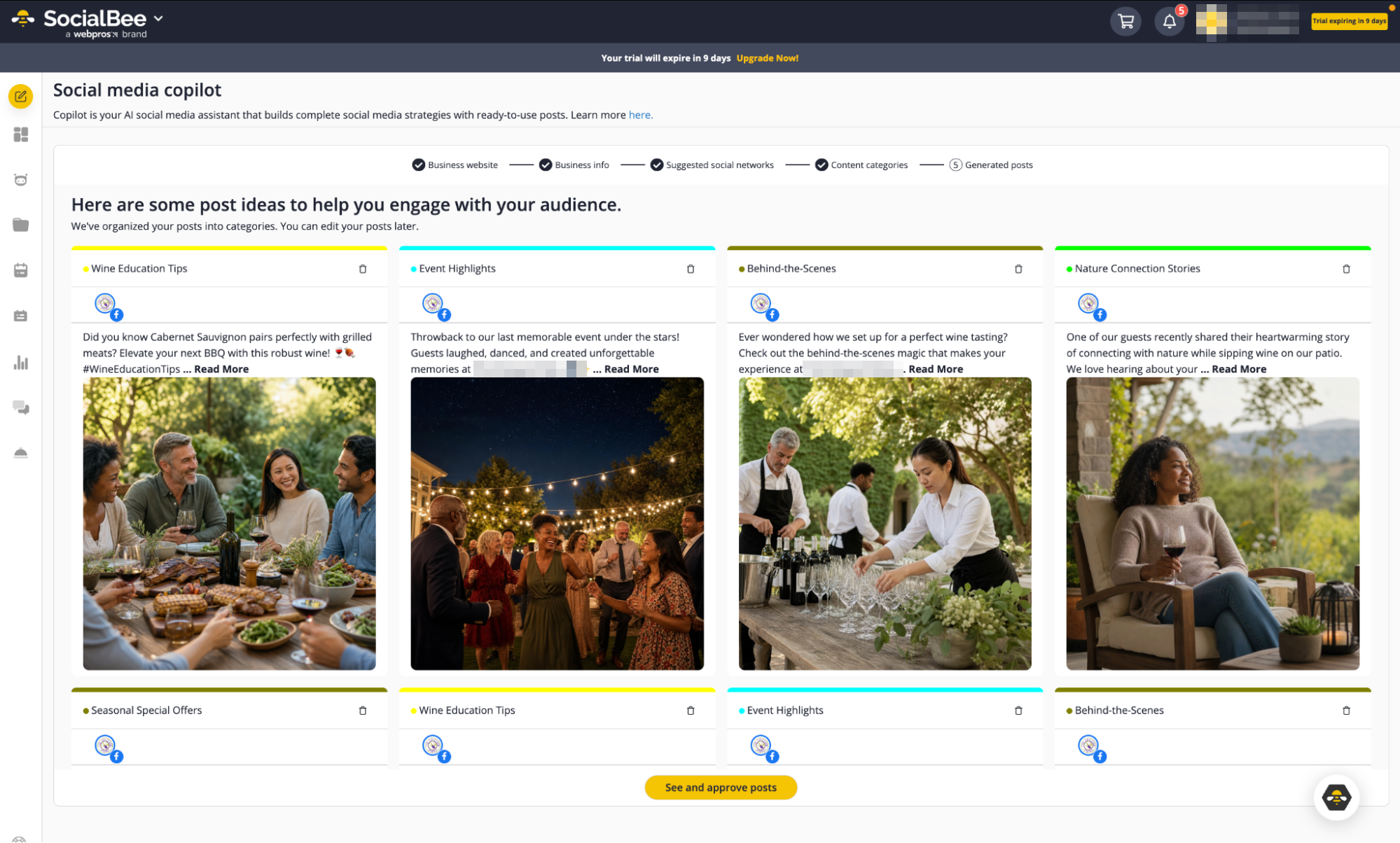
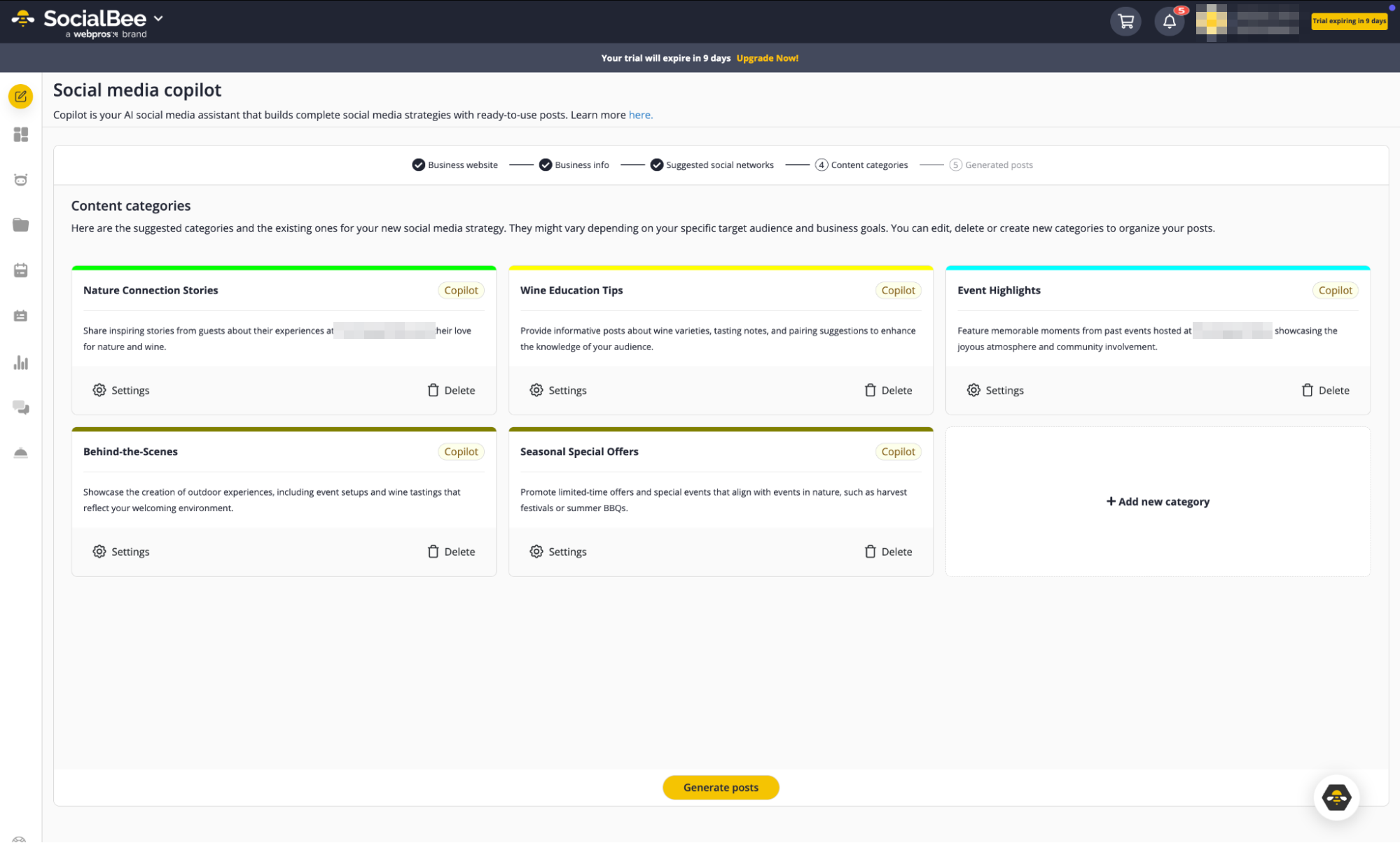
Copilot moved through stages rather than dropping a pile of captions on the screen. It suggested social networks, then proposed content categories based on the brand and niche. After I approved the direction, it generated post ideas inside those categories, complete with draft copy and images. SocialBee’s own Copilot documentation describes the same progression.
A testimonial did not stay an isolated caption. It became part of a proof or promotional category. An educational post had somewhere to go next week. A blog update could become part of a recurring content stream instead of disappearing after one use. That felt more practical than asking an AI writer for “20 ideas for Instagram” and then sorting them myself.
The AI captions were not the part that impressed me
The actual captions were mixed. Some were useful starting points. Others sounded safe and generic enough that I would not publish them without editing. That did not bother me much, because I have the same reaction to most AI-generated social copy.
What interested me more was how SocialBee assigned those ideas a role, and there is a downside to that. A mediocre AI caption affects one post. A badly designed content category can affect the next month.
Once I noticed that, I spent more time reviewing Copilot’s category recommendations than polishing its first captions. If “educational” and “promotional” are poorly defined at the start, automation simply repeats a weak strategy more efficiently. SocialBee’s content-category system is therefore more important to this review than the AI writing button.
The Dashboard Made SocialBee Feel More Guided Than Most
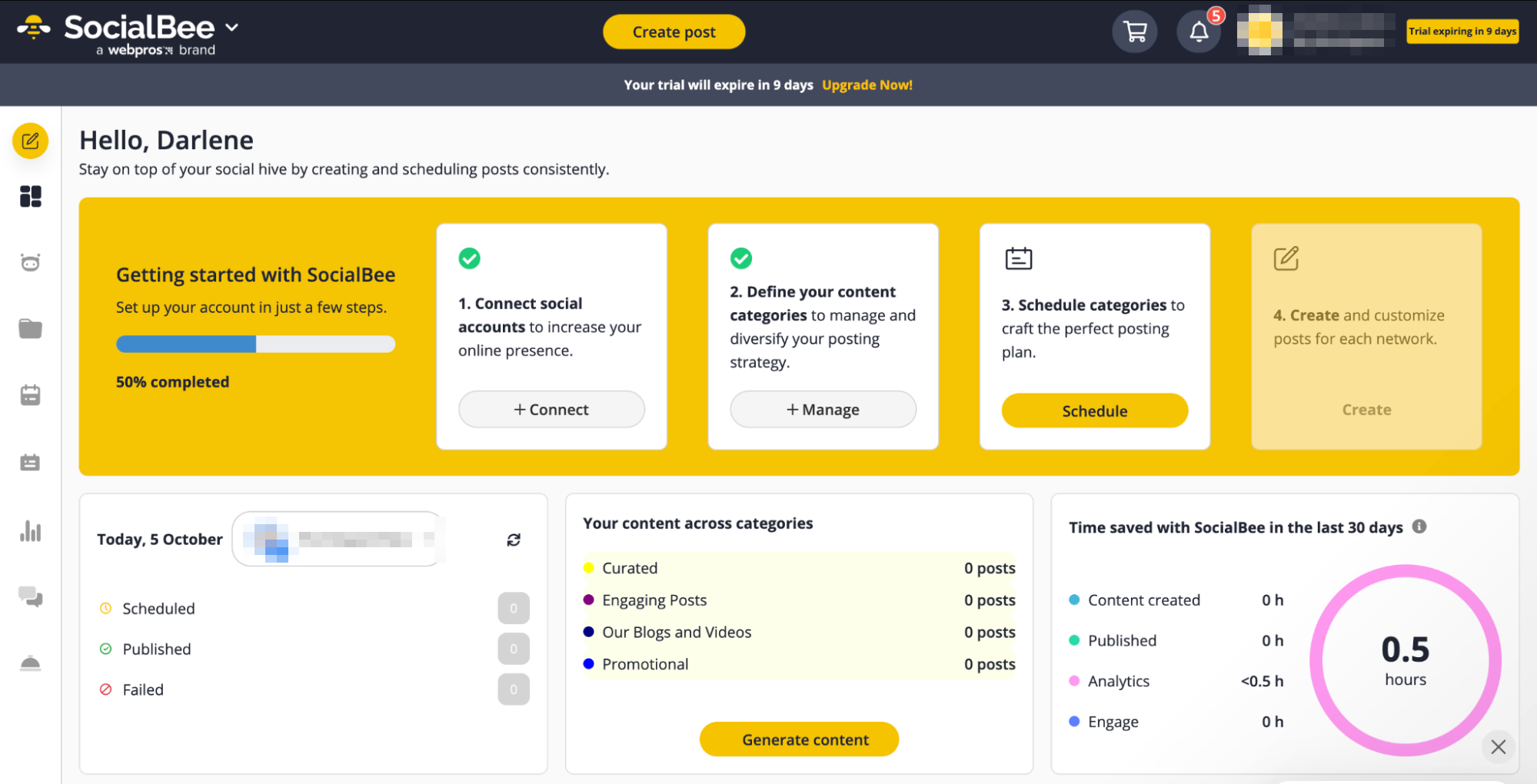
Once I moved beyond Copilot, the dashboard kept that guided feeling. The home screen showed the setup sequence, connected accounts, content categories, scheduled and failed-post counts, and an estimate of time saved.
What stood out more was the amount of help built around the product. SocialBee has ConciergeBee for outsourced social media support, plus SocialBee University and help resources inside the dashboard. Not every scheduler I tested made human help and training this visible.
I would not choose a platform because it has a course library. But for a tool that asks users to think in categories, queues and reusable content systems, the extra guidance makes the learning curve easier to understand.
The Content Area Was More Than a Library
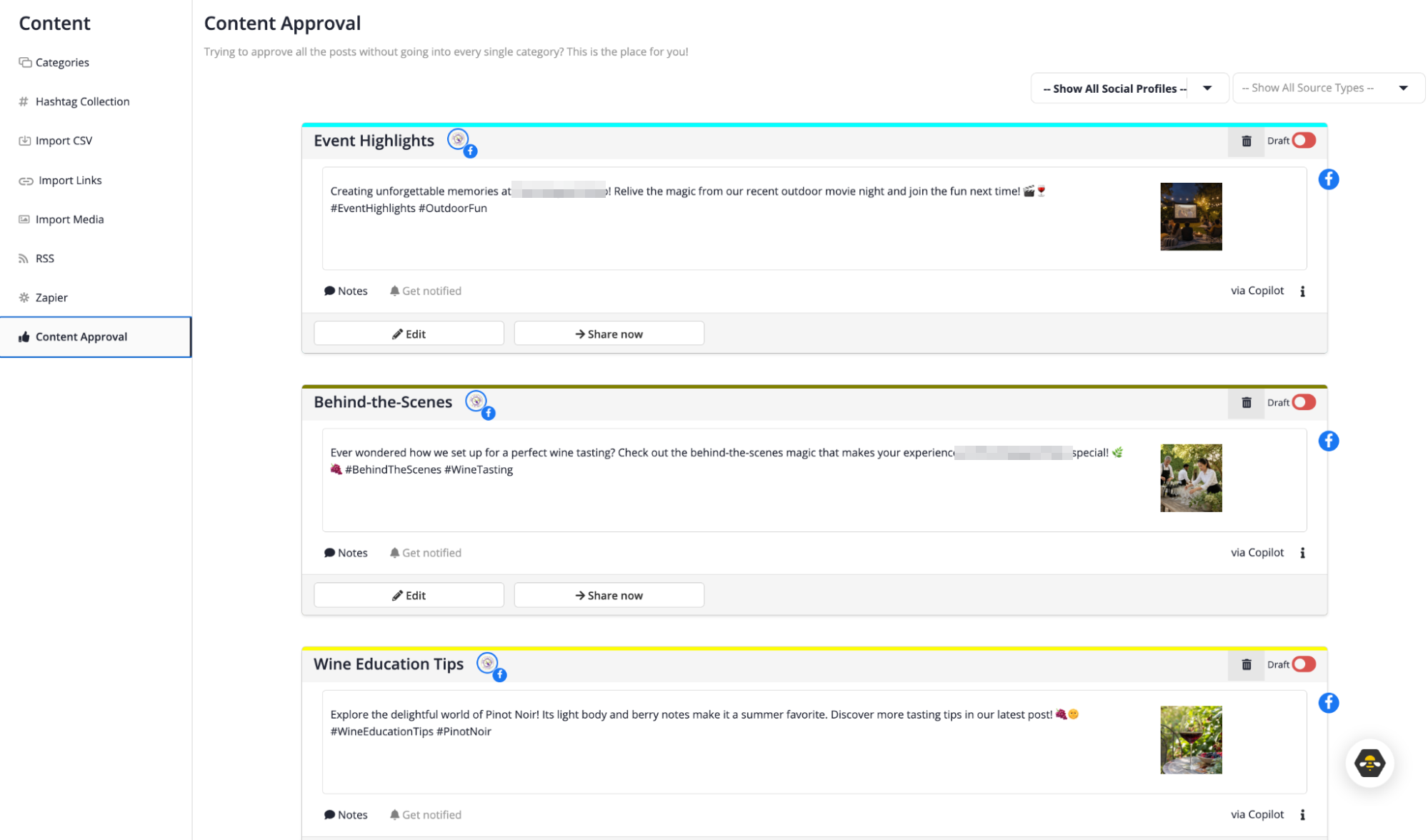
Under Content, SocialBee gave me more than categories. I could also work with Hashtag Collections, CSV imports, link imports, media imports, RSS, Zapier and Content Approval.
Hashtag Collections were simple but practical: I could save a named set for the brand instead of rebuilding the same group every time. Content Approval was more interesting, because it connected directly back to Copilot. Posts generated through Copilot appeared there as drafts, grouped by category, with notes and editing controls available before they moved further into the publishing system.
That made the content area feel like the middle layer between strategy and scheduling. Copilot generated ideas, categories organised them, approval cleaned them up, and the scheduler decided when they would go out.
One Failed Instagram Post Told Me More Than a Successful One
Once Copilot had generated content, I selected several ideas and moved them into the content area. One Instagram post looked almost ready. The caption was there, the account was selected, and the idea itself was fine.
Then I tried to approve it. SocialBee stopped me because the post had no image, and I actually liked that interruption. A less careful workflow can make an unfinished post look complete because the caption box is filled. SocialBee surfaced the platform requirement before the post entered the publishing queue. I opened Canva from inside the editor, attached a visual, saved the update, and the warning disappeared.
Then I tried a video. This time SocialBee replaced the warning with a mobile-reminder indicator, because the media did not meet the requirements for direct Instagram publishing. I either had to correct the format or finish the publishing step through the mobile workflow. That sequence made the post editor feel less like a generic text box.
Cross-posting still needed a human pass
Next I separated the same idea into Instagram, Facebook and LinkedIn versions. Once I switched to profile-level customisation, the controls changed with the platform: covers, collaborators, locations, tags, post formats and first comments, depending on what each network allowed.
The convenience was real, because the base idea stayed connected. Still, SocialBee did not magically turn one caption into three good posts. I changed wording, checked the media and reviewed each version before approving it.
That is an important distinction across this whole category. “Cross-posting” can mean copying one post everywhere, or it can mean giving you one starting point and making network-specific editing easier. SocialBee was closer to the second.
I also saved multiple caption options as variations. When the content returned through the queue, SocialBee could rotate those versions instead of repeating exactly the same text. I still changed the hook, example or call to action when something felt too familiar. Automation handled the rotation. It did not give the audience a new reason to care.
Then I Realised the Calendar Was Not Really the Main Product
This was the point where my view of SocialBee changed. I added one post to a category and chose where it should sit in the queue. Moving it to the top meant it would become the next available post when that category appeared in the schedule. Moving it down meant other posts would go first.
That sounds like a small scheduling detail until the category contains ten or twenty pieces of content. I was no longer deciding “what should I publish next Tuesday?” I was deciding “what should this category publish the next time its slot comes up?” Those are different workflows, and the second scales much better when your content has recurring themes.
I turned recycling on for a post with two variations and set it to expire after two shares, so each version ran once before the post stopped. I also tested the date-based expiry option, which matters for promotions, events, seasonal posts and anything that becomes inaccurate. Recycling is useful until an old Black Friday offer unexpectedly comes back in February.
SocialBee let me set rules for when posts stopped recycling, which made the automation feel more controlled. The content mix added another layer: as I changed which categories occupied the weekly schedule, I could see the balance between educational and promotional content shifting. At that point I was not moving boxes around a calendar. I was changing the composition of the feed.
The Scheduler Turned Categories Into an Actual Publishing Plan
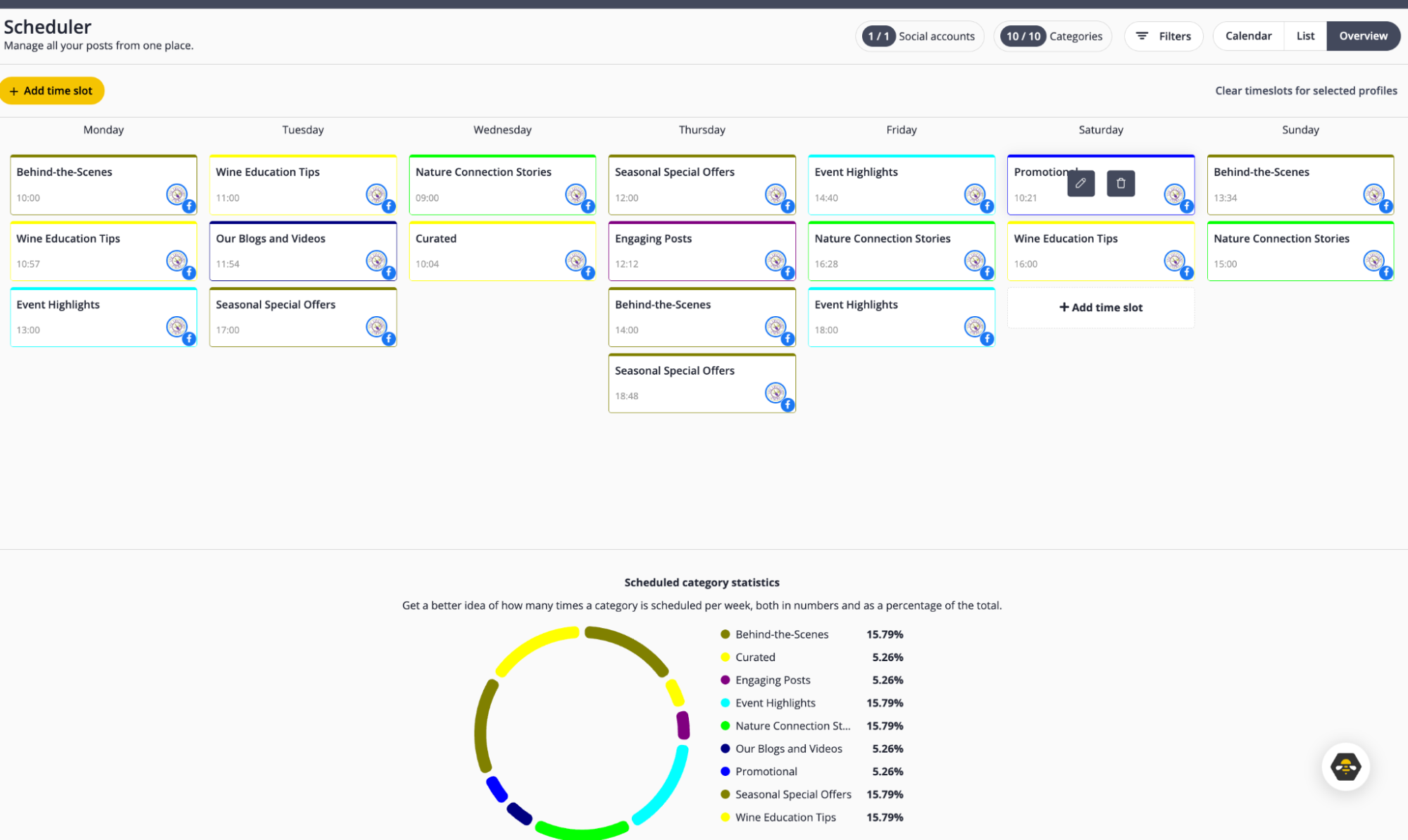
After Copilot generated the categories, SocialBee prompted me to build a schedule for them. That step is where the strategy became operational.
Instead of choosing a date for every post, I assigned category time slots across the week. The Overview view then showed how often each category appeared and what percentage of the weekly mix it represented. That was useful, because I could see when the schedule leaned too heavily towards one theme. If promotional or seasonal content occupied too much of the week, I could rebalance the category slots before worrying about individual captions.
Next Posts Became My Control Room
After working with categories, I understood the Scheduler differently. SocialBee gives you calendar, list, overview and Instagram grid views, and the current Scheduler documentation confirms that recurring category schedules now live alongside upcoming and previously published content.
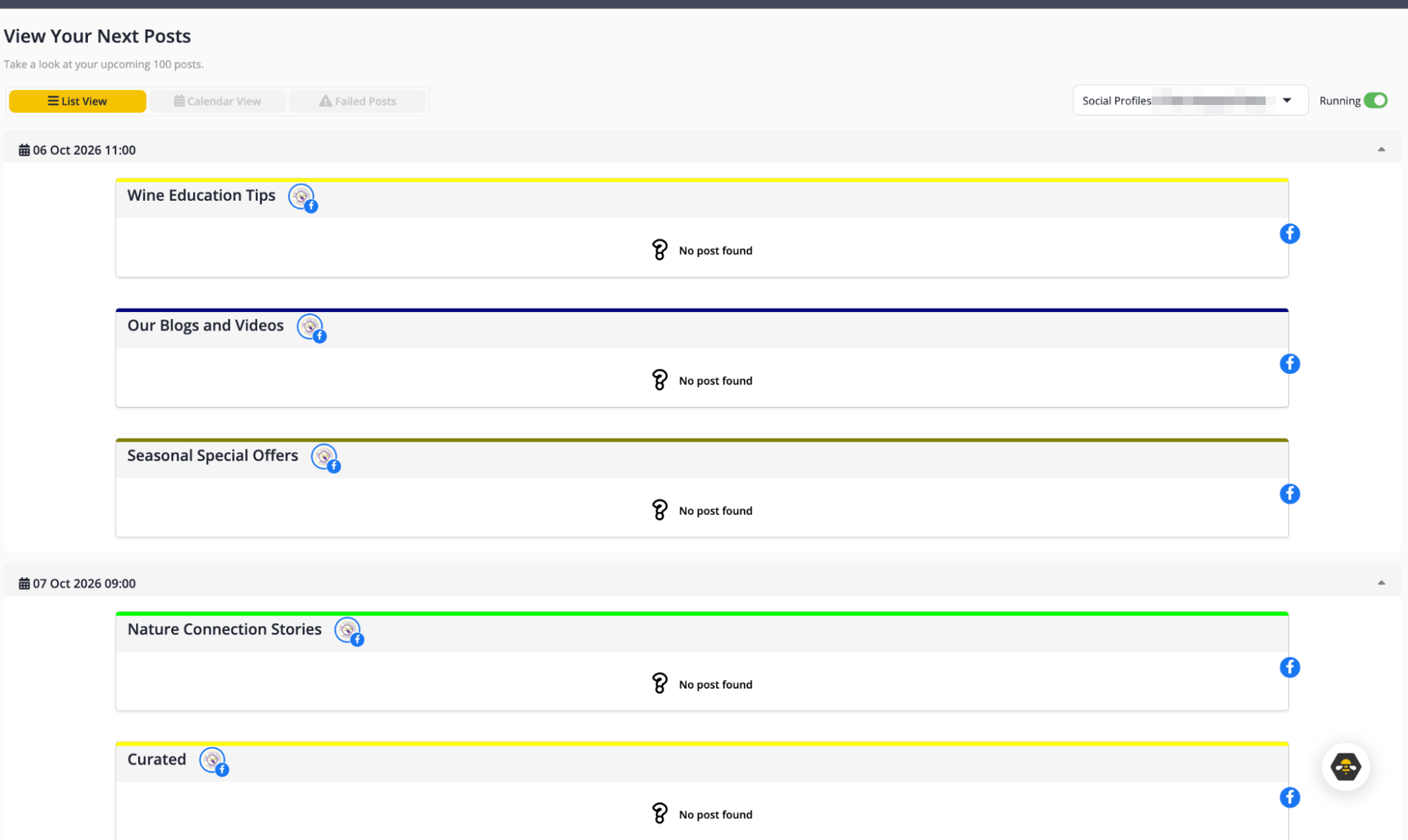
During my test, the list view was more useful than I expected. A normal calendar tells me what is scheduled. The SocialBee queue also helped answer where the system was about to run out of content. If a category had a scheduled slot but nothing approved inside it, the gap stayed visible. From there I could add something, approve an existing draft, or leave the slot empty.
That made Next Posts feel closer to a maintenance board than a traditional calendar. I could scan the upcoming week and see which parts of the system were healthy and which needed attention. That is probably the clearest differentiator I found. Other platforms made me think about the individual post and what happened to it across networks. SocialBee kept making me think about the content supply behind the schedule.
The Engage Dashboard Put Conversations Into One View
I also tested SocialBee’s Engage area. It works like the inbox or feed layer I have seen in other platforms, but SocialBee organises it as streams.
I could create streams around posts, mentions, messages and comments, which gave me one place to monitor the conversations tied to the connected account. The underlying job is familiar, but the stream approach makes it easier to decide which type of activity to watch.
I would not call Engage the main reason to choose SocialBee. Agorapulse still felt more deliberately built around inbox and community-management workflows. In SocialBee, Engage works more like another supporting layer around the content system.
Page Analytics Was the Part I Could Test Directly
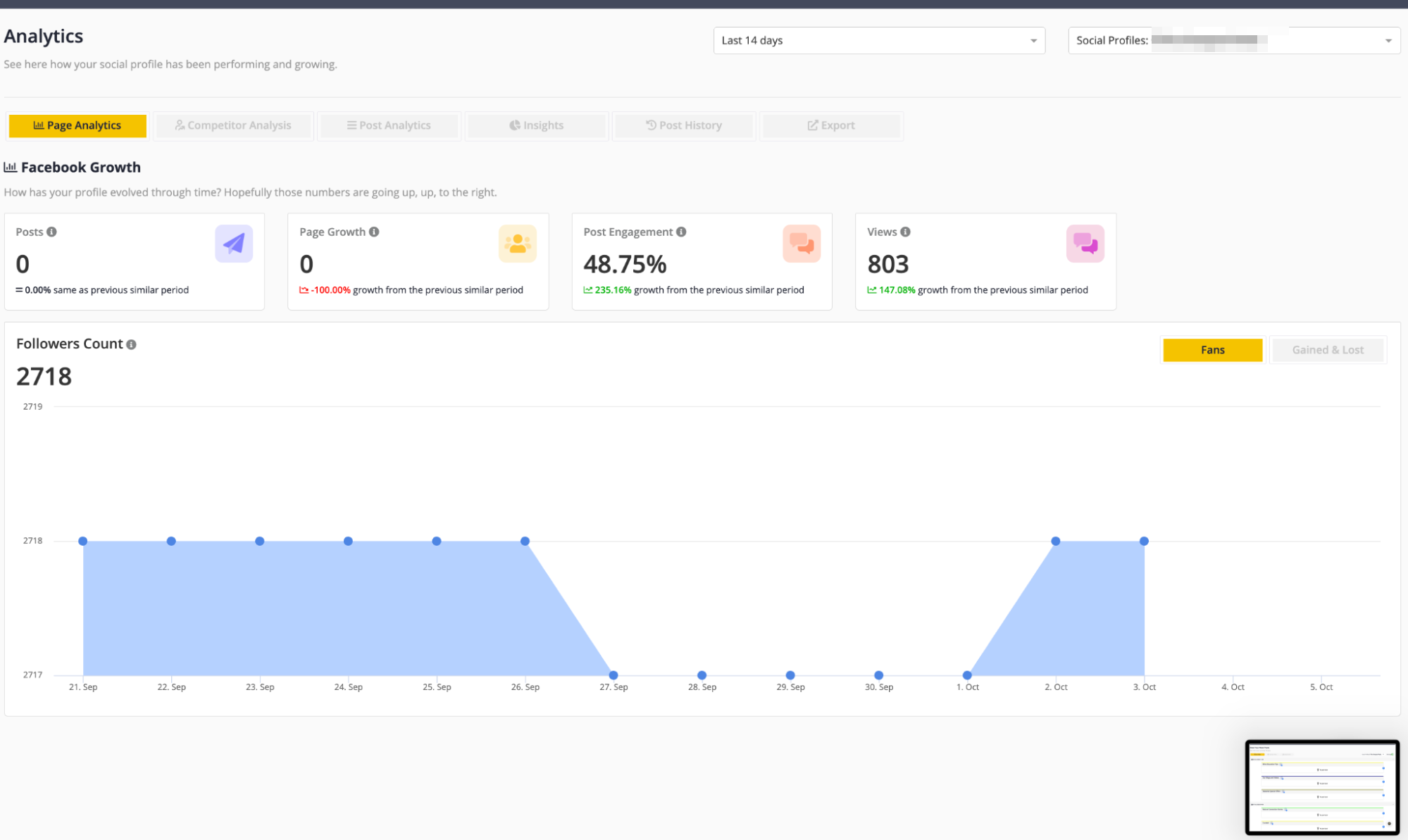
The analytics area is another place where plan level changes the experience. On the account I tested, Page Analytics was available. I could see Facebook growth, follower count, post engagement and views across the selected period, which was enough to understand the basic performance layer without leaving SocialBee. The dashboard also showed how the account changed compared with the previous period.
SocialBee reserves deeper analytics for higher plans. Competitor Analysis, Post Analytics, Insights, Post History and exports appear as additional options once those features are unlocked. That matters, because the premium analytics story is broader than what I could see in Page Analytics alone. Post History, for example, is designed to help users revisit older content, according to SocialBee. For this review I would separate those capabilities from the page-level analytics I used directly.
Metricool still felt stronger when I wanted broader reporting and cross-network performance views. SocialBee’s analytics make more sense as another feedback layer inside its content-management system than as the centre of the product.
SocialBee and Metricool Solved Different Parts of My Week
Testing Metricool before SocialBee made this difference much easier to see. My Metricool review followed the work from brand setup into cross-network planning, asset management, analytics, Studio and reporting. I found Metricool more useful when the workflow moved towards measurement and client reporting.
SocialBee stood out earlier in the content cycle. It became more interesting when I had a library of ideas that needed rules.
That does not make one universally better. It means I would choose between them based on where the weekly bottleneck happens. If the recurring problem is “we constantly have to refill the calendar”, SocialBee makes more sense. If it is “I need to plan across channels and then explain the results to clients”, Metricool has the stronger pull.
There are other comparisons I want to make as this review series grows. RecurPost is particularly relevant, because evergreen reuse is central to its positioning too, and Planable is a useful comparison for teams where client feedback and approvals matter more than automated rotation. I have not tested RecurPost yet, but we have since tested Planable hands-on. I am not ranking either against SocialBee here.
Pricing Made More Sense After I Built the System
SocialBee starts at $29 per month for Bootstrap, with Accelerate at $49 and Pro at $99 when billed monthly. The company also offers yearly billing and larger agency tiers.
Monthly billing, from SocialBee’s pricing page, accessed October 6, 2026.
The profile limits are easy to understand. The workspace and user limits are where I would pay more attention. A solo marketer may stay comfortable on Bootstrap for a long time; an agency hits a different constraint first, because each client may need its own workspace and collaborators need the right access.
SocialBee uses Owner, Manager, Publisher and Contributor roles, with different publishing and account-management permissions. That means I would price SocialBee around the workflow, not just the number of Instagram accounts. Before upgrading I would count how many brands need isolated workspaces, how many people need their own logins, who needs approval rights, how much analytics history matters, and whether PDF reporting is necessary. That calculation tells me more than the plan names do.
My Take After Using SocialBee
The most memorable part of SocialBee was not publishing a post. It was watching a post become part of something larger.
One idea entered a category. It failed an Instagram requirement. I added a Canva visual. I customised it by network. It gained another variation. Then it entered a queue with rules telling SocialBee when to reuse it and when to stop. That sequence explains SocialBee better than its feature list does.
The platform requires more planning at the beginning, because categories, schedules and recycling rules need to be set up properly, and early on that can feel like additional work. The payoff appears later. Once the categories contain good content, the next week does not begin with the same empty-calendar question.
It still has a composer, analytics, approvals and dashboards, and many of the other features we are going to see again and again across this category. I would remember it as the scheduler that made me build the content system first, then let the calendar run from it.