How I Tested Vista Social
I expected Vista Social to feel like another scheduler with a few agency features around the edges. The first ten minutes changed that expectation. The dashboard did not just ask me to connect a profile and schedule a post. It also pushed me toward team access, Ask Vista, brand voice, knowledge training, DM automation, Vista Page, AI agents, and desktop or mobile apps.
That breadth became the real story of the review. Vista Social is trying to cover publishing, engagement, automation, reporting, reputation management, project work, link-in-bio pages, listening, employee advocacy, and AI assistance inside one account. That sounds attractive for an agency, but it also raises a harder question: does putting everything in one place actually simplify the work, or does it simply move the complexity into a larger dashboard?
I tested Vista Social with a real Facebook page and followed the workflow as I would for a client account. I connected the profile, created content, used the AI Assistant, tried Ask Vista, reviewed brand settings, scheduled a post, explored publishing controls, opened the Inbox, worked through DM automation templates, checked internal listening, created tasks in Vista Work, and reviewed the reporting area.
I also inspected team roles, review integrations, profile groups, queues, URL tracking, link shortening, media settings, employee advocacy, and Vista Page. A few higher-tier features, including external listening, sentiment analysis, industry benchmarking, and some enterprise controls, were visible but not available in my trial, so I treated those as researched features rather than hands-on results.
What impressed me most was not a single feature. It was how often Vista Social gave me a reason not to leave the platform.
The Setup Experience Made the Product’s Ambition Obvious
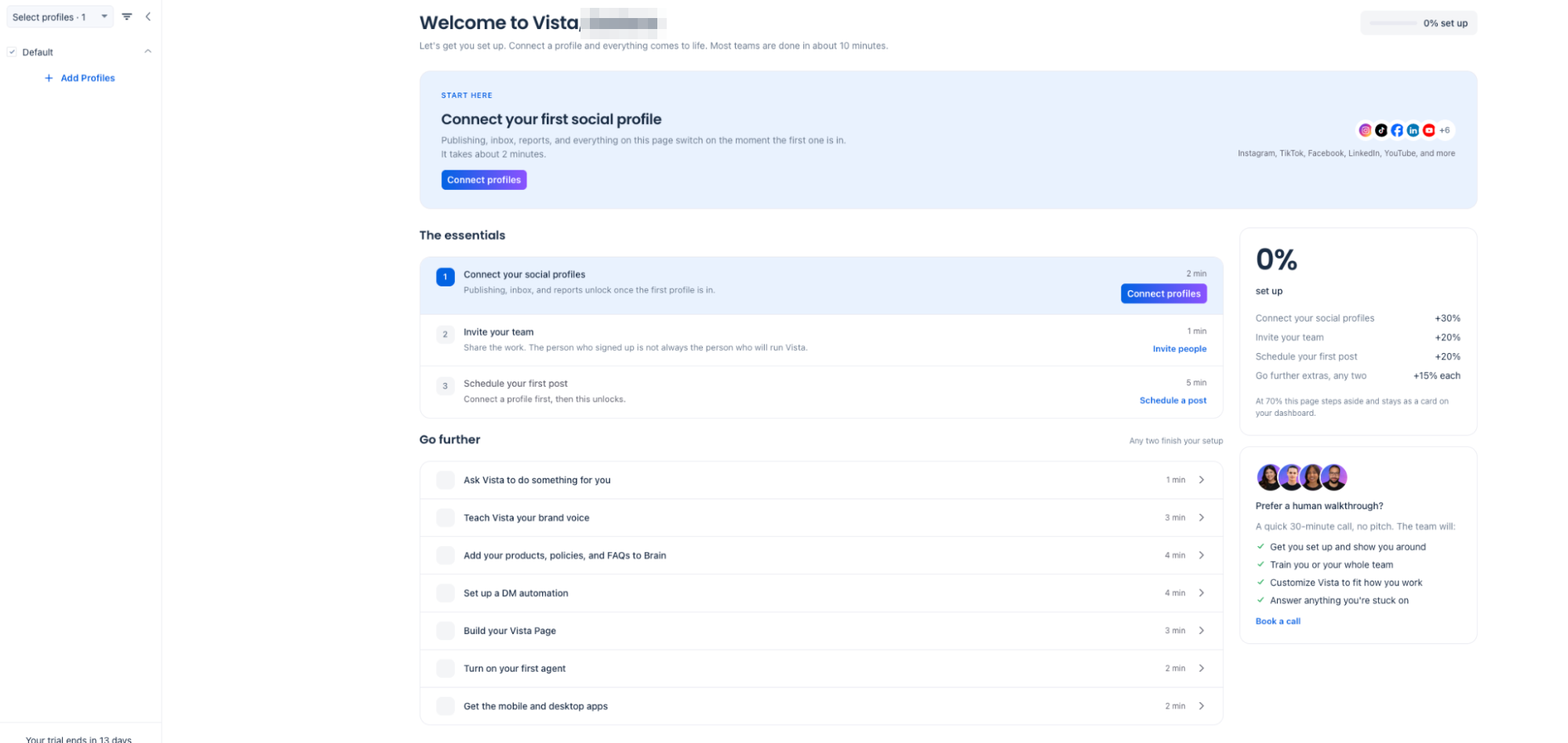
The onboarding screen was more useful than I expected because Vista Social has enough features to become confusing very quickly. Instead of dropping me into a blank account, it divided setup into essentials and optional next steps.
The essentials were clear: connect social profiles, invite a team member, and schedule a first post. The next steps exposed the larger system without forcing me to configure everything immediately.
That worked well for me because the platform is not small. Ask Vista, brand voice, knowledge, DM automation, Vista Page, agents, reporting, listening, reviews, and project work could easily feel like unrelated modules if they appeared without context. The guided setup gave them a sequence and made the account feel more intentional.
I also liked the human walkthrough option on the dashboard. Vista offers a call to help with setup, train a team, customize the workspace, and answer questions. That kind of support is easy to overlook in a feature comparison, but it becomes useful when the software is broad enough that a team could configure it badly and then blame the tool.
The connection experience reinforced the agency angle. Vista Social organizes work around profile groups, which means related client or brand accounts can live together instead of every social profile existing as a separate island.
A Connection Screen That Goes Far Beyond the Usual Social Networks
Vista Social’s connection screen was one of the first places where the product felt different from a standard scheduler.
I saw Facebook, Instagram, Threads, X, LinkedIn, TikTok, Bluesky, Reddit, Pinterest, Snapchat, Tumblr, and YouTube, but the list continued into integrations for TikTok Ads, Bitly, Google Analytics, Google Business, Apple App Store, Google Play Store, Trustpilot, Yelp, TripAdvisor, OpenTable, Vista Page, Canva, Zendesk, and custom connections.
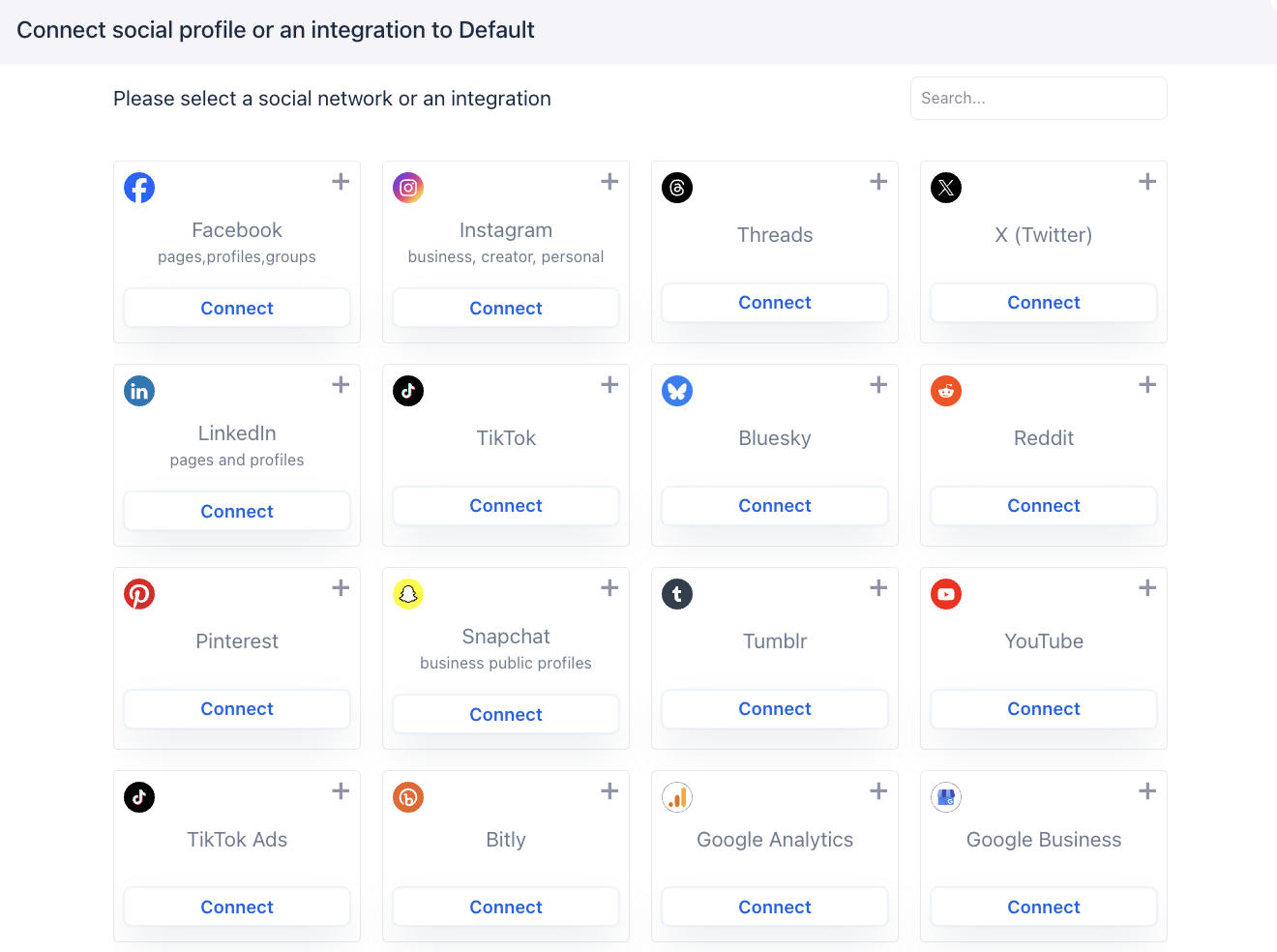
This broader connection model changes who Vista Social can serve. A restaurant or hospitality group can care about Google Business, TripAdvisor, OpenTable, and Yelp alongside Instagram and Facebook. An app company can bring App Store and Google Play reviews into the same environment. An agency can keep social publishing, review management, analytics, Canva, link tracking, and customer-support integrations closer together.
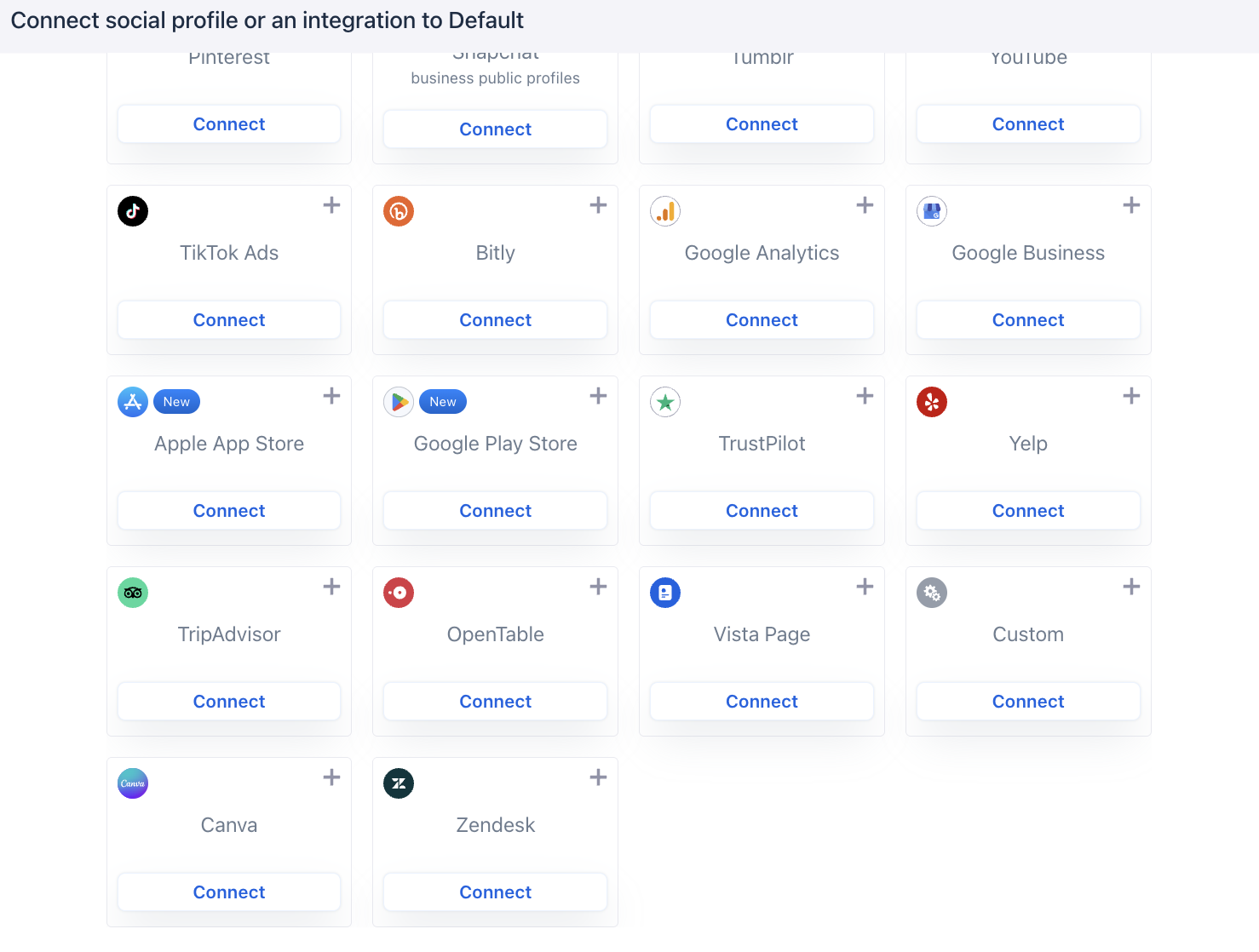
When I tested Metricool, the connection workflow leaned more heavily toward major social networks, analytics, websites, and ad accounts. Vista Social felt more expansive around reputation management, local business, app reviews, and support workflows. That does not make one universally better; it means Vista is trying to absorb a wider part of the daily operating stack.
Facebook setup was refreshingly clear about limitations
When I connected Facebook, Vista Social showed the difference between a Page, a personal or professional Profile, and a Group before I completed the setup. That was helpful because the available features were not identical.
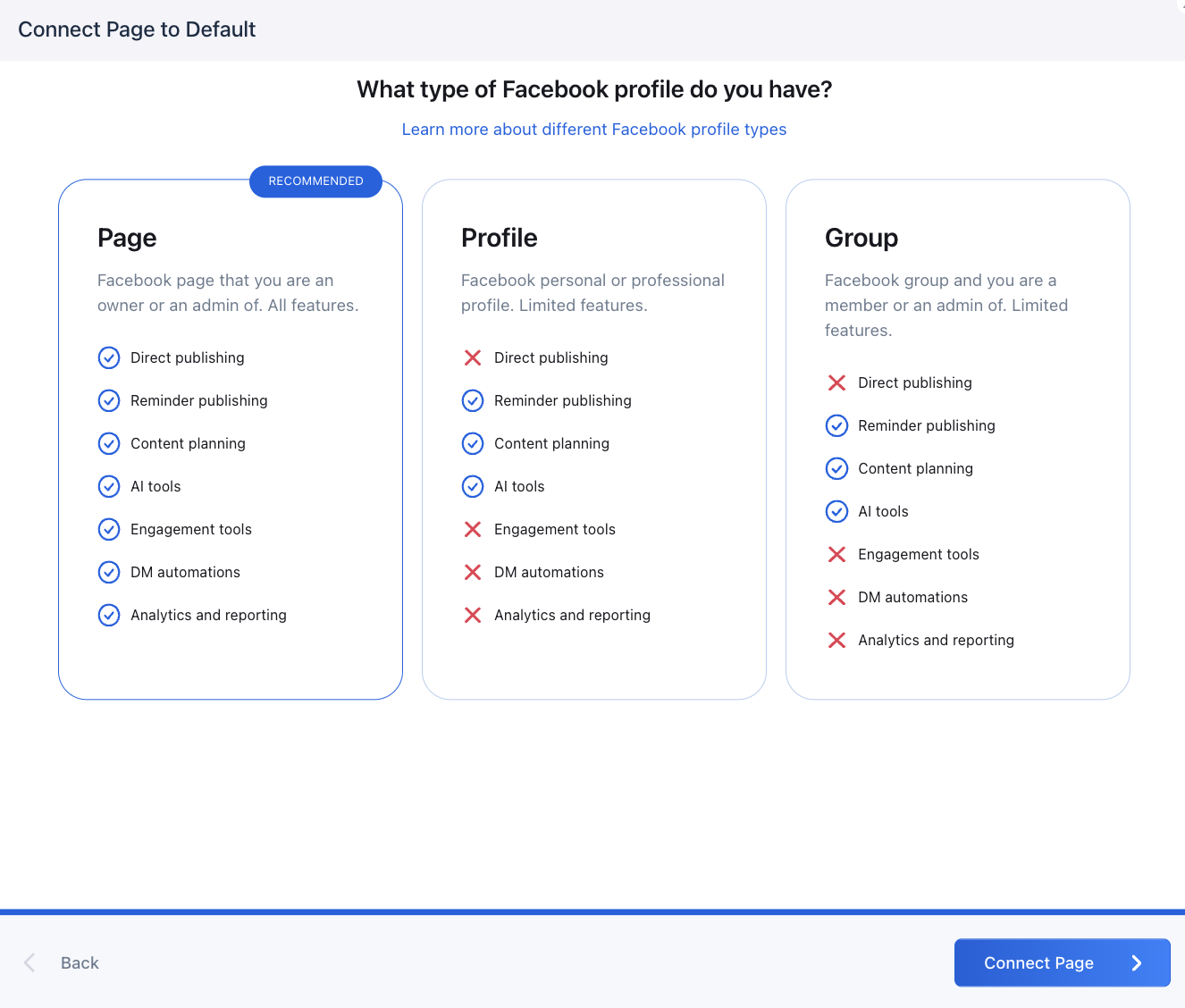
A Facebook Page supported direct publishing, reminder publishing, content planning, AI tools, engagement tools, DM automations, and analytics. Profiles and Groups had more limited support. I appreciated seeing those limitations before connection instead of discovering them later when a feature suddenly disappeared.
That kind of transparency improves setup because social APIs already create enough inconsistency across platforms. A scheduler cannot control every network restriction, but it can make those restrictions obvious.
Team access also felt designed for client work
The team invitation flow separated Account Admins from Restricted Users. An Account Admin has full account access, while a Restricted User can be granted permissions by profile group.
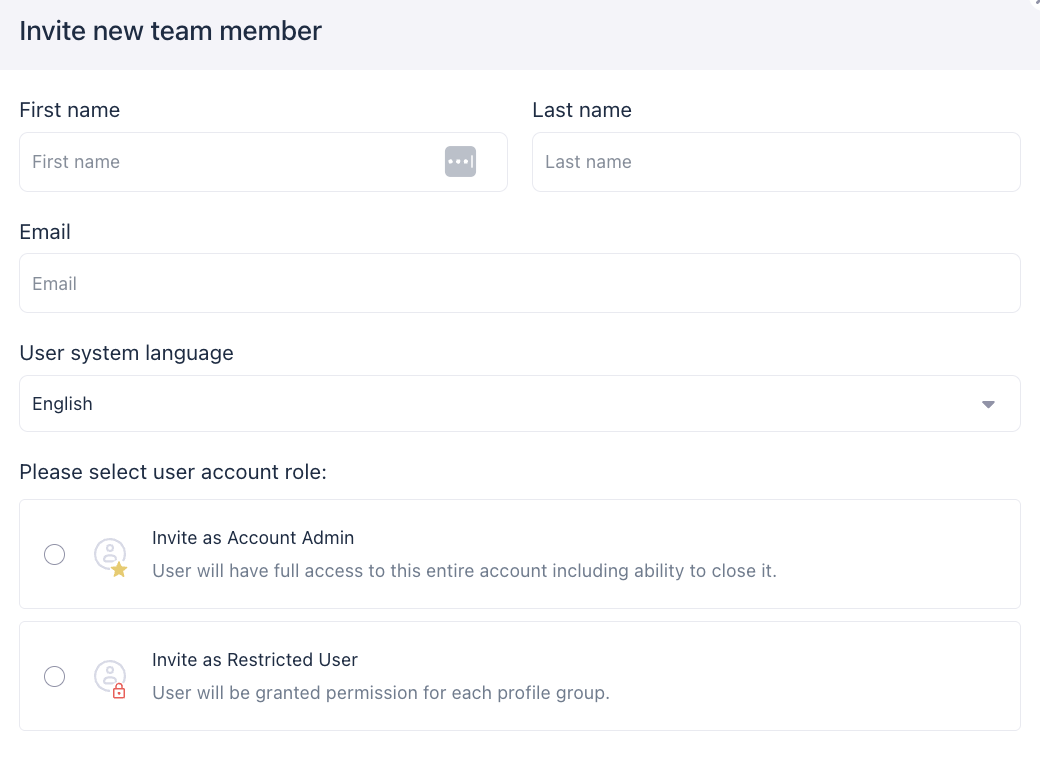
That structure makes sense for agencies. I would not want a freelancer working on one client to see every account in the agency, and I would not want every client to have administrator-level access. The profile-group model gives Vista a more credible agency foundation than a simple “invite user” button.
The AI Assistant Was Better Structured Than a Blank Prompt Box
AI writing is no longer a differentiator by itself. Almost every platform I have tested now has some kind of caption assistant, so I paid more attention to how Vista Social structured the task.
Its AI Assistant includes Guided mode, Advanced mode, Image generator, and Generate videos. In Guided mode, I could control Tone, Format, Goal, and CTA type rather than writing a long prompt every time.
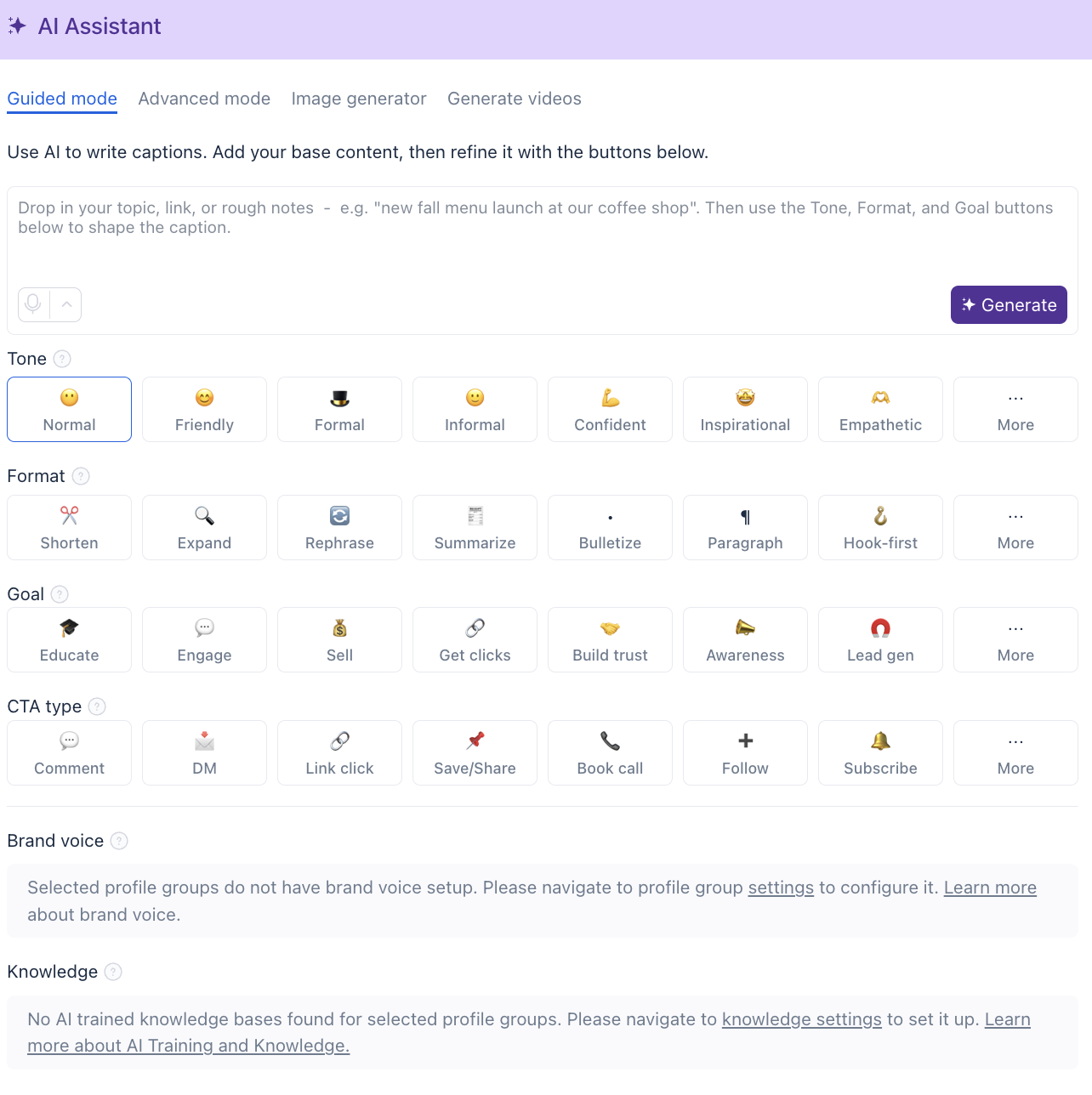
The tone options included Friendly, Formal, Informal, Confident, Inspirational, and Empathetic. Format controls included Shorten, Expand, Rephrase, Summarize, Bulletize, Paragraph, and Hook-first. Goal options included Educate, Engage, Sell, Get clicks, Build trust, Awareness, and Lead gen, while CTA choices included Comment, DM, Link click, Save or Share, Book call, Follow, and Subscribe.
That design is useful for social managers who know the objective of the post but do not want to translate that objective into prompt engineering every time.
I tested the assistant with a simple “tech event caption” prompt. The generated result was usable, but it still needed editing because it added generic phrasing and included a hashtag year, #TechEvent2023, that did not match the 2026 event creative.
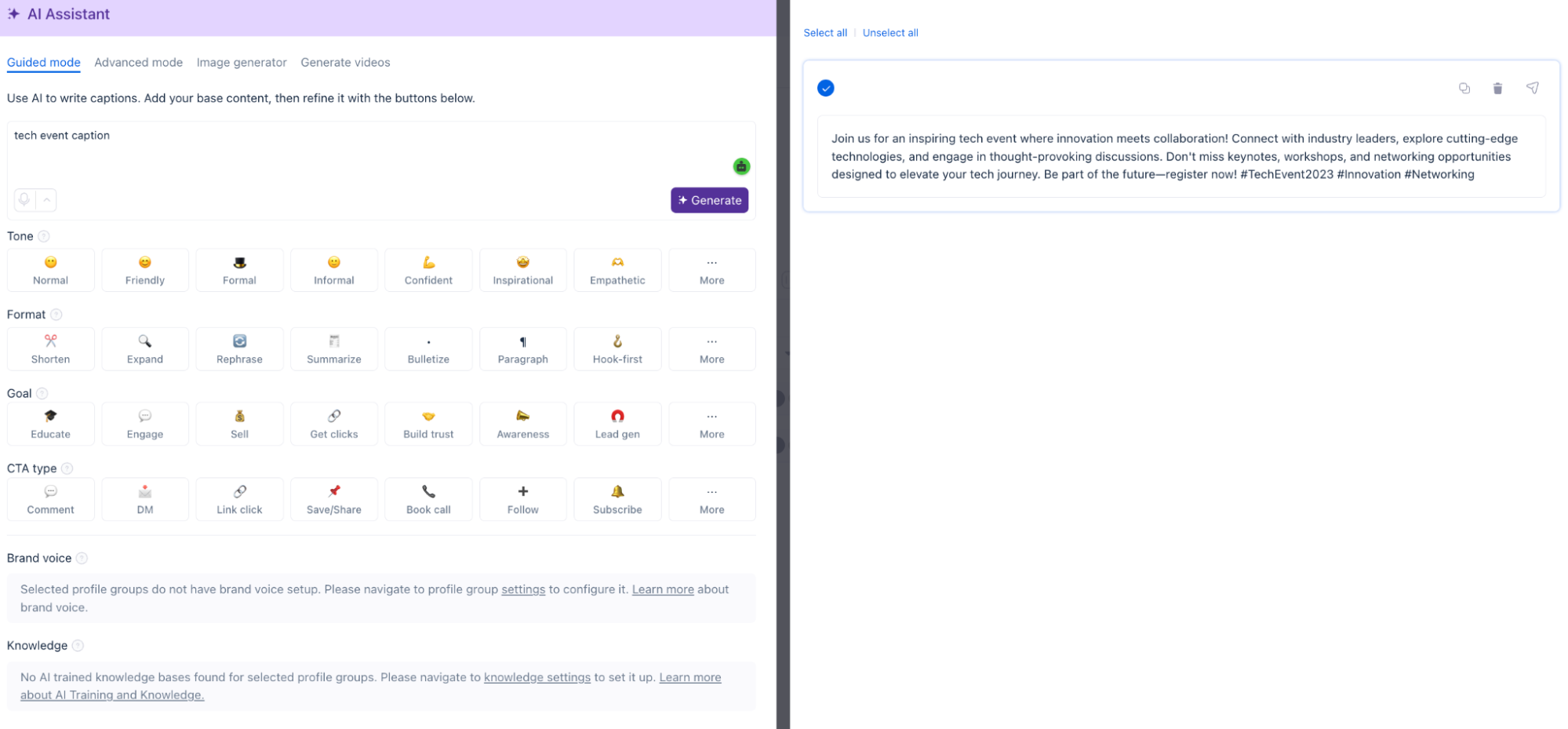
That was a good reminder of where AI fits in this workflow. It speeds up the first draft, but the person managing the account still has to check facts, dates, claims, brand language, and whether the caption actually sounds like the client.
Brand voice and knowledge were more interesting than the first draft
The stronger AI feature was the ability to train Vista around a brand. Inside Profile Group settings, Vista includes Brand Voice and Brand Safety & Compliance Policy, and both can be written manually or generated with AI.
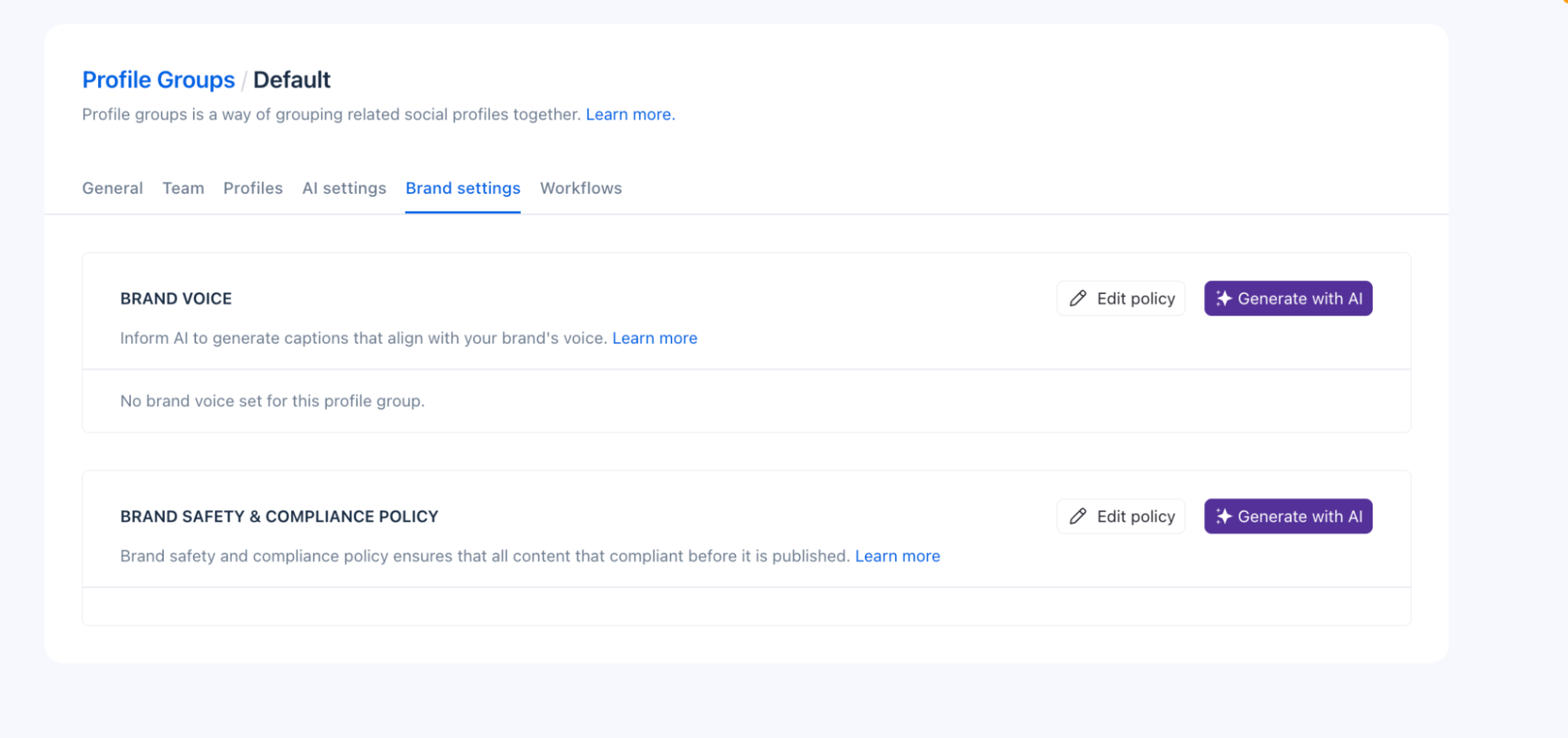
The AI Assistant also showed whether the profile group had a brand voice and knowledge base configured. That gives the tool more potential for agency use because Client A can have one tone and policy set while Client B can have another.
A generic caption generator is easy to replace. A system that remembers how a brand should sound, what it sells, what claims are allowed, and which policies the team wants the AI to follow has more operational value. The quality will still depend on the information the team provides, but the structure is stronger than starting every AI request from zero.
Ask Vista felt like a shortcut across the platform
Ask Vista is separate from the caption-writing assistant. It opened as a conversational interface with suggested prompts such as “Draft this week’s posts,” “What should I post today?” and “Recap yesterday’s comments.”
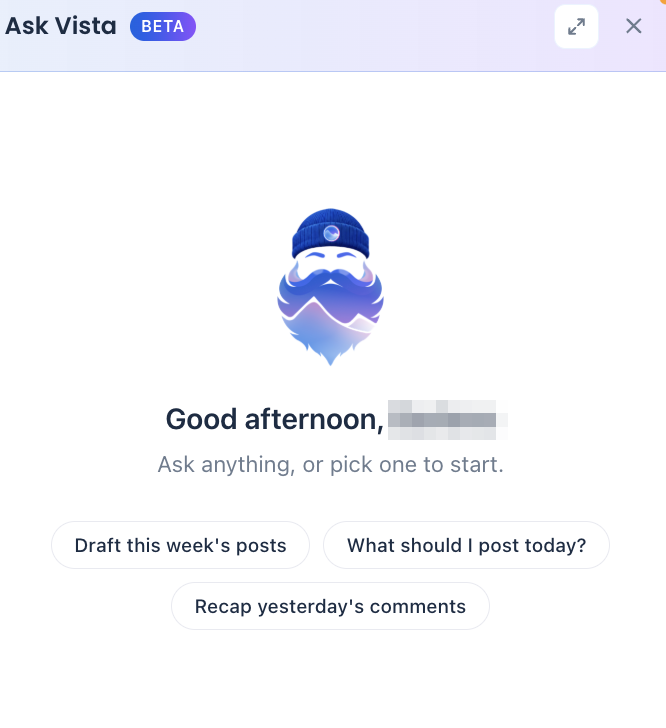
That distinction is important: the AI Assistant helps create content, while Ask Vista is trying to help operate the account.
I did not have enough live data in every module to stress-test Ask Vista across a full week of client work. The suggested prompts showed how Vista intends to use AI beyond content creation, including drafting posts and summarizing account activity. Whether those features work reliably in daily agency operations would require further testing.
The Publishing Screen Was Dense, but in a Useful Way
The publishing workflow gave me more control than I expected. I had the shared post on the left, a live network preview in the middle, and platform-specific settings on the right.
For Facebook, I could customize the post further, control media behavior, choose auto publishing, add post comments, enable location, use country targeting, set relationship status, choose gender and age targeting, set auto-delete rules, and work with boost settings.
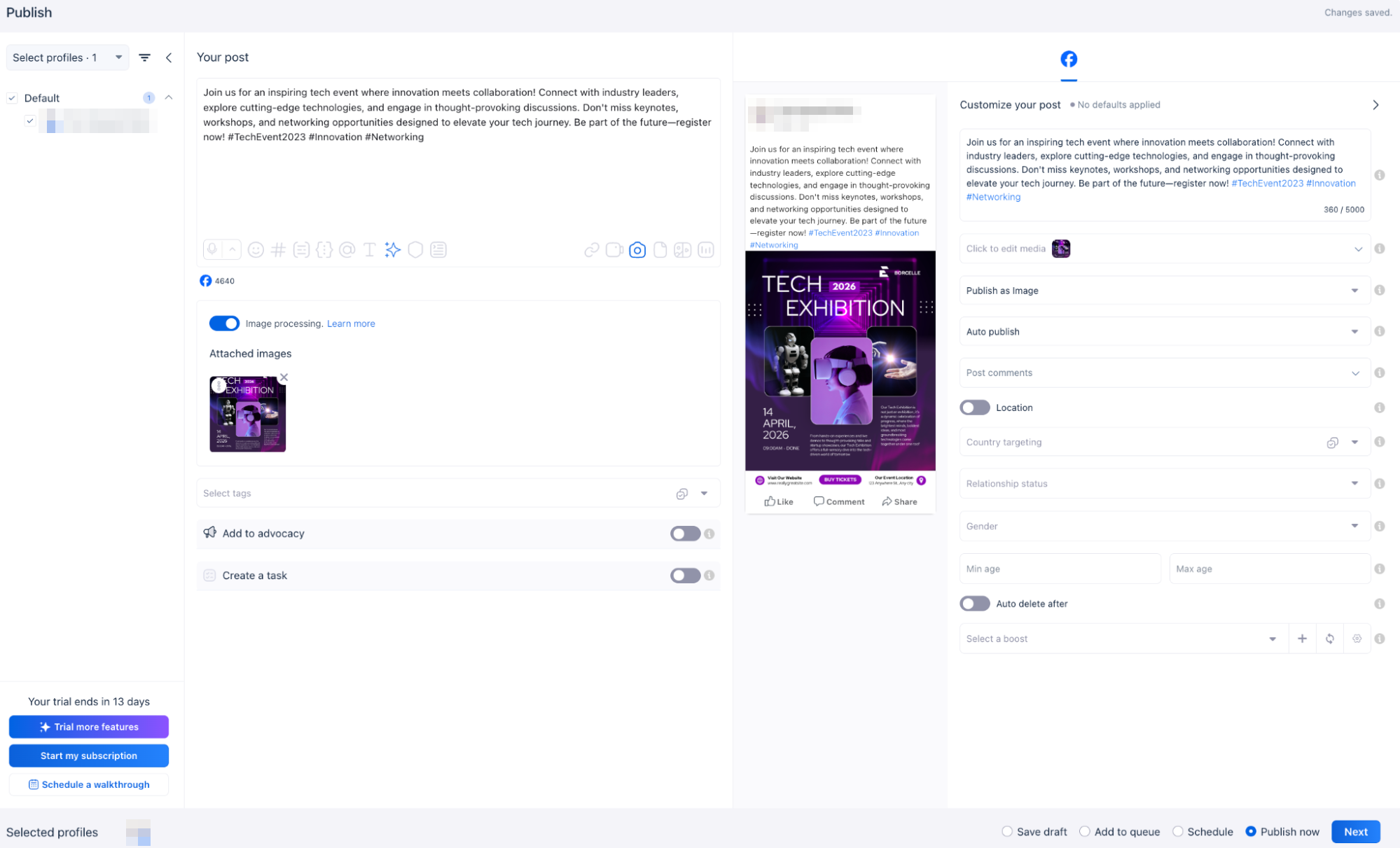
The bottom of the screen also gave me the practical publishing choices I expected: Save draft, Add to queue, Schedule, or Publish now. On the left, I could add the post to employee advocacy or create a task from it.
The interface is not minimal, but it is dense for a reason. Vista is trying to keep planning, publishing, targeting, internal work, and distribution options together. For an experienced social manager, that can save clicks. For someone new to social management, it may take time to understand which controls are useful and which can be ignored.
First comment support went beyond the basic checkbox
When I opened Post comments, Vista let me create a first comment and then add another comment after it.
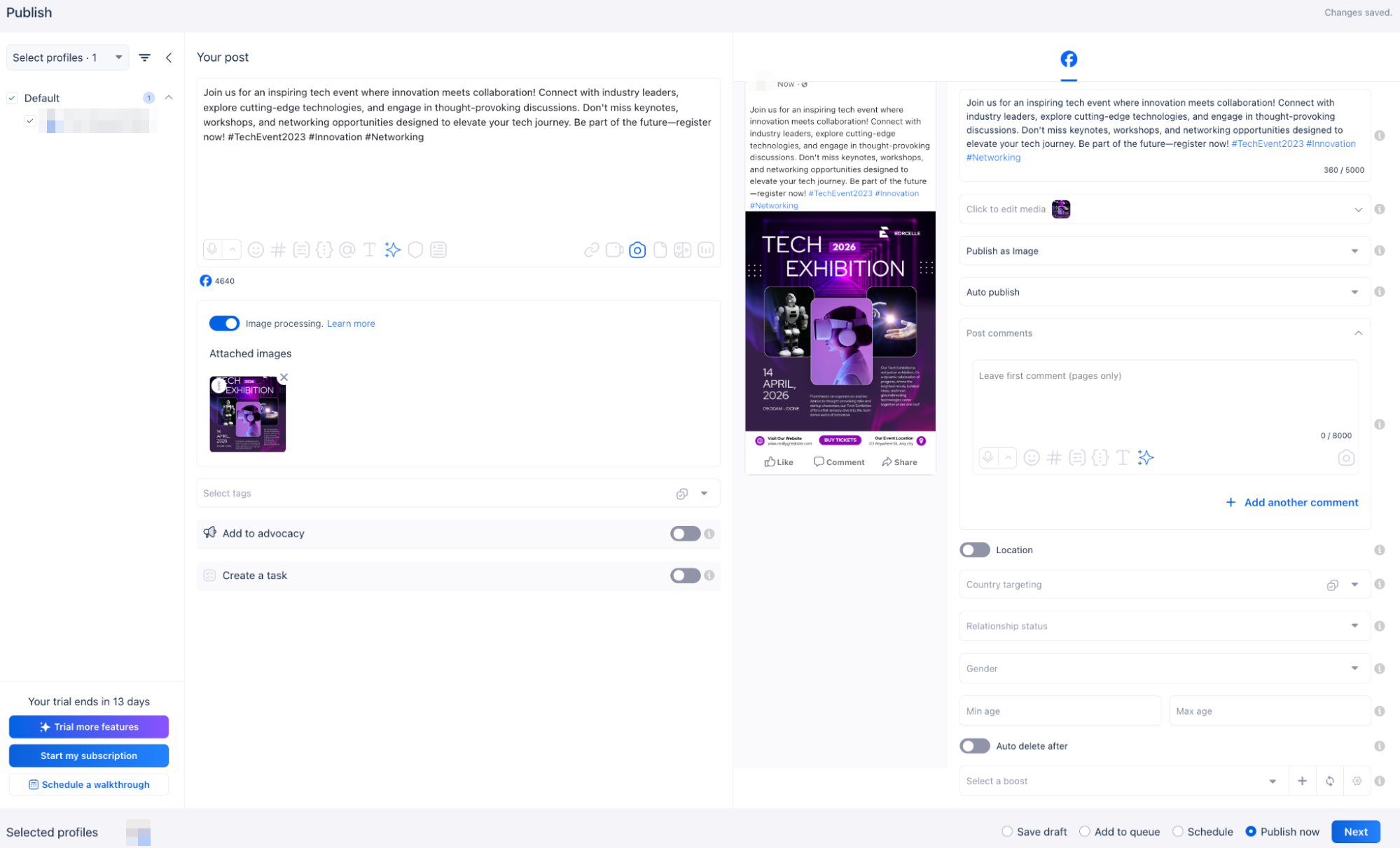
That is a small feature, but it is useful for teams that place hashtags, links, additional context, or staged information in comments. I liked that the workflow supported more than a single first-comment field.
The calendar did not try to be clever
Vista’s calendar looked like a normal monthly content calendar, and I was fine with that. Scheduled content appeared in its date cell, and the interface did not force another learning curve on a familiar task.
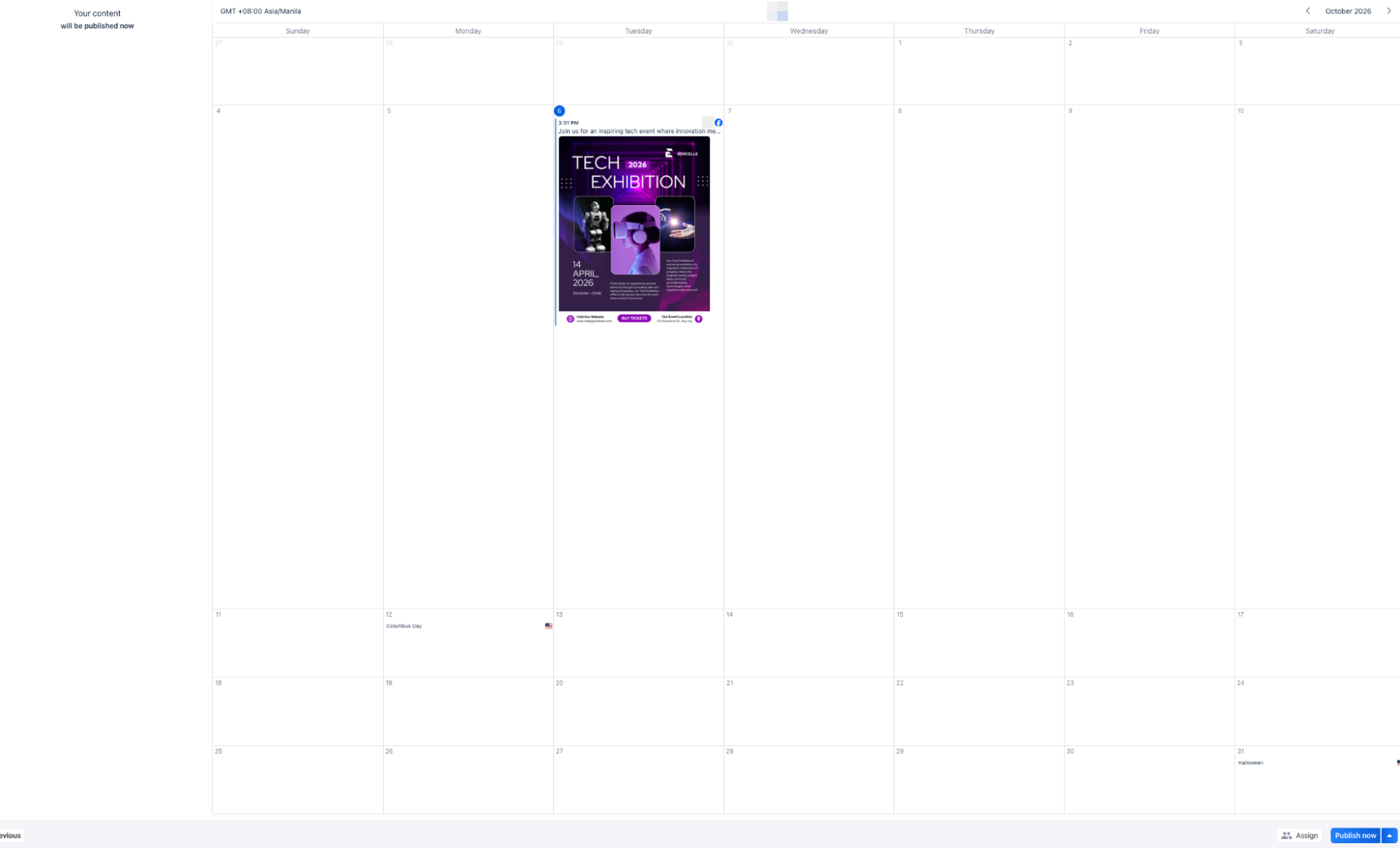
I have tested other platforms where the calendar itself is a major differentiator. SocialBee, for example, made the schedule feel more like a reflection of its category system, while Planable used the calendar heavily for collaboration and review. Vista’s calendar is less distinctive, but the surrounding publishing system is much broader.
The Publishing Settings Were More Revealing Than the Calendar
The Publishing Settings area showed where Vista becomes operationally serious. It grouped Approval Workflows, Boost Settings, Calendar Settings, Custom Fields, External Calendars, Link Shortening, Media Processing, Posting Defaults, Publishing Queues, Publishing Safety, Saved Mentions, and URL Tracking in one place.
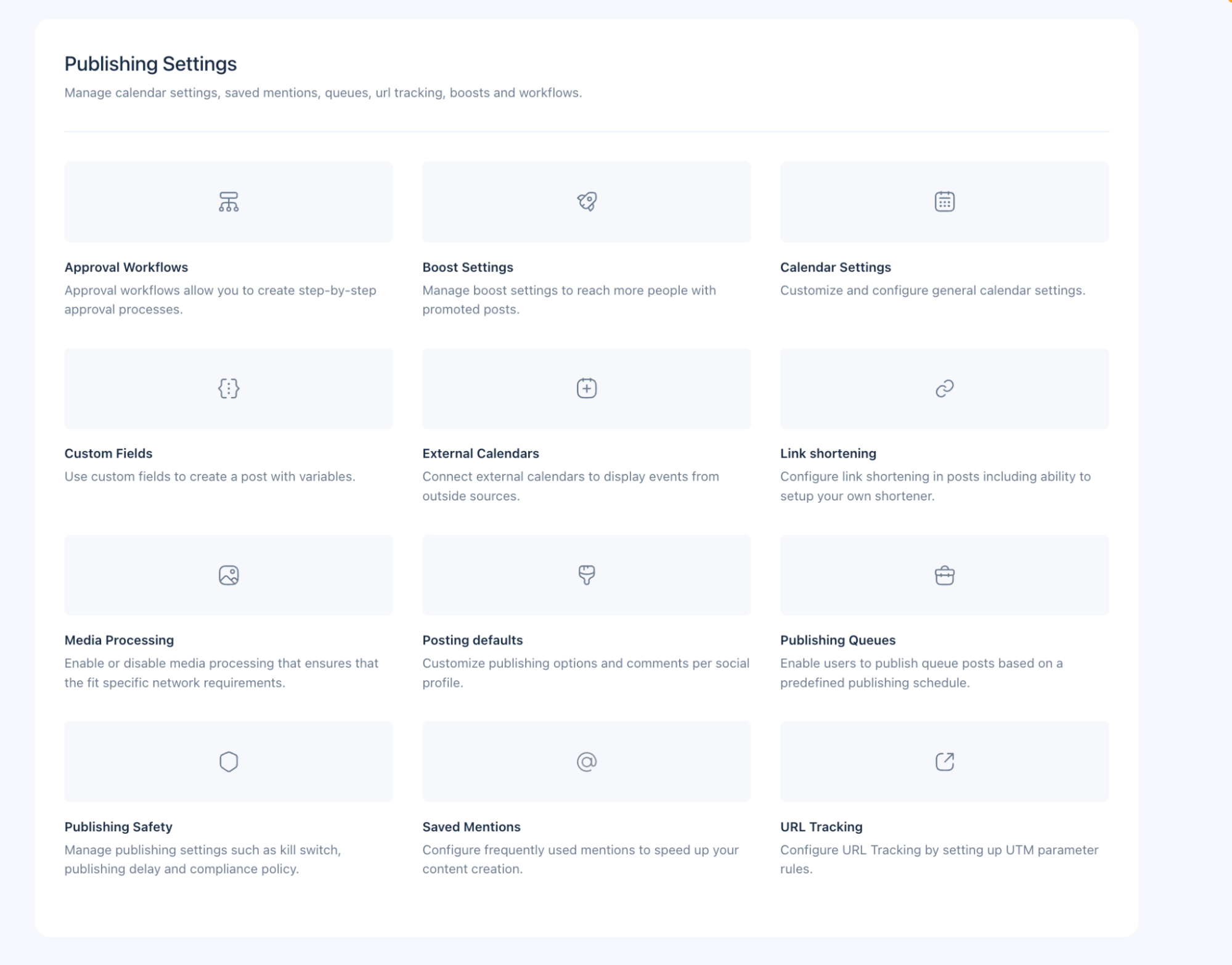
This is the kind of section that becomes more useful after several client accounts are involved. A team can standardize publishing defaults, shorten links, configure tracking, manage queues, set safety rules, and create approval flows without rebuilding those decisions for every post.
In SocialPilot, URL tracking and UTM templates were among my favorite quieter features because they helped standardize campaign measurement. Vista offers that same kind of behind-the-scenes control, but it combines it with queues, safety, approvals, media processing, and external calendars.
DM Automation Was the Clearest “I Might Cancel Another Tool” Moment
The DM Automation area did more to support Vista’s all-in-one claim than the scheduler did.
Instead of forcing me to start from a blank workflow, Vista offered ready-to-go templates for Auto-DM links from comments, Generate leads with stories, Respond to all your DMs, Grow followers from comments, Auto-reply to comment in DM, Auto-send links in DM, Grow followers with a freebie, Grow your YouTube, Give coupons in stories, and Boost webinar sign-ups.
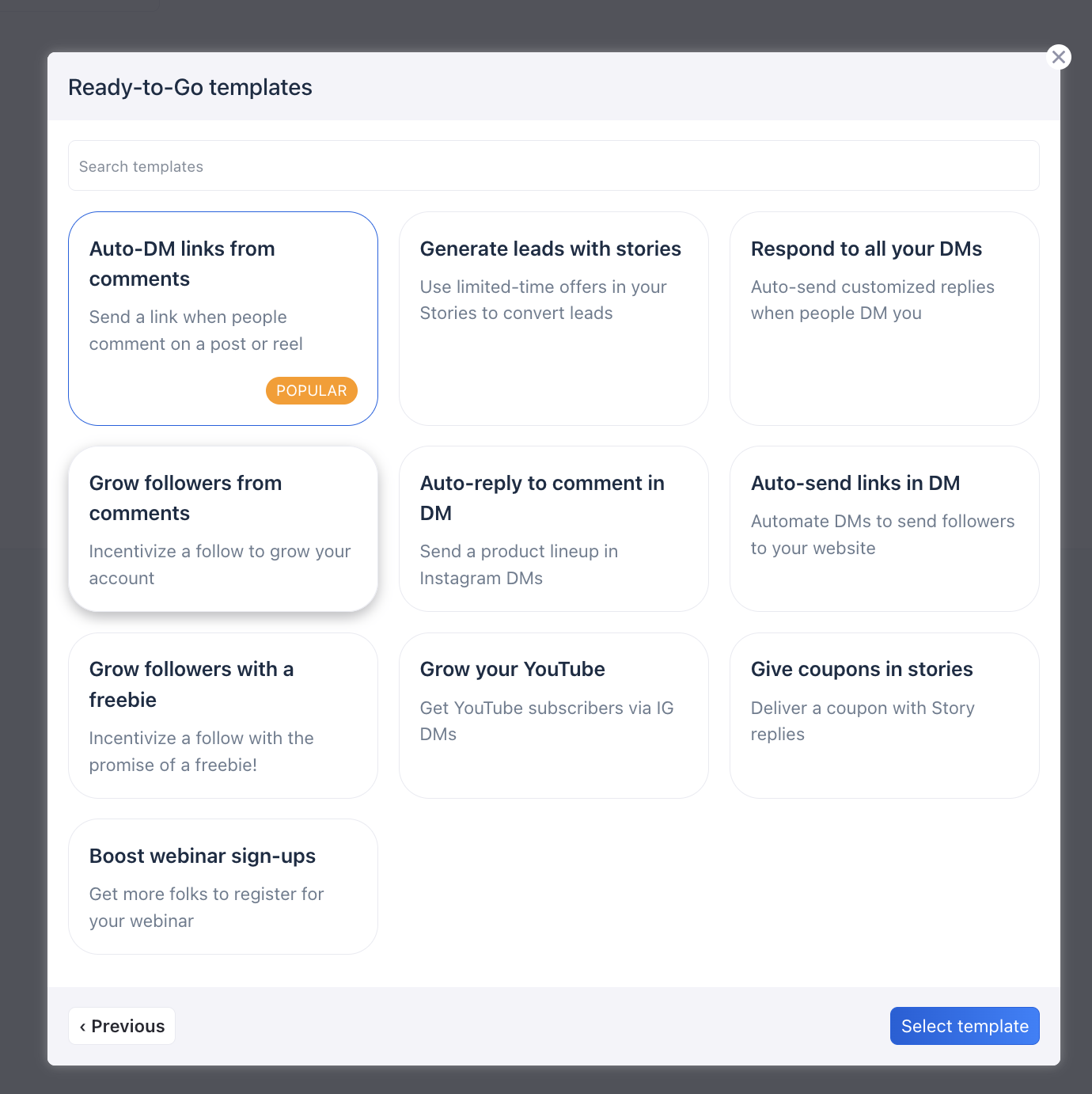
This is where I could most easily imagine replacing a separate automation tool for simpler workflows. Agencies often end up with one platform for scheduling and another for comment-to-DM automation. Vista is trying to keep both in the same account.
The automation builder also went beyond a basic keyword trigger. In the Auto-DM links from comments template, I could choose comments on a post or Reel, target all posts or specific posts, use intent detection, require certain keywords, exclude others, and add more triggers.
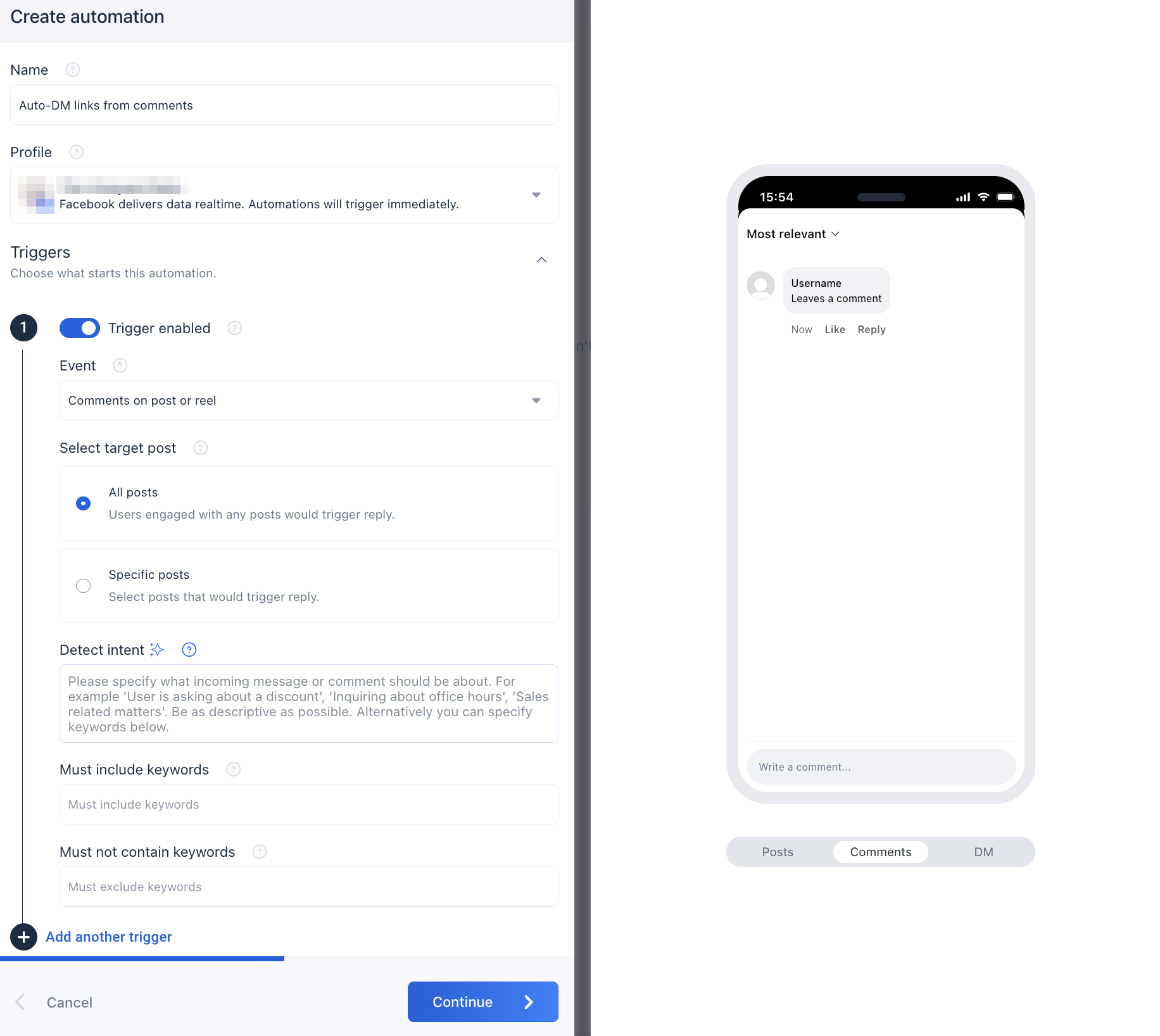
I would still want to run a live automation over time before judging delivery reliability or edge cases, but the builder itself was one of the strongest features I tested. It felt substantial enough to support actual lead-generation or customer-response workflows rather than just canned replies.
The Inbox Made Those Automations More Practical
The Inbox brought direct messages, mentions, and conversations into one workspace. I opened a real Facebook conversation and could see the message list on the left and the selected thread on the right. Vista also offered Summarize, Mark all complete, Reply, and Note controls, plus AI assistance inside the reply area.
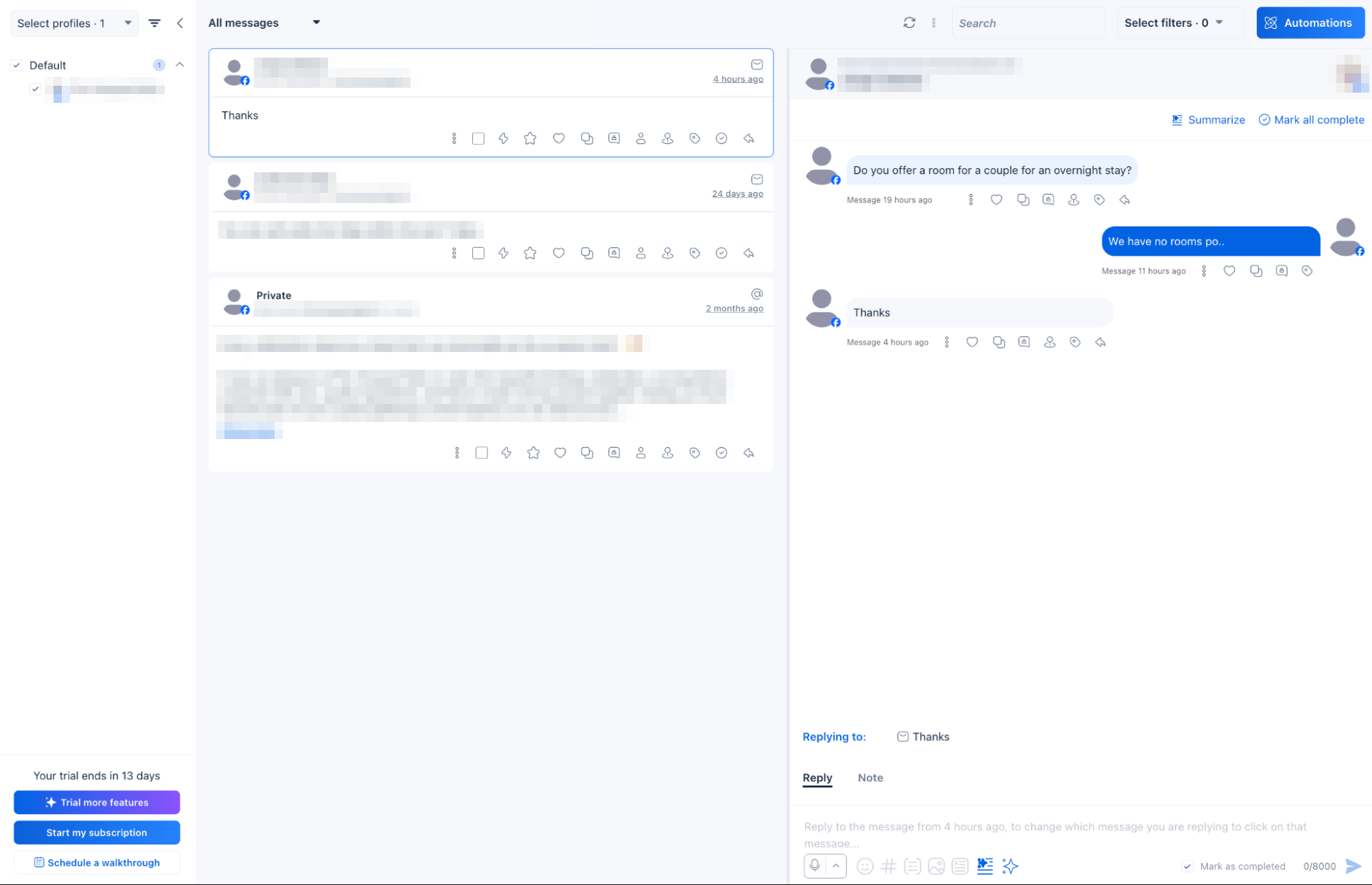
The Reply and Note distinction is useful for teams because customer-facing responses and internal context stay separate. That is especially helpful when several people handle one account, and someone needs to leave context without sending it to the customer.
In Agorapulse, Inbox ownership and community-management workflow were central to the product. Vista Social’s Inbox felt less specialized but more connected to the wider system because it sits beside DM automation, reviews, Work, reporting, and AI. If I wanted the deepest community-management workflow, I would still look closely at Agorapulse. If I wanted to reduce the number of separate tools around engagement, Vista’s approach is compelling.
Internal Listening Is Included, While Broader Listening Is an Add-On
Vista separates listening into Internal and External options. Internal Listening is included and focuses on topics across connected profiles, including mentions, reviews, and comments. External Listening is an add-on that expands monitoring to public web sources, news, social conversations, blogs, and trend signals.
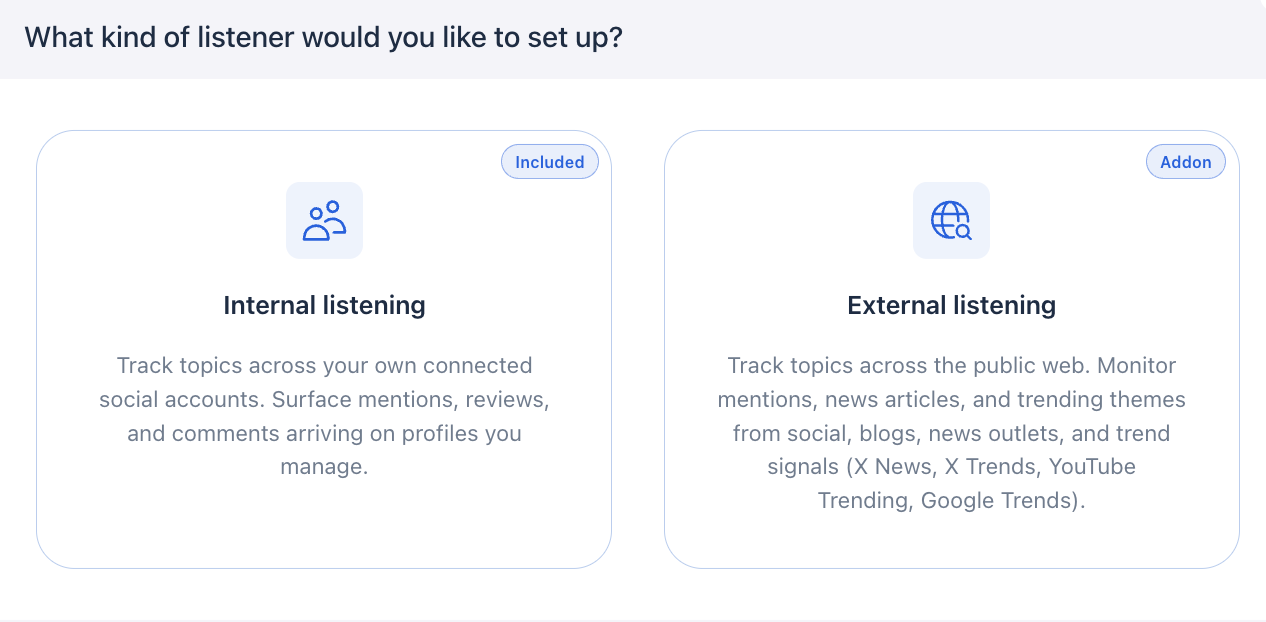
I like that split because basic monitoring stays useful even without buying the larger listening package. The external layer is more appropriate for brands doing reputation monitoring, PR, competitor research, or trend analysis, while smaller teams can still keep an eye on activity around the profiles they already manage.
Vista Work Was the Feature That Changed the Category for Me
Vista Work made the platform feel least like a social scheduler and most like an agency operations tool. The Board view looked familiar if you have used Trello, Asana, or ClickUp, with Not Started, In Progress, and Completed columns. I could create tasks and switch among Board, List, and Calendar views.
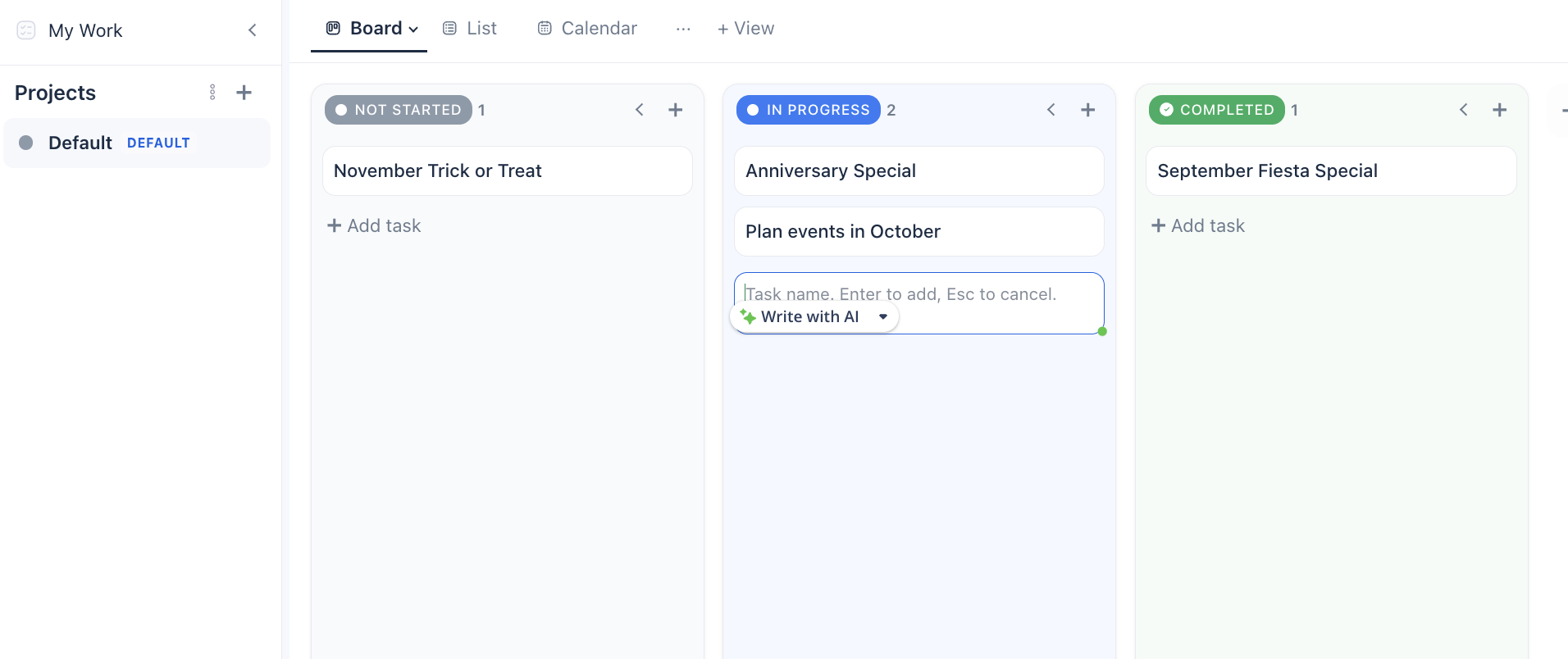
This feature makes practical sense because social work rarely ends when a post is scheduled. Someone has to request the design, confirm event details, review a landing page, follow up with a client, or check whether the content was approved. Those tasks often live in a separate project-management system.
I would not claim Vista Work can replace a complex agency setup after one test. Teams with advanced dependencies, time tracking, resource planning, or deeply customized workflows may still need a dedicated project-management tool. For straightforward social operations, though, having tasks connected to the same environment as publishing and reporting could remove another handoff.
Reports Covered More Than Social Performance
Vista’s reporting section was another strong example of the platform’s breadth. The core reports included Profile performance and Post performance, but the menu also showed Advocacy performance, Competitor analysis, Inbox performance, Industry benchmark, Listener report, Paid performance, Review performance, Sentiment analysis, and Work performance. Industry benchmark and Sentiment analysis were locked in my trial.
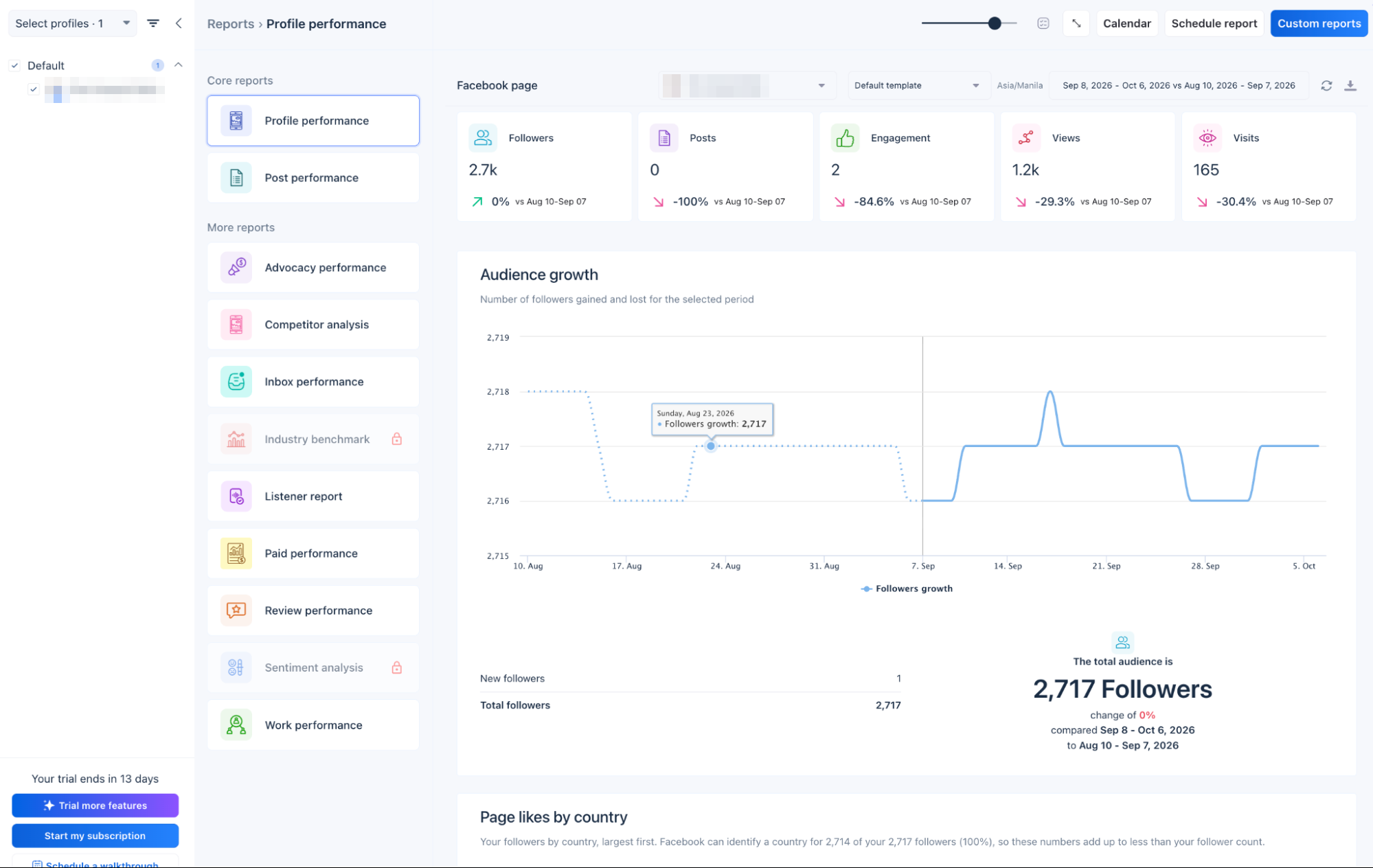
That mix is more interesting than another follower-growth dashboard because it lets Vista report on the operations around social, not just the posts themselves. Inbox performance, review performance, listener performance, and Work performance are evidence that the different modules are intended to function as one system.
In Metricool, analytics and reporting were one of the strongest reasons to use the product. Metricool felt measurement-first. Vista Social felt operations-first, with reporting spread across the different pieces of that operation.
Reviews, Vista Page and Advocacy Widen the Use Case
Vista’s review integrations add another audience beyond agencies that only publish social content. The connection screen included Google Business, Trustpilot, Yelp, TripAdvisor, OpenTable, Apple App Store, and Google Play Store, which means the same account can pull reputation work closer to social engagement.
For a restaurant, hospitality group, local service business, franchise, or app publisher, that can be a useful combination. For teams managing both social media and customer reviews, these integrations could reduce the need to switch between separate platforms for publishing, engagement, and reputation management. I did not have enough review volume in this test account to judge the review workflow under load, so I would treat the feature as promising rather than fully proven in my hands-on test.
Vista Page is another small tool the platform can absorb
Vista Page is the platform’s link-in-bio builder. Users can build a page from a template, generate one with AI, or import an existing link-in-bio page. That may sound minor compared with automation or reporting, but it fits the same replacement strategy: it gives Vista users a way to avoid another subscription for a simple link-in-bio page.
Employee advocacy extends the platform into distribution
Vista also includes employee advocacy, which lets employees share approved brand content with less risk of changing the message. The company prepares the copy and makes it easier for employees to distribute it through their own networks.
That feature will not be relevant to every user, but it makes more sense for larger companies, B2B teams, recruiting organizations, franchises, and brands where employee participation is part of the distribution strategy. It also reinforces the idea that Vista is trying to manage more than the publishing calendar.
What I Liked, and What Frustrated Me
The strongest part of Vista Social was the number of places where I could stay inside the same account instead of opening another tool. Publishing, Inbox, DM automation, project tasks, reporting, review management, brand voice, basic listening, Vista Page, and employee advocacy all sit close enough together that the workflow can feel continuous rather than stitched together.
That does not mean Vista Social is deeper than every specialist platform in every category. A dedicated automation platform may still offer more advanced branching. A full project-management suite may handle more complex dependencies. A specialist listening platform may provide deeper analysis. The value here comes from reducing tool switching and keeping context in one environment.
For agencies, that can be a real advantage because every additional platform introduces another login, another permission layer, another training requirement, another place for data to drift, and another bill to justify.
The same breadth creates friction
Vista Social is big. The first few hours involve learning profile groups, publishing settings, AI tools, automations, queues, approval workflows, reviews, Work, reports, Pages, advocacy, listening, and more. The onboarding tours helped, and I liked that individual areas such as Automations included walkthroughs, but the platform still asks more of the user than a lightweight scheduler.
That trade-off is easier to accept for an agency or social team because those users can actually use the extra layers. A solo creator who only wants to queue three Instagram posts a week may find Vista heavier than necessary.
Pricing gets complicated once add-ons enter the picture
Plans start at $99 a month for Professional, with Advanced at $199 and Scale at $449, and every plan has a 14-day free trial. The add-ons are where the total moves. External listening across social, web, and news is $75 a month, X costs an extra $29 a month on every plan, Employee Advocacy starts at $199 a month for 25 employees, and sentiment analysis is an Enterprise feature. Vista can replace several tools, but the final value depends on which parts of the stack a team actually wants to consolidate.
Who Vista Social Fits Best
After testing it, I would place Vista Social closer to an agency operations platform than a creator scheduler. A solo creator can still use the AI, publishing calendar, Inbox, automations, and Vista Page, but a large part of the product becomes more useful when there are multiple clients, profile groups, team members, approval rules, reporting needs, review channels, and work assignments.
That is also where Vista compares well with some of the other tools I tested. Sendible felt broader around agency delivery, white labeling, media handling, and client operations. Planable felt stronger around collaborative content review. SocialPilot emphasized standardization and multi-account operations. Vista’s advantage is that it tries to connect more of those jobs inside one system.
Vista Social Makes the Strongest Case When You Want Fewer Tools
I would not choose Vista Social because its calendar is dramatically better than every other calendar I tested. It is not. I would choose it because the calendar is only one layer of the product, and the rest of the workflow can stay close to it.
What makes Vista Social different is how these features connect. The publishing tools, Inbox, automations, reporting, and project management features are designed to work within the same environment. For agencies managing multiple accounts, that integration may matter more than having the most advanced individual feature in every category.
Vista Page can remove the need for a separate link-in-bio tool, while Ask Vista adds a conversational layer over an already broad system. That combination is why the all-in-one positioning felt more credible after testing than it did when I first saw the feature list.
Vista Social is not the simplest product in our Hands-On Reviews, and that is both its weakness and its appeal. For agencies and social teams that are tired of moving between a scheduler, Inbox, automation tool, reporting dashboard, task board, review platform, and link-in-bio service, it is one of the more convincing attempts I have seen at putting those jobs under one roof.