I expected tl;dv to be mainly a meeting recorder with transcripts. After putting it through several different recordings, I found that the transcripts were easier to follow than I expected, even with longer and mixed-language conversations.
But there was a catch. Some details that appeared in the transcript didn't always make it into the AI-generated notes, especially when the conversation included specific figures or metrics.
I tested six prerecorded recordings, including a nearly two-hour file, to see how tl;dv handled different recording lengths, transcripts, AI notes, multiple uploads, and its free plan. I also paid attention to the smaller things that affected the experience, like finding recordings and getting back to the meeting list.
So, could tl;dv actually capture everything I needed, or would I still have to dig through the transcript myself?
The Feature That Caught My Attention Wasn't the Transcript. It Was the Meeting Templates
I expected tl;dv to feel like a straightforward meeting recorder: record the conversation, get a transcript, and let the AI summarize it.
Instead, the first thing I noticed was how much was happening around the meeting itself.
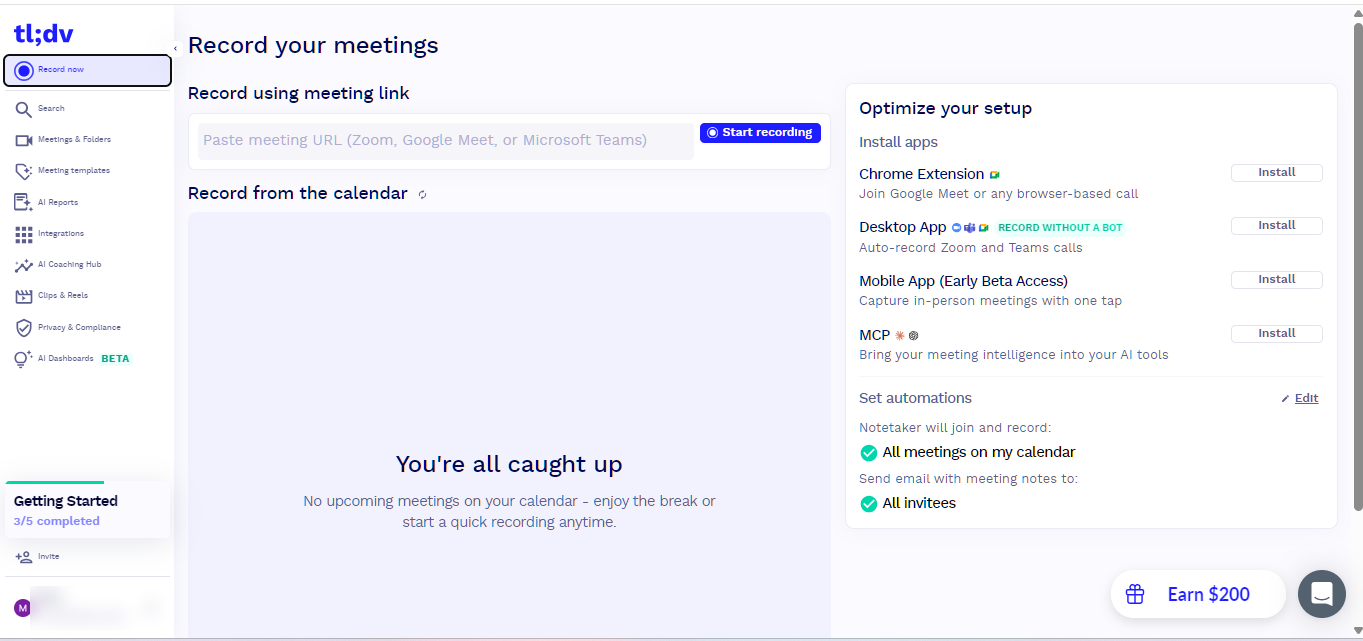
The interface was clean and easy enough to navigate, so I didn't spend much time trying to figure out where things were. The meeting page also has built-in tutorials covering the basics, teams, and AI experts, which gave me a quick idea of what else I could explore.
But the feature that caught my attention was meeting templates.
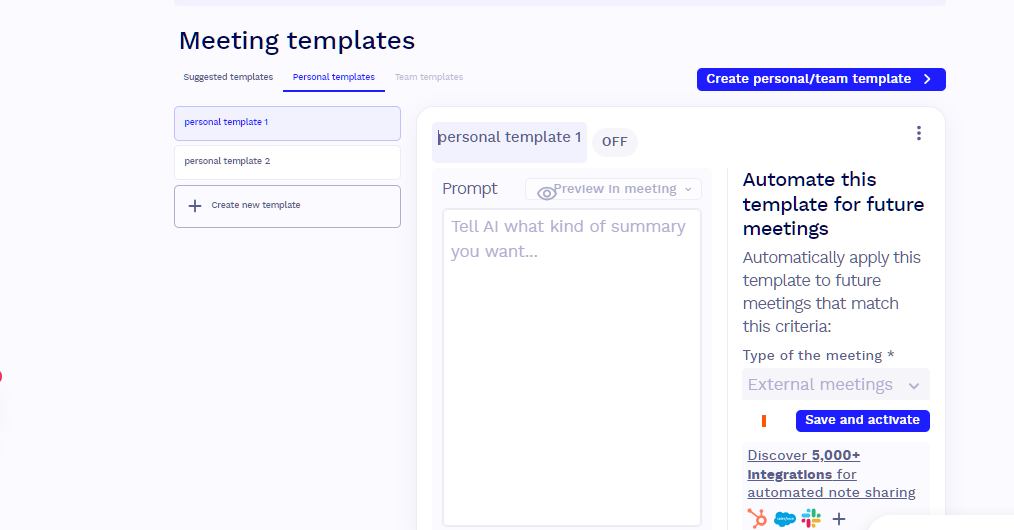
Rather than simply giving me the same type of summary for every recording, tl;dv lets me customize how meeting information and AI-generated outputs are structured. That made me curious because I wasn't just looking at another tool that could summarize a recording. I also wanted to see whether I could actually control what I got back from it.
The Meetings and Folders section also made it easier to keep recordings and meeting information organized. There were quite a few options available, but I didn't feel overwhelmed while going through them.
Then I started looking at the more important question for my test: how much of this could I actually use without paying?
At this point, I hadn't decided whether tl;dv was something I would actually use regularly. I had only seen what the platform said it could do.
I Put Six Different Recordings Through tl;dv
For this test, I prepared six prerecorded files to see how tl;dv would handle different types and lengths of recordings. Five of the six files were successfully uploaded and processed during my testing.
I wasn't only looking at whether tl;dv could produce a transcript. I also wanted to see how the information was turned into AI-generated notes, whether specific details such as numbers and metrics were carried over, and how easy the results were to review afterward.
I used two recordings that I had also tested on other AI note-taking platforms so I could compare the results.
I also included a more detailed conversation with several pieces of information to see how tl;dv handled a busier discussion.
For the longer tests, I used a video that was approximately 25 minutes long, an audio recording of around one hour, and another audio recording that was close to two hours.
I also tested the upload process by uploading multiple recordings at the same time. In one test, I uploaded a video I had previously used on another platform along with another recording.
The Transcripts Were Easier to Follow Than I Expected
Most of the recordings uploaded fairly quickly. Processing took additional time depending on the recording, but I didn't find myself waiting too long before I could start reviewing the results.
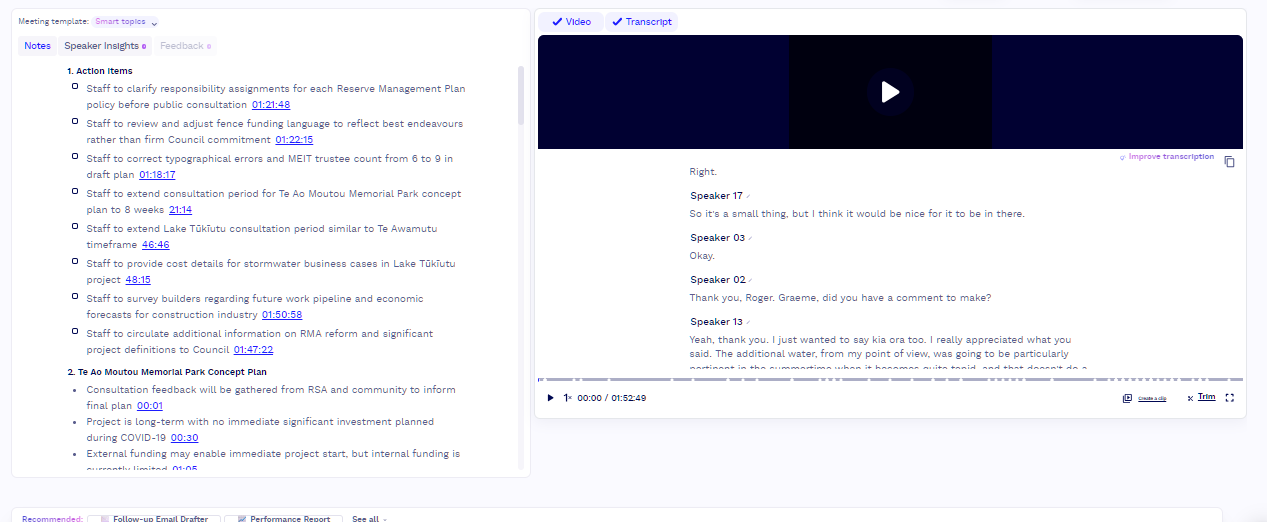
The transcripts were one of the stronger parts of my testing. In several recordings, the transcript was clear enough to follow the conversation without constantly going back to the original recording.
However, the multilingual recording was not perfect. There were a few messy sections, which may have been caused by pronunciation or by switching between languages, but I could still understand the overall conversation from the transcript.
The AI-generated notes were also organized enough to give me a useful summary of what had been discussed.
That is close to the reverse of what I found in our review of Fireflies.ai, the first AI note-taker in our Hands-On Reviews. There, the AI notes were the stronger half and the transcript was the part I had to check. With tl;dv, the transcript was the part I trusted, and the notes were where details went missing.
The Almost Two-Hour Recording Held Up, but Specific Figures Were Easier to Miss
I also tested longer recordings to see whether the transcript quality would change as the recording got longer.
The longest recording I tested was close to two hours, and tl;dv still produced a transcript that I could work with. Based on this test, I didn't run into an obvious problem simply because the recording was long.
I do want to keep that finding within the limits of my test, though. I only tested a small number of recordings, so I wouldn't use this to make a broader claim about how tl;dv handles every long meeting.
The more noticeable limitation appeared when I tested recordings containing numbers, metrics, and specific figures.
The conversation itself could still be understood from the transcript, but some of the exact figures I expected to see in the AI-generated notes were missing or generalized.
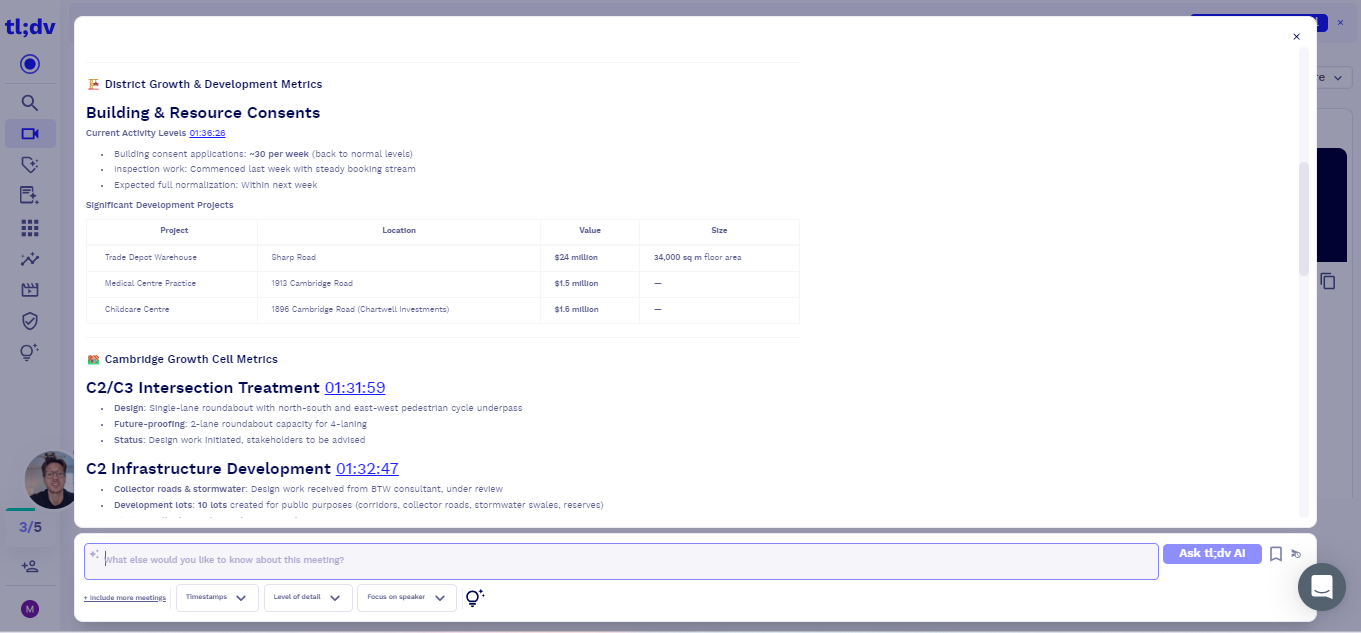
In those situations, I had to use the built-in AI assistant and ask for the specific information I was looking for. It was able to provide the information, but this added another step.
For me, this was one of the more important findings from the test. Having the information somewhere in the transcript is different from having the AI notes surface that information automatically.
I ran into a related problem later in our Grain review, where the figures did appear in the AI’s answers but some of them were wrong.
Uploading Multiple Recordings Was Harder to Keep Track Of
I also ran into some difficulty when I uploaded multiple files at the same time.
It became harder to tell which recording had finished uploading or processing because I didn't see clear loading indicators. One of the recordings was also difficult for me to locate afterward.
I can't say for certain whether this was a platform issue or something related to how I uploaded the files, so I wouldn't call it a bug.
What I can say from my own experience is that uploading one recording at a time was much easier to manage. It made it clearer which file I was waiting for and reduced the uncertainty around whether a recording had already been processed.
Your Uploaded Videos Are Automatically Archived After About Two Days
Another limitation I noticed while using the free plan was what happened to my uploaded videos after a couple of days.
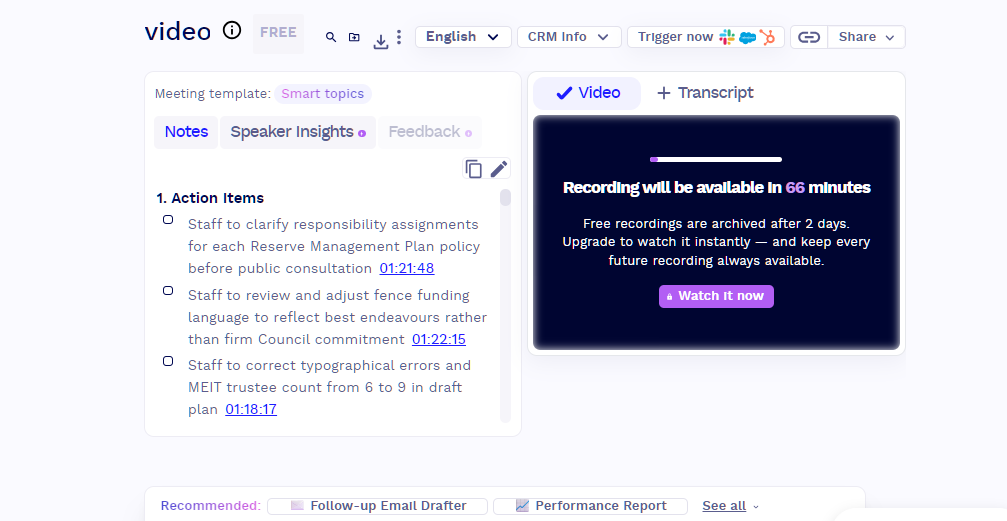
After about two days, the uploaded videos were automatically archived. Once they were archived, you couldn't immediately access them again. To unarchive them, tl;dv gave two options: upgrade to a paid plan or wait about 70 minutes for the videos to become available again.
This was something I only noticed after continuing to use the platform beyond the initial testing period.
If you're only uploading a recording to get its transcript and AI notes once, this may not be a major issue. But if you expect to return to your uploaded videos later, the automatic archiving is an important limitation to keep in mind when using the free plan.
The Free Plan Gave Me Plenty to Test, but It Also Came With Some Limits
The Free Forever plan gave me enough access to test the parts of tl;dv I was most interested in. I was able to upload and transcribe recordings, work with AI-generated notes, test different file lengths, and explore the platform without immediately needing to upgrade.
That was a different experience from our ChatPDF review, where the free version's daily caps shut me out of some tests before I could finish them.
There are still limits to what is available on the free plan. According to tl;dv's pricing page, the Free plan includes AI notes for up to 10 meetings and a capped number of Ask AI queries, and it lists uploads as "up to 5." Its 5,000+ integrations, which cover tools such as Notion and Slack, and its MCP server, which connects meeting data to AI tools like Claude and ChatGPT, are on the paid plans. The paid plans start with Pro at $29 per seat per month, or $18 per seat per month billed annually. The platform also lists features such as API access and the AI Coaching Hub for users who need more advanced workflows.
I didn't personally test those paid features, so I can't say from firsthand experience how useful they are or whether they're worth upgrading for. What I can say is that the free plan gave me enough access to evaluate tl;dv's core recording, transcription, and AI-note workflow.
I Could Easily Find the Privacy and Consent Settings, but I Couldn't Test the Full Workflow
While exploring tl;dv, I noticed that privacy and compliance are clearly visible in the sidebar. There are also consent-related settings that users can access.
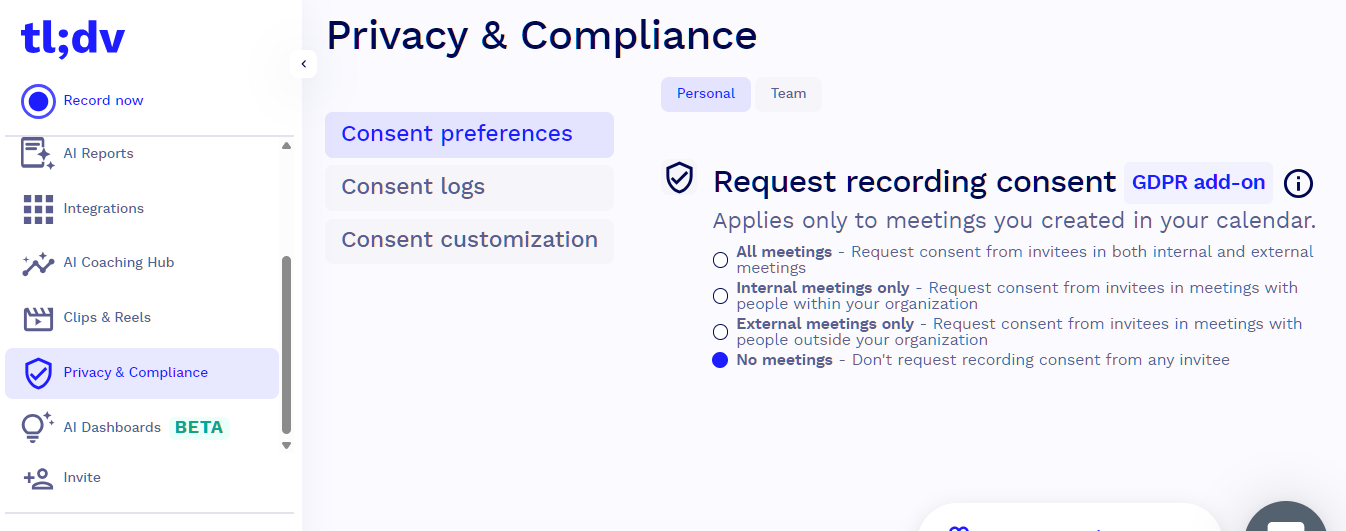
I liked that these options were easy to find. They weren't buried somewhere in the settings, which made it easier for me to understand where the privacy-related controls were.
I wasn't able to fully test the consent features because that would require a live meeting with other participants.
Would I Use tl;dv Regularly?
After testing tl;dv for myself, I can say that I enjoyed the overall experience.
The platform was easy enough to explore, and I was able to get through the core recording, transcription, and AI-note workflow without much difficulty. I did notice a few smaller usability issues along the way, but none of them prevented me from using the platform.
What I liked most was that tl;dv gave me room to explore without immediately making me feel like I needed to upgrade. The free plan gave me enough access to understand how the platform fits into my workflow and which features would actually matter to me.
For now, I'm comfortable staying with the free plan. If I eventually need more from tl;dv, I'll consider upgrading based on what I need at that point.
If the job is analysing many sources together rather than capturing one meeting, our Dovetail review covers a tool built for that.
So, would I consider making tl;dv part of my regular workflow? Yes, if my workflow involved more meetings. For my current needs, the free experience is enough, but I can see myself exploring the paid features if I eventually need more from the platform.