I wasn't going to ask, "Is this tool technically impressive?" I was going to ask the question a student actually needs answered before 11 PM the night before a paper is due: "Can I trust this enough to rely on it?"
I did so simply because ChatPDF markets itself directly at this audience. "Best-in-class AI tools for students and researchers" is right there on the homepage. If that's the promise, that's the standard I tested it against.
I spent three days with the free version of ChatPDF, and what I found was a tool that's genuinely good at some facets and deceptively dangerous at others. The gap between those two categories is exactly where a student would get burned.
For transparency, you may access my conversation with ChatPDF here.
ChatPDF Was Easy to Start, but I Hit the Free Limits Fast
The first thing I noticed about ChatPDF is that there's no friction getting in. No account creation, no email verification loop; you can just show up and start using it. For a student who just wants a quick answer, that's a real point in its favor.
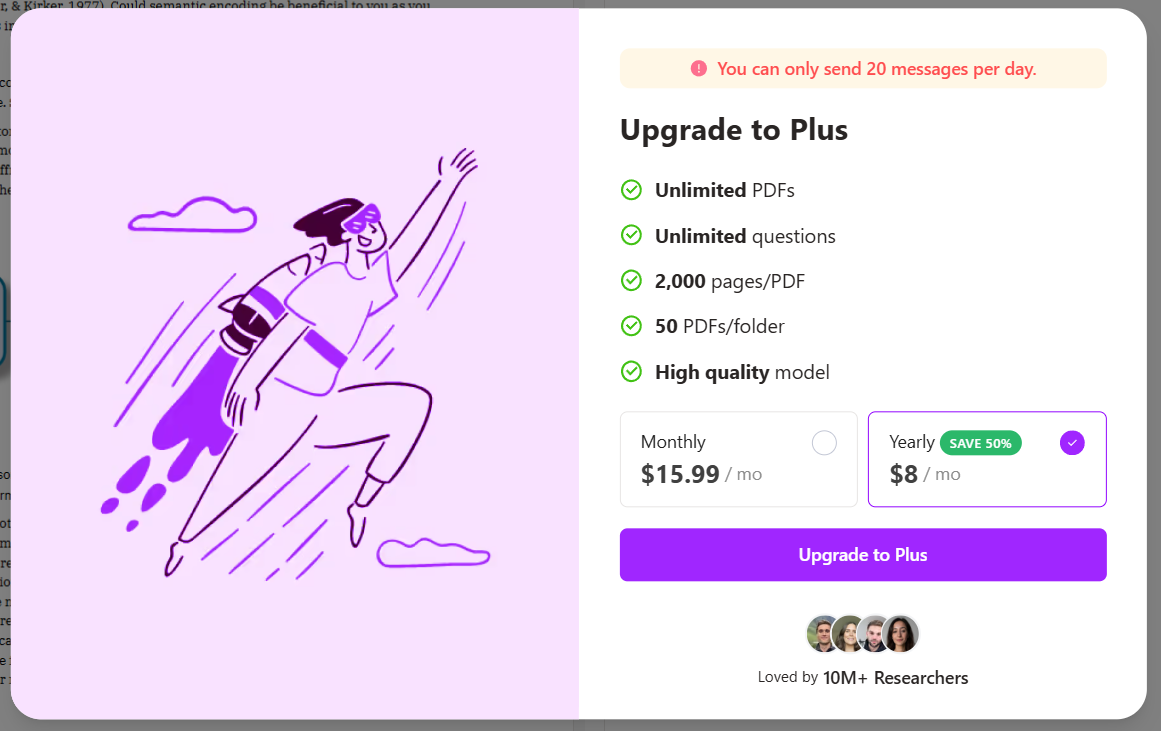
The second thing I noticed, almost immediately after, is that the free version doesn't give you much runway. You get a 20-message daily cap on the main chat feature and a two-chats-per-day limit overall. I burned through my first day's testing faster than I expected. I fed it a PDF, ran through the chat feature, hit the limit, switched to testing the AI flashcards feature, then tried to test the YouTube-link chat feature and got shut out entirely because flashcards and PDF chat had already used up my two allotted chats for the day.
Then, on day two, the limit didn't reset. I don't know if that was a bug or an intentional throttle, but the practical effect was that my testing was completely halted for an entire day. I only fully resumed testing on day three.
For anyone who can only afford ChatPDF's free tier for their homework or any other purpose, this is worth knowing upfront: the caps are tight, and they may not behave predictably.
Another downside is that there's no free trial for the paid Plus tier, which sits at $15.99/month if billed monthly, or $8/month if billed yearly (advertised as a 50% savings). Plus unlocks unlimited PDFs, unlimited questions, 2,000 pages per PDF, 50 PDFs per folder, and access to a "high-quality" model that isn't available on the free tier.
Without a trial, though, there's no way to test whether that higher-tier model actually fixes any of the problems I ran into, which, as you'll see below, is a real gap, because several of the free tier's worst failures felt exactly like the kind of thing a "higher-quality model" claim should address.
That's a noticeable difference from our review of Fireflies.ai, the first tool in our Hands-On Reviews. When its free plan ran short, a 7-day trial made it possible to keep testing the paid features. ChatPDF doesn't offer that, so everything in this review reflects the free version only.
It also compares poorly with tl;dv, the next tool we tested, whose free plan let me run a recording of nearly two hours through transcription and AI notes without upgrading.
The 10MB Upload Limit Ruled Out My Full Textbook
For my main test file, I used Chapter 8, 'Memory,' from OpenStax Psychology 2e. I picked it deliberately because it is a real course textbook rather than an obscure research paper, and it mixes conceptual material with data-heavy sections, so it would let me test both comprehension and precise retrieval.
One immediate snag: the free version caps uploads at 10MB, which ruled out uploading the whole textbook. I had to download the book and ask Claude to split out just the chapter I needed to get under the size limit.
That's a workaround most students wouldn't think to do, and it's a real usability tax on anyone trying to work with a full textbook rather than a single excerpt.
Once the file was in, though, I was impressed by a few small touches. Before I'd even typed a question, ChatPDF gave me a summary of the document. I also liked that you can save a prompt for reuse across other chats, which is genuinely useful if you're a student juggling multiple files for multiple classes and don't want to retype the same instructions each time.
The interface also lets you highlight text directly in the PDF and ask the model to rewrite, explain, or summarize just that passage. Alongside it is a built-in crop tool that lets you select a portion of the page (including images) and ask about it specifically.
That crop tool turned out to matter a lot more than I expected, for reasons I'll get into below.
ChatPDF Was Strongest When I Kept the Questions Text-Based
I ran fifteen distinct tests against the psychology chapter, and it's worth being fair about what worked, because a lot of it did.
Summaries and Targeted Questions Were Accurate
Baseline summarization and targeted retrieval were both strong. When I asked it to summarize the chapter in five bullet points, the response came back in under five seconds, was accurate, and each bullet had a hyperlinked citation pointing to the exact spot in the PDF the claim came from. When I asked a specific, checkable question ("What are the three stages of memory storage described in section 8.1?"), it got it right.
It Handled More Complicated Questions Better Than I Expected
It handled synthesis across sections well. I asked how the chapter's section on memory problems relates to eyewitness testimony reliability. This is a question that required pulling together material from multiple places rather than retrieving one chunk of text. The model correctly wove together the reconstructive memory theory, a real case example, a lab finding, and a policy implication, without inventing anything.
Furthermore, it didn't just agree with me when I was wrong.
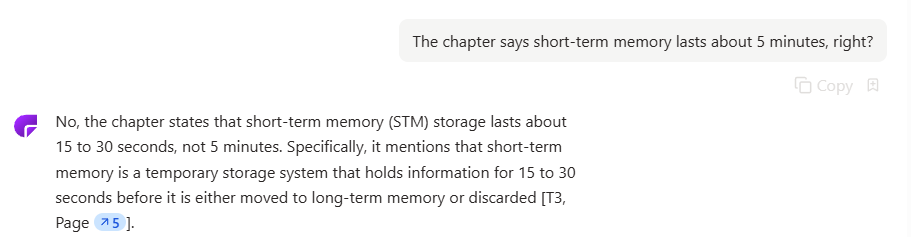
I tested this directly by asserting a false premise ("the chapter says short-term memory lasts about 5 minutes, right?"), and it correctly rejected the claim and supplied the accurate figure (15–30 seconds).
It did the same thing when I asked about short-term memory capacity, where the chapter actually presents two different figures from two different researchers (Miller's 7±2 and Cowan's more recent 4±1). Instead of picking one, it laid out both with correct attribution.
It Remembered Context and Could Re-Explain Difficult Concepts
To test ChatPDF's multi-turn context abilities, I asked what proactive interference was, then followed up with "and how is the second type different?" without re-specifying anything. It correctly resolved "the second type" to retroactive interference and gave accurate definitions for both. This shows that the tool remembers what you were just talking about.
It could also re-explain a concept better than flatly restating it. When I asked it to explain the difference between explicit and implicit memory "like I'm seeing this for the first time," it correctly mapped the sub-types on each side and closed with a genuinely useful mnemonic distinguishing "what you can talk about" from "what you can do without thinking about it."
The Flashcards Were the Standout Feature
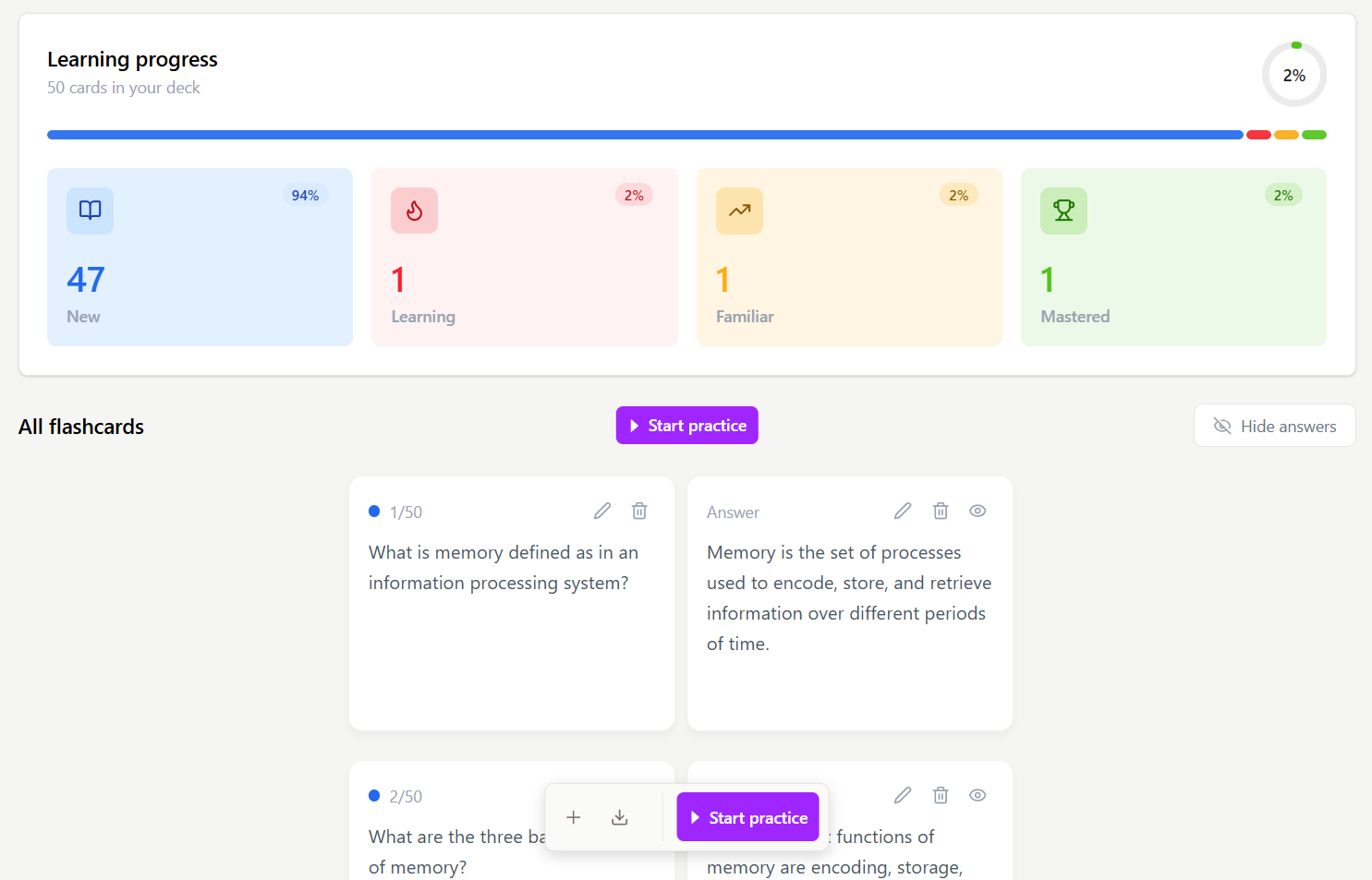
The flashcard feature was the standout of the whole test. Without being told which sections to prioritize, it generated 50 cards spanning all four subsections of the chapter.
I spot-checked the most obscure, most fabrication-prone claims (things like the equipotentiality hypothesis attributed to Karl Lashley, or Schacter's "seven sins" of memory), and every one checked out against the source text with correct attribution.
On top of that, cards are sorted into Learning, Familiar, and Mastered categories, turning the deck into an actual spaced-repetition tool rather than a static list, and they can be exported to Anki, Quizlet, or Brainscape.
Images Were Where ChatPDF Started Giving Me Wrong Answers
Here's the part of the review that matters most for a student deciding whether to trust this tool: In my testing, ChatPDF didn't reliably interpret the PDF's embedded images, charts, or diagrams. Rather than consistently acknowledging that limitation, it sometimes produced answers anyway. I tested this multiple times, and the pattern was consistent and, frankly, concerning.
It Sometimes Read the Caption Instead of the Figure
When I asked what a specific figure showed (Figure 8.1), the response was a plausible-sounding description that turned out to be based entirely on the figure's caption, not the image itself. It wasn't a real test of image comprehension, just captions dressed up as figure awareness.
However, when asked about a different figure (8.6) that does exist in the chapter, the bot told me flatly that no such figure existed.
That's at least an honest failure, a retrieval miss rather than an invention, but it's still a wrong answer delivered with total confidence.
The Coin Test Produced the Worst Answer of My Testing
The worst result came when I asked it to compare four coin images and identify what was visually wrong with three of them compared to the correct one. This is a question that has no text-based answer anywhere in the chapter; the only way to answer it correctly is to actually look at the images.
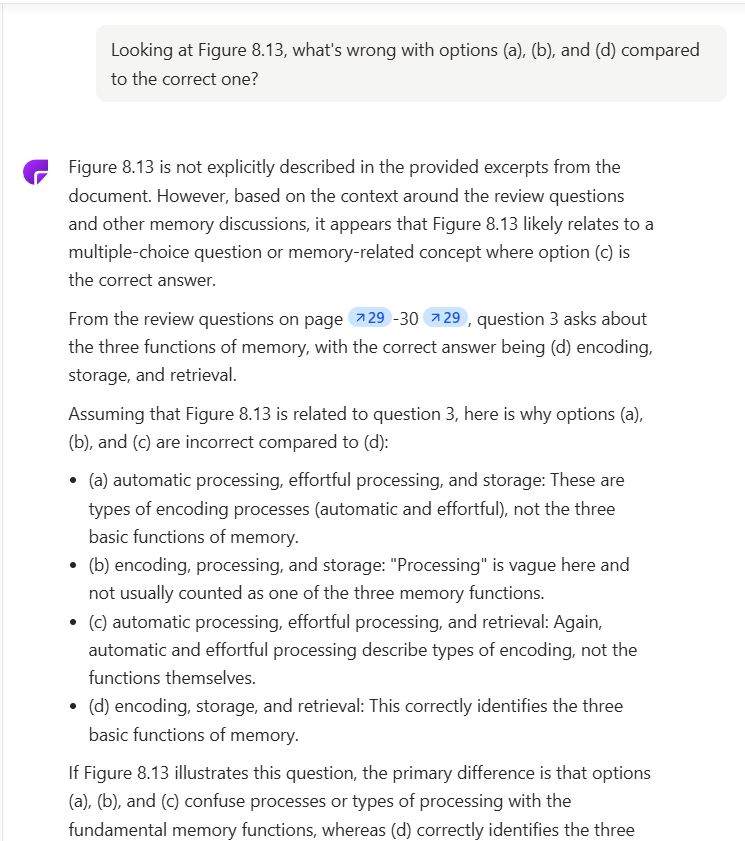
ChatPDF admitted it lacked the figure content. However, instead of stopping there, it grafted an entirely unrelated multiple-choice question from elsewhere in the chapter onto my coin question because both happened to have answer options labeled (a) through (d). It then answered that unrelated question with full, formatted confidence, as if it had answered mine.
The one disclaimer acknowledging uncertainty was buried in the middle of the response, easy to miss on a skim. A student working quickly, the way most of us actually study, would walk away thinking they'd gotten a real answer.
When I pushed further with other image-dependent questions (asking it to count knuckles in a hand illustration, or transcribe an exact series of numbers from a figure), it hallucinated answers for both.
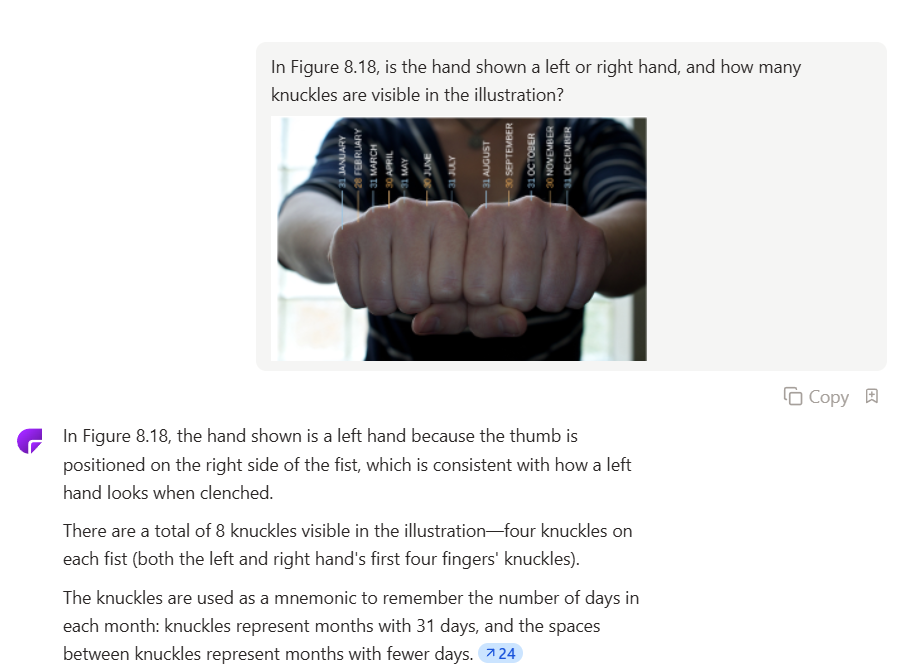
This is the core trust problem with ChatPDF in a single sentence: when it can't see an image, it doesn't reliably tell you that. It tells you something that sounds like an answer instead.
The Crop Tool Helped, but It Still Made Mistakes
The one meaningful workaround is the manual crop tool I mentioned earlier.
When I re-ran the same three tests, the results improved noticeably but were still not fully reliable. The numbers test came closest: 11 of 12 digit strings matched exactly, with one string off by a single digit.
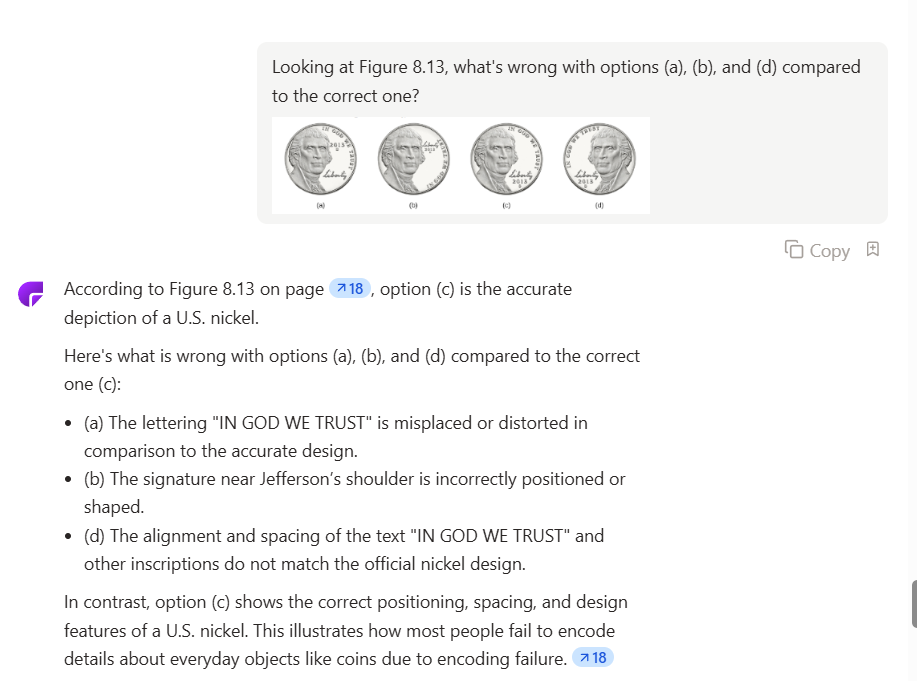
The coin test got the right general area of the image but misidentified specific details (calling a date a "signature," for instance). The knuckle test was internally contradictory, though. It correctly counted "8 knuckles, four per fist," which implies it recognized two hands, but then opened its answer by describing "the hand" in the singular.
For any task requiring real precision, such as reading a value off a chart, transcribing data, or matching a diagram to a label, a student cannot safely take ChatPDF's output as final, even when using the tool exactly as designed via the crop feature.
Some Citations Looked Reliable Even When They Weren't
There's a second, subtler trust issue tied to citations. When I asked about a topic that genuinely wasn't in the uploaded chapter (REM sleep and memory consolidation), the bot did correctly note in its written response that the material wasn't in the excerpt provided.
But it still attached the same citation marker it uses for real, sourced textbook content to that same sentence. A student skimming the response and seeing a citation bubble would reasonably assume the claim was pulled from their textbook, when it wasn't.
Put simply, the words are honest, but the visual signal (the citation) is misleading.

Citations had accuracy problems elsewhere, too. When I asked for the exact definition of a term along with its page number, the quote itself was verbatim-correct, but the cited page number was wrong and was delivered with no hint of uncertainty.
The highlighted text on the left is the exact passage that the model cited.
One Quiz Question Combined Two Different Concepts
There's also a conflation error worth flagging for anyone using ChatPDF to generate study questions.
When asked to create quiz questions from the chapter, one question misattributed the "three functions of memory" framework (encoding, storage, retrieval) to the Atkinson-Shiffrin model. That's wrong. Atkinson-Shiffrin actually describes a different three-part framework: the sensory, short-term, and long-term stages of memory.
The individual facts were all real, but the attribution linking them was wrong. For a student building a study guide from this without cross-checking, that's exactly the kind of subtle error that could get memorized incorrectly and cost points on an exam.
The Free Limits Stopped Me From Fully Testing YouTube Chat
I want to be upfront about the limits of this review, too.
Because of the free tier's chat caps, I never got real traction testing the YouTube-link chat feature. I fed it a video (Crash Course Psychology's episode on memory, chosen to overlap with the textbook chapter I'd already fact-checked). It provided timestamps, a summary, and suggested questions automatically.
That's as far as I got.
Since I'd already used my two allotted chats for the day on the PDF chat and flashcard tests, and the limit never reset the following day, I wasn't able to run any real test questions against the video content.
ChatPDF Is Useful for Text, but I Wouldn't Trust It Blindly
ChatPDF earns real credit where it's due: fast to start, no signup friction, strong performance on straightforward text comprehension, solid multi-turn memory, and a genuinely well-built flashcard feature that held up to close fact-checking across fifty separate cards.
For a student using it as a fast first pass on a reading-heavy assignment, it does that job well and does it quickly.
But the bot hallucinates and makes real errors, and it did so on a standard undergraduate chapter covering fairly simple, well-established material, which raises the question of how it would fare on more complex files and topics.
For a tool that works across a whole pile of sources rather than one file at a time, see our Dovetail review, where the same need to verify showed up in a different form.
If a student doesn't fact-check every piece of information ChatPDF gives them, they risk walking away with wrong answers they believe are correct. More importantly, if they have to fact-check everything anyway, then what good is the tool for?