Fireflies.ai surprised me in one way during my testing. Its AI-generated meeting notes were more organized and useful than I expected, even though the transcripts still had some mistakes.
I wanted to see what actually happens when you use it as a user. Are there differences between the company's description and the actual experience? What is the difference? From what I saw, Fireflies has high ratings across different review platforms, so I wanted to find out if the actual experience matched those ratings.
I also subscribed to the 7-day free trial to unlock more features and continue my testing. But do you know what I discovered?
Fireflies' AI note-taking features were organized and useful, and the platform offers several other features as well. But after testing it with different types of conversations, recordings, and a live meeting, I found some things that worked well and some things I still had to check myself.
So, what actually happened during my testing? How accurate were the transcripts? How useful were the AI notes? And would I actually recommend Fireflies after using it myself?
The Mobile App Was Easier to Navigate Than the Web Version
I started testing Fireflies.ai through the web version. The sign-up process was quick, but the free-trial promotion appeared before I reached the dashboard. I expected to explore the platform first, so I found the timing a little strange.
Once I reached the dashboard, it was easy to explore. The UI is simple, but it can look a little busy because there are many sections and features. I spent some time getting familiar with the main tools before starting my actual tests.
I then used the web version for my main testing, including recordings, uploads, and a live Zoom meeting.
I also briefly checked the mobile app. The web version gave me 3 free transcription credits, while the mobile app gave me 10 as a new user. Fireflies says the number of credits depends on the platform used to sign up, although it does not explain why they are different. The mobile app also felt a little easier to navigate.
Since my actual testing was mainly done on the web, I used the web version as the basis for the rest of this review.
I Put Fireflies Through Five Different Meeting Scenarios
I prepared several scenarios to see how Fireflies handled different types of conversations, from simple discussions to longer and more complex meetings.
I started with a simple English conversation that included numbers, deadlines, and a follow-up meeting. I wanted to see how well Fireflies could capture basic details and action items.
Next, I tested a workplace conversation involving a website project, technical issues, deadlines, and a specific budget. I also included multiple languages to see how it handled mixed-language conversations.
For the complex business meeting, I created a three-person discussion about conflicting sales figures, possible causes, investigation tasks, and deadlines. This was to see how well Fireflies could organize a more detailed discussion.
I also tested longer recordings to see how Fireflies handled content that would take more time to process. I uploaded a video that was more than 40 minutes long and an audio recording that was more than 30 minutes long. I wanted to see how the platform handled longer recordings compared with the shorter ones, particularly in terms of processing time, transcription, and the AI-generated notes.
For the live Zoom meeting, I set up a conversation between a client and a freelance UX designer about an e-commerce checkout redesign. This gave me a chance to see how Fireflies performed with technical terms, numbers, and deadlines.
The AI Notes Got Details Right That the Transcript Got Wrong
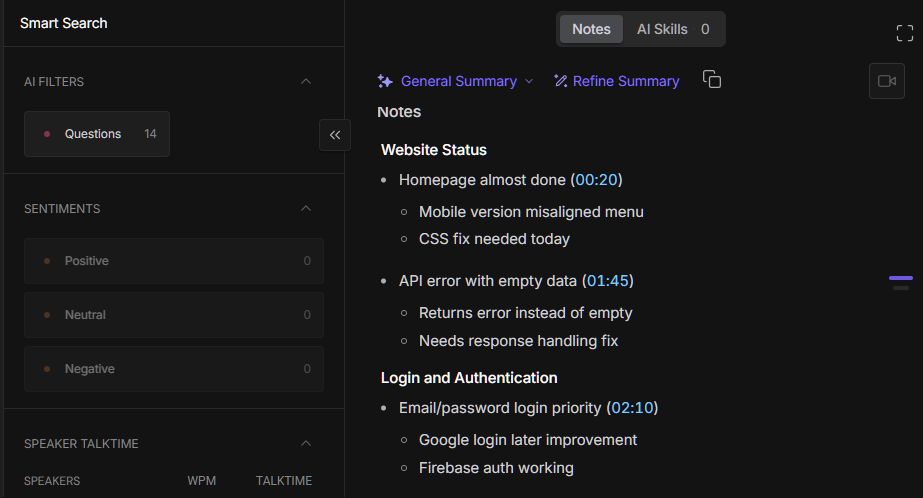
One thing that stood out during my testing was the difference between the transcript and the AI-generated notes. The notes were much cleaner and easier to understand.
The AI notes were surprisingly accurate. They picked up the important details from my conversations, including numbers, deadlines, decisions, problems, and action items. I didn't notice important information missing from the notes in the tests I did.
This was also helpful with the more complicated meeting. There were several numbers, possible causes, tasks, and deadlines being discussed. Fireflies turned all of that into organized sections, so I could understand the meeting without going through the whole conversation again.
The transcript was where I noticed most of the problems. The mixed-language parts were not always accurate, and some technical terms were misheard.
For example, in my live Zoom test, "UX changes" was transcribed as "U Exchanges." "UX budget" became "UX badge." There was also one case where a statement about the guest checkout being visible was transcribed as "disabled." That changed the meaning of what was actually said.
Another thing I liked was the meeting search and filtering. I could search through meetings and narrow them down by category. With several meetings in the account, this makes it easier to find a specific one instead of going through them one by one.
So for me, the transcript is the main thing that needs checking. The AI notes were much more reliable for getting the overall information from the meeting. If I needed the exact wording, though, I would still check the transcript before using it.
Fireflies Found the Action Items but Didn't Always Assign Them
Fireflies was generally good at picking out action items from the meetings I tested. The problem was that the assignments were not always consistent.
In the simple and standard conversations, the action items were extracted but left unassigned. In the complex meeting, some were assigned while others were not. In the live Zoom meeting, the assignments were more consistent.
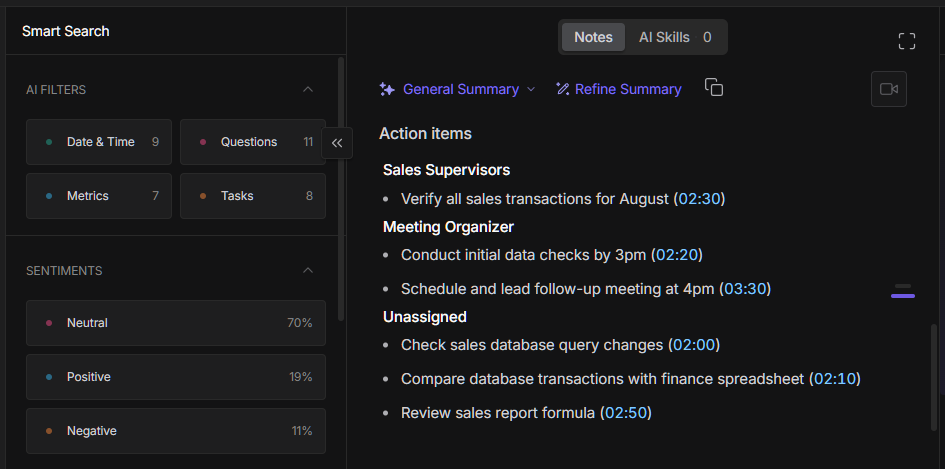
So, Fireflies can identify action items well, but I would still check who each task is assigned to after the meeting.
My 40-Minute Video Failed Twice, but the Audio Didn't
For the shorter recordings I tested, Fireflies was quick to upload and process the files. I was able to move from one test to another without much waiting.
The live Zoom meeting also worked well in terms of processing. After the meeting, Fireflies was able to process the recording and generate the meeting notes without any major delay in my experience.
I also wanted to see how Fireflies handled longer recordings. I first uploaded an original video that was more than 40 minutes long. The upload itself was quick, but it stayed in processing for more than an hour. I tried uploading the same video a second time, but it still showed "Video couldn't be processed." So, the same video failed on both attempts.
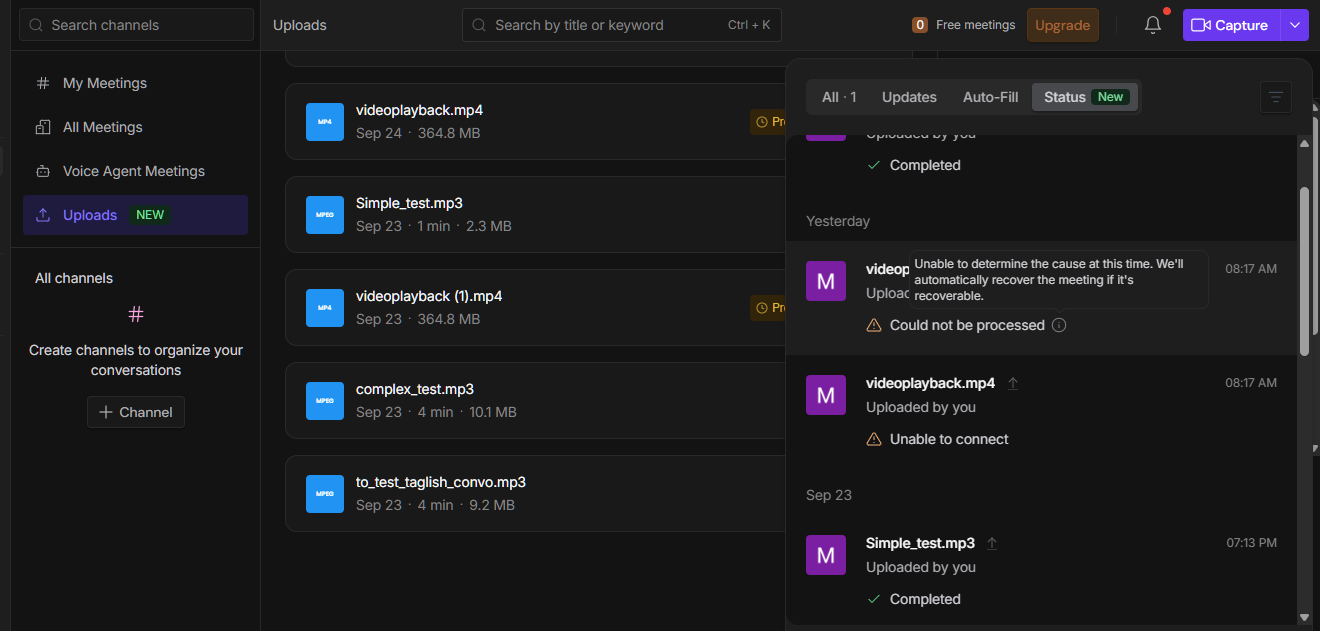
I'm not sure whether the problem was with the video file itself or if it was just a processing issue. Instead of treating that one experience as a general problem, I decided to test another long recording. I uploaded an audio recording that was more than 30 minutes long, and that worked normally.
For my testing, shorter recordings and the live meeting processed smoothly. The longer audio recording also worked well, while the longer video is something I would test again in the future to see if the same issue happens with other files.
The Free Plan Was Enough to Start, but Not Enough to Test Properly
Fireflies has four plans: Free, Pro, Business, and Enterprise. The Free plan is $0, while Pro starts at $10 per seat per month when billed annually. Business is $19, and Enterprise is $39 per seat per month when billed annually.
From my experience, the Free plan was enough for me to see how Fireflies works, but the credits were too limited for the amount of testing I wanted to do. I could use the basic features, but I couldn't really enjoy or test the platform fully without subscribing.
The website says the Free plan is free forever, but after using it myself, it felt more like a limited trial. Some features were locked behind the paid plans, and the meeting and upload credits also limited how much I could use the platform.
It didn't feel like Fireflies was aggressively pushing me to subscribe. The upgrade options were there, but I mostly noticed them because I wanted to use features that were not available on the Free plan.
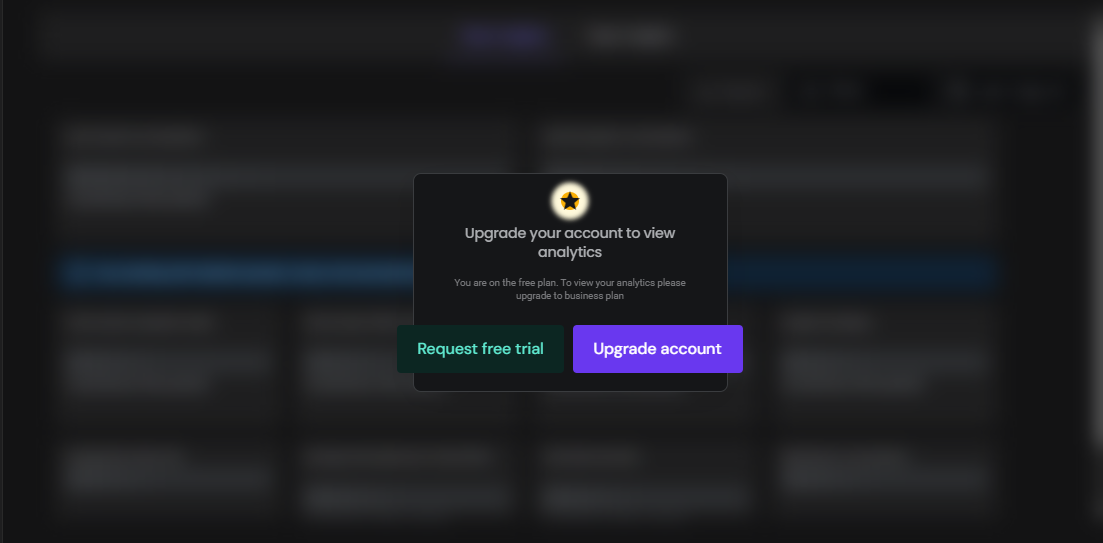
I then used the 7-day trial so I could continue testing the platform. With the paid features available, I was able to test more of the AI tools and use Fireflies for longer meetings.
I haven't tested all of the integrations yet, especially CRM integrations, so I can't say much about those. But based on the features I actually tested, I didn't regret using the paid trial. The AI notes and AI Skills were useful, especially for marketing-related meetings where there are a lot of things to remember.
The pricing can feel a little high, especially if you only need Fireflies for occasional meetings. For someone who regularly attends meetings and wants help with notes and follow-ups, I can see why paying for it could make sense.
Fireflies' Privacy Was Reassuring, but I'd Still Be Careful
Since Fireflies handles a lot of data, I also checked what happens to that data. According to Fireflies, meeting data can include the recording, transcript, AI notes, participant information, calendar details, and other account information. It says the data is encrypted and that meeting content is not used to train its AI models. It also says its third-party vendors do not keep meeting audio, video, transcripts, or summaries after processing.
Based on what I found, I didn't see anything that would make me uncomfortable using Fireflies for regular meetings. The security and privacy information they provide was reassuring, especially the statement that meeting content is not used to train AI models.
For me, though, it still depends on the type of meeting. If it's a normal work meeting, planning session, or something that doesn't contain highly private information, I would be comfortable using it. For a confidential meeting or a discussion involving sensitive information, I would be more careful before recording it and would check the company's rules and Fireflies' privacy settings first.
Based on my testing so far, I'm comfortable using Fireflies. I would just be more cautious if the meeting was private or confidential, depending on the type of information being discussed.
The AI Notes Are Why I'd Keep Using Fireflies
For me, Fireflies was worth the money. The AI-generated notes were the part I liked the most because they were organized and did a good job keeping important details, especially numbers, deadlines, and action items.
I also found AskFred, the meeting search and filters, and AI Skills useful. They made the meeting information easier to work with instead of leaving me with just a transcript.
I also liked having the option to manually capture information during a meeting. This can be useful when I want to focus on something specific instead of relying completely on the AI.
The transcript still needs checking when the exact wording matters, especially when there are technical terms or mixed-language conversations. But overall, I had a good experience using Fireflies.
The notes were the biggest reason I found it worth paying for, while the other AI tools made the platform even more useful.
I also feel like Fireflies is something worth keeping around, especially for work-related stuff. That's why I'm installing the mobile app so I can use it for future meetings when I need it. I haven't tested the mobile experience enough yet, so I won't go into that part in this review.