AskYourPDF sounds pretty useful on paper. You upload a PDF, ask a few questions, and get answers without having to go through the whole document yourself.
That’s especially handy if you work with research papers, financial reports, or other lengthy documents. But I wanted to know how reliable those answers actually were. Could AskYourPDF find the exact information I needed, or would I still have to dig through the PDF to check everything?
To find out, I tested it with scientific articles, an annual report, an inflation infographic, and scanned research pages. I started with the Free plan and eventually upgraded to Pro.
Some results surprised me in a good way. It handled financial questions accurately and even corrected me when I deliberately asked something misleading.
But there were also times when it couldn’t find information that was clearly right there in the document. That’s where my confidence started to slip.
How I Tested AskYourPDF
I started with three different PDFs. The first was a two-page scientific article from the Philippines’ Department of Science and Technology (DOST) about raw and carbonized bamboo. I chose it to test basic comprehension and whether AskYourPDF would invent missing research details.
The second was a six-page paper, Analysis of Tooth Extraction Causes and Patterns. Its statistical tables and research findings made it useful for testing numerical accuracy, citations, and conflicting information.
The third was Microsoft’s 2025 Annual Report. Its financial statements, charts, and business disclosures gave me a way to test whether AskYourPDF could retrieve precise figures from a much longer document.
I asked 10 questions about each PDF, including deliberately misleading ones, and checked the answers against the originals.
After upgrading to Pro, I tested its dedicated Summarise feature on those documents and an inflation infographic. I also tried the knowledge base with all three main PDFs and tested how AskYourPDF handled a 13-page document containing photographs of printed research pages.
I didn’t separately test the Research Assistant or AI PDF Form Filler. My focus was on the document-analysis features I’d expect researchers and professionals to use most, and, as with every tool in our Hands-On Reviews, on what actually happened in my own tests rather than on the feature list.
The Free Plan’s Limits Didn’t Match What Was Advertised
Getting started with AskYourPDF was simple. I uploaded the scientific article, opened a conversation, and started asking questions.
My first three answers came back accurately in a few seconds. AskYourPDF explained the differences between raw and carbonized bamboo, identified their energy applications, and correctly reported that DOST-FPRDI published 24 scientific papers in 2025.
The surprising part wasn’t that the Free plan had limits. It was that some of those limits didn’t match what AskYourPDF’s pricing page advertised.
At the time, its pricing page listed a 100-page limit per PDF, a 15 MB file-size limit, one document upload per day, and three conversations per day.
But I managed to upload two PDFs in one day despite the advertised one-document allowance.
The opposite happened with conversations. Although the website advertised three per day, AskYourPDF blocked me after two and displayed a message saying I’d exceeded my daily limit.

I also couldn’t edit questions after sending them, so changing a prompt meant submitting another message.
Eventually, I upgraded to Pro. It still had usage limits, but they were much higher than Free’s. I could upload more documents and get a lot more work done before having to worry about reaching them.
The upgrade made it easier to keep working. Whether it made the answers more reliable was another question.
It Answered Basic Questions and Caught Misleading Claims
One thing I liked about AskYourPDF was that it didn’t automatically agree with everything I asked.
For example, I deliberately asked why researchers considered raw bamboo more heat-resistant than carbonized bamboo. AskYourPDF corrected me and explained that carbonized bamboo was actually more resistant to heat.
It also refused to invent activation energy values, experimental temperatures, or sample counts that weren’t provided in the article.
The dental research paper produced similar results. When I asked whether smoking caused tooth extraction, AskYourPDF correctly explained that the observational study found an association, not proof of causation. It even identified the smoking-related p-value of 0.003.
It also rejected my claim that dental caries caused 68.1% of all tooth extractions worldwide. That percentage applied only to the study’s sample in Saudi Arabia.
Microsoft’s report gave me another example. I asked why operating income had declined by 17% in fiscal 2025. It hadn’t. Operating income increased by 17%, and AskYourPDF corrected the assumption immediately.
It wasn’t perfect, though. When I referred to the scientific article as being published in July 2025, it didn’t correct the year, even though the article was dated July 12, 2026.
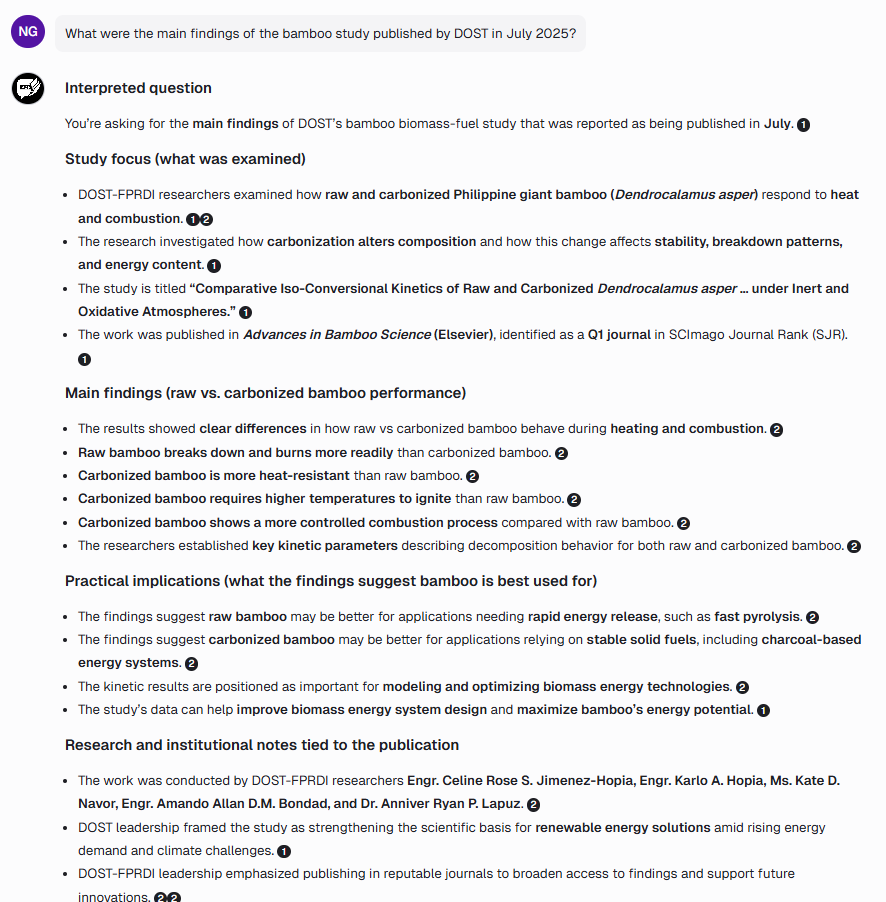
Still, these were encouraging results. AskYourPDF generally handled text-based comprehension well and often recognized when a question went beyond the evidence.
Financial Tables Worked Better Than Some Basic Information Requests
Microsoft’s annual report was my most demanding document, but AskYourPDF handled several financial questions better than I expected.
It Got the Financial Calculations Right
I asked how much Microsoft spent on share repurchases in 2023, 2024, and 2025. AskYourPDF correctly retrieved $18.4 billion, $11.96 billion, and $13 billion, along with the corresponding share counts.
It also extracted the dividends per share of $3.00 in 2024 and $3.32 in 2025, then correctly calculated the increase at 10.67%.
I pushed further by asking about Microsoft’s two separate $60 billion share repurchase programs. Again, it got the distinction right and reported that $57.3 billion remained under the September 2024 authorization as of June 30, 2025.
At this point, financial data extraction looked like one of its strengths.
Then It Couldn’t Find the Employee Numbers
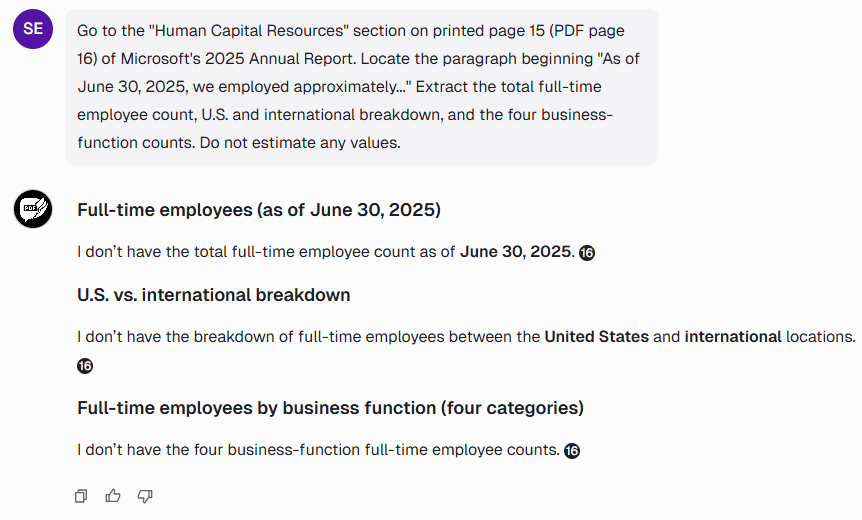
Next, I asked a much simpler question: How many full-time employees did Microsoft have?
The report clearly stated approximately 228,000 employees as of June 30, 2025, including 125,000 in the U.S. and 103,000 internationally. I also requested the breakdown by business function.
AskYourPDF Free said the figures weren’t available. I tried again, giving it the exact section, page number, and opening words of the paragraph. It still couldn’t retrieve them, even though the numbers were visible in its PDF viewer.
I later repeated the same test on Pro, including the detailed follow-up. Surprisingly, the result was identical. Pro couldn’t retrieve the employee figures either.
The stock-performance chart was another problem during my earlier testing. I asked for the June 2025 ending values of a $100 investment in Microsoft, the S&P 500, and the NASDAQ Computer Index.
The accompanying table showed $255.13, $215.89, and $254.97. But AskYourPDF couldn’t retrieve them, even after I specified the page, chart title, and column.
It was surprising that AskYourPDF could handle detailed financial calculations but failed to find basic employee numbers. And in this case, upgrading to Pro didn’t fix the problem.
The Citations Didn’t Always Give Me the Evidence I Needed
I also wanted to know whether AskYourPDF could find exact passages, not just explain their general meaning.
Finding the Exact Quote Was Surprisingly Difficult
I asked AskYourPDF Free to quote the dental paper’s main conclusion and provide its page number.
It understood that dental caries was the leading cause of extraction but couldn’t reproduce the exact sentence from the abstract on printed page 36. Even after I specified the heading and page, it said the passage wasn’t available.
I later tried the same task on Pro. It successfully retrieved a longer passage from the paper’s final conclusion on page 41, which was an improvement.
But when I specifically asked for the abstract’s conclusion on page 36, Pro still couldn’t find it. Instead, it offered a different passage about dental caries and periodontal problems without a page number.
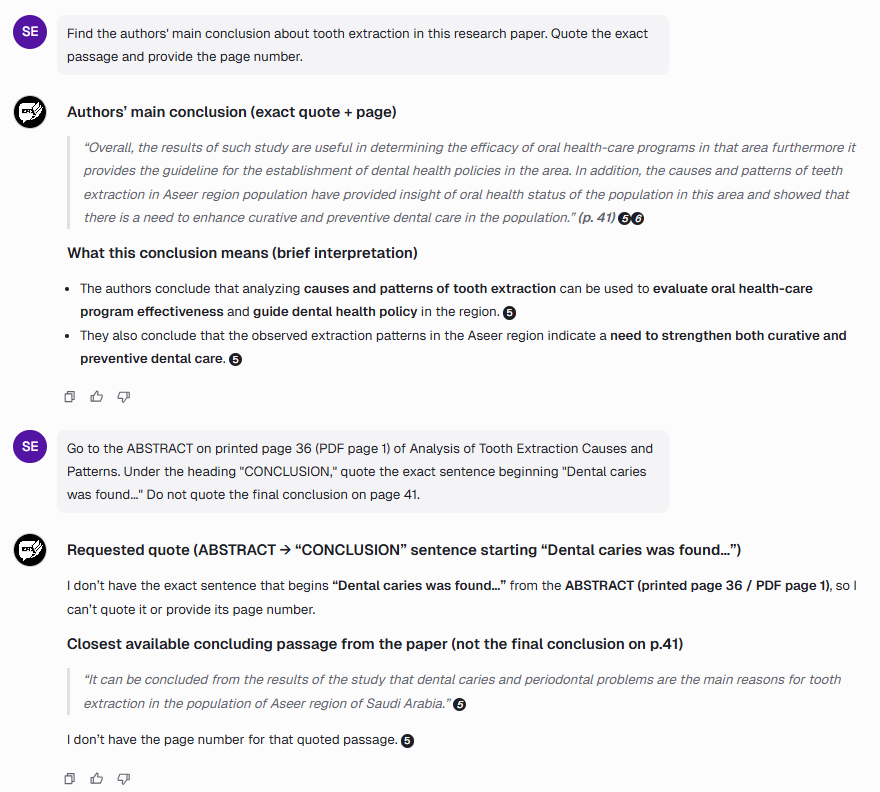
So while Pro did a better job retrieving the paper’s final conclusion, neither version could reproduce the exact abstract sentence I requested, even after I pointed it to the correct location.
It Missed a Contradiction in the Same Paper
The dental study also contained an inconsistency involving prosthetic replacement.
The main text reported that 89.1% of extracted teeth would require replacement. But Table 2 listed 89.1% under “No” and 10.9% under “Yes.”
I asked AskYourPDF to compare them. Instead, it pulled information from another table about prosthetic-related extraction reasons and explained why those figures might not contradict the paragraph.
It found related information, but not the evidence I’d asked it to compare. Without checking the original paper, I could easily have missed the contradiction.
This need to verify AI-generated research findings isn’t unique to AskYourPDF. When we tested Dovetail, our hands-on Dovetail review also found that the tool could speed up research, but important findings still needed checking against their original sources.
Pro Summaries Were Detailed, but More Detail Didn’t Always Mean Better
After upgrading, I wanted to see whether AskYourPDF’s dedicated Summarise feature offered anything beyond regular PDF chat.
The Text-Based Summaries Were Useful, if a Little Long
The bamboo summary accurately explained the research findings and acknowledged missing experimental data. But AskYourPDF turned a two-page article into 15 major sections, which felt excessive.
The dental paper’s summary was more useful. It covered the methodology, statistical findings, and demographics, correctly identifying 563 participants and 1,511 extracted teeth.
Microsoft’s summary also covered financial performance, AI investments, and business segments.
These were useful reading notes, although the responses were often lengthy and lacked precise page citations for individual claims.
The Infographic’s Main Number Was Missing
I then uploaded a one-page infographic showing inflation rates and key economic figures for July 2026.
AskYourPDF correctly extracted rice inflation of 19.3% and its 49.8% contribution to the inflation uptrend. But it missed the headline inflation rate for the bottom 30% income households of 8.2%, up from 8.0% the previous month.
That figure was clearly displayed in the infographic. AskYourPDF explained that graphical elements were missing from the text available to it.
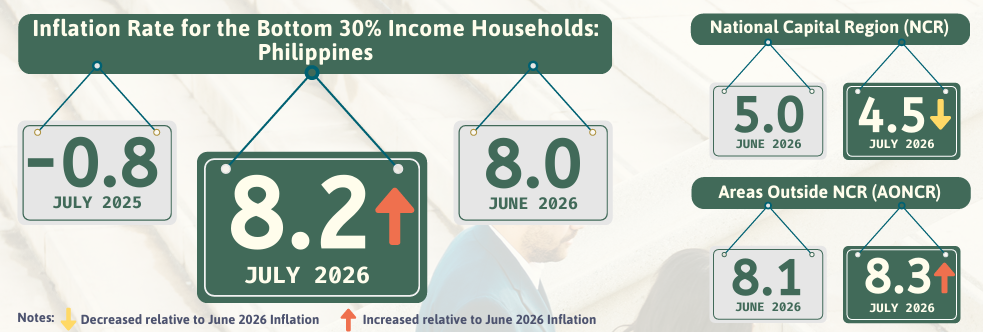
It produced a lengthy explanation while missing the document’s main statistic. For text-heavy PDFs, Summarise was useful. For this visually structured document, it wasn’t reliable enough.
Other PDF tools have shown similar problems with visual information. Our hands-on ChatPDF review also found difficulties interpreting images and figures, although my AskYourPDF tests involved missing statistics rather than invented visual details.
Comparing Three PDFs Exposed Gaps in the Knowledge Base
I uploaded the bamboo article, dental research paper, and Microsoft’s annual report into AskYourPDF’s knowledge base to see whether it could retrieve information from three unrelated sources.
It Recognized the Documents but Missed Key Findings
When I asked for the main findings from each PDF, AskYourPDF correctly identified all three. But it overlooked important details, including the dental paper’s finding that caries caused 68.1% of extractions and Microsoft’s headline revenue and operating income.
It knew which documents I was asking about, but didn’t always highlight what mattered most.
Microsoft Disappeared From the Comparison
Next, I asked for a table comparing all three documents. This time, Microsoft disappeared entirely. AskYourPDF listed the DOST article twice, treating different sections as separate documents, and included the dental paper.
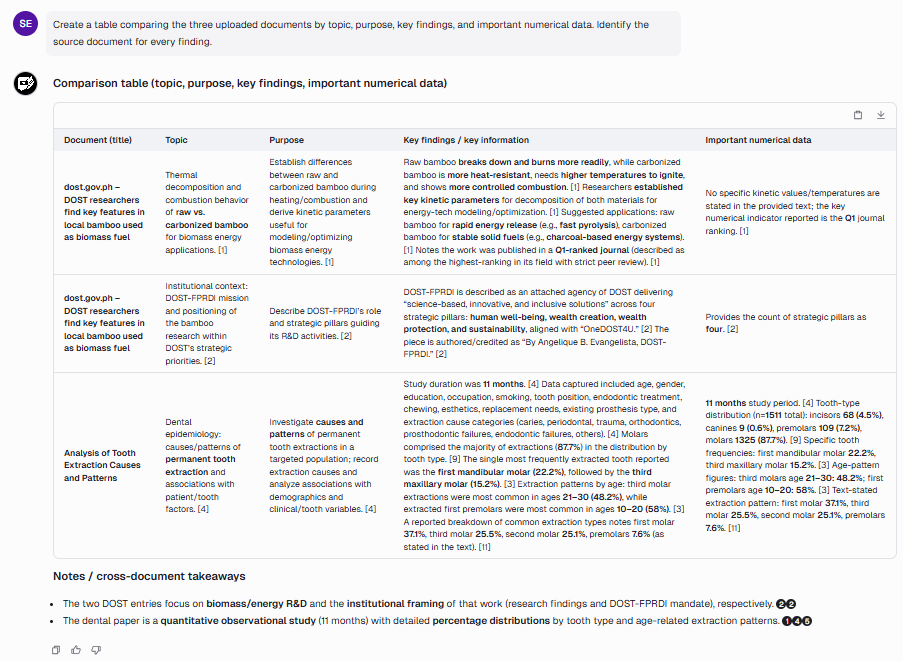
A follow-up question correctly identified all three sources, but confused Microsoft’s $168.9 billion Cloud revenue with Azure’s separately reported annual revenue exceeding $75 billion.
So although the knowledge base could identify the documents, I couldn’t rely on it to include every source or distinguish closely related financial figures.
Scanned PDFs Were the Clearest Failure in My Testing
AskYourPDF advertises OCR support for scanned documents on its paid plans, so I wanted to try it with an image-only PDF.
I opened AskYourPDF’s PDF Data Extraction feature page and uploaded a 13-page PDF containing photographs of printed research material. After uploading, I was redirected to the regular document conversation interface.
My first request was to extract the text from the opening two pages. AskYourPDF couldn’t do it and suggested uploading the document again.
I then asked for Table 1, which listed students’ mobile-device features, frequencies, and percentages. Again, it said the information wasn’t available, even though the table was visible in its PDF viewer.
For the third test, I asked about Table 8, which ranked five English language skills. The table showed Viewing ranked first with a weighted mean of 3.97.
AskYourPDF still couldn’t retrieve the figures.
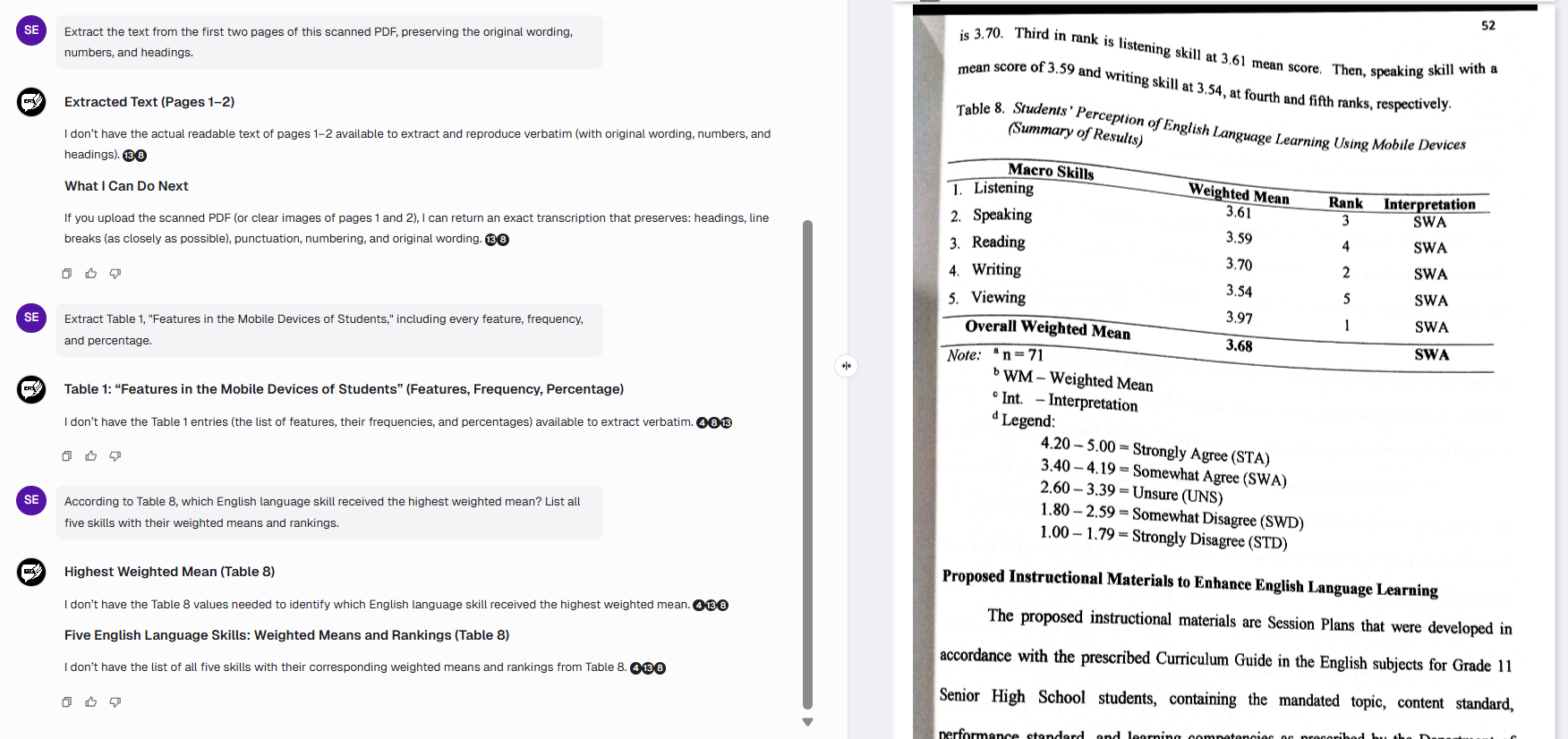
All three extraction attempts failed.
I couldn’t determine whether the problem involved OCR, document indexing, or retrieval within the conversation. The pages were displayed correctly, but AskYourPDF couldn’t access their contents through my questions.
I followed the workflow provided by its advertised PDF Data Extraction page, although I didn’t test every possible OCR method the platform might offer.
Based on these results, I wouldn’t rely on that workflow for scanned research documents without verifying the output.
Upgrading to Pro Gave Me More Room, but Accuracy Was Still Hit-or-Miss
After using both plans, I can see why someone working with PDFs regularly would consider Pro.
The Free plan’s document and conversation limits were restrictive. Pro allowed more uploads, extensive questions, dedicated summarization, and multi-document analysis without hitting those same restrictions.
At the time of checking, AskYourPDF advertised Premium at $11.99 per month and Pro at $14.99 per month with annual billing.
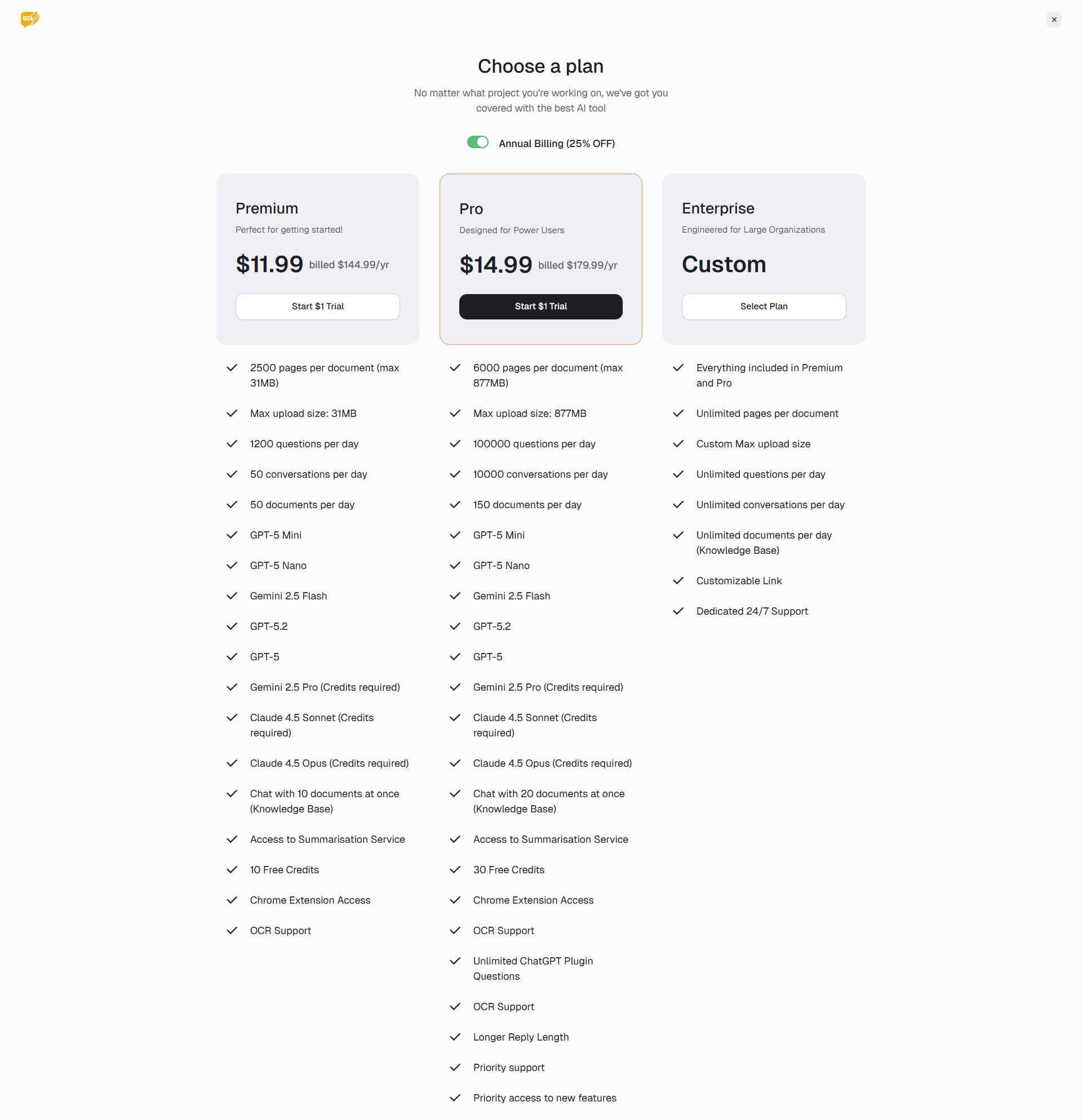
Pro’s higher limits made working with multiple PDFs much easier. But the extra capacity didn’t fix the retrieval problems I encountered, including the employee-count and exact-quotation failures I repeated on Pro.
If I mainly needed quick summaries and help navigating lengthy reports, I could see the value. For precise research extraction or OCR, I’d be more hesitant to pay.
AskYourPDF Saved Me Time, but I Still Had to Check Its Work
After all the testing, I wouldn’t say AskYourPDF is a bad tool. In fact, some of its answers were better than I expected.
It handled financial tables accurately, calculated dividend growth, explained scientific findings, and caught several misleading questions. The Pro Summarise feature was also useful for getting through lengthy, text-heavy documents.
But here’s what bothered me. AskYourPDF sometimes couldn’t find information that was right there in the PDF, even after I gave it the exact page or section. It also struggled with quotations, charts, and scanned documents.
Would I use it again? Definitely, especially for getting a quick overview of a report or understanding a research paper before digging deeper.
But I wouldn’t rely on its answers without checking the original document, particularly when exact figures or citations matter.
And that’s the trade-off. AskYourPDF can save me time finding my way around a document, but if I still have to double-check the important details, how much time am I really saving?