A note is easy to save. Finding it when you actually need it is another story.
I’ve been keeping notes since high school, but saving information doesn’t automatically make it useful. That’s what made Mem interesting to me. At first glance, it looks like a familiar note-taking app with AI features, but its promise goes beyond storing information. It aims to help users connect related notes, retrieve forgotten details, and turn scattered information into something they can actually use.
I wanted to see whether it could deliver on that promise. Rather than starting with my personal notes, I tested Mem using sample business information to see how well it handled connected information, changing decisions, tasks, and meeting notes.
The results were mixed. Mem successfully connected related information and organized tasks, but inconsistent retrieval, integration problems, and missing details in meeting notes made it harder to rely on. Here’s what happened during my tests.
I Gave Mem 15 Business Files to See What It Could Remember
For this test, I prepared 15 files containing sample business information. I wanted to evaluate how well Mem connected information across notes, tracked changes in decisions, identified outstanding tasks and commitments, and distinguished newer information from earlier updates.
My materials included spreadsheet data, document content, and notes prepared in Markdown (.md) format. I imported the Markdown files directly and manually copied relevant content from the other materials into Mem notes.
I also tested Mem’s Voice Mode during a live meeting, reviewing the generated notes for important details, decisions, and action items. Afterward, I used the refinement feature to see whether it could correct errors without changing the intended meaning.
Next, I tested Mem Agent’s connections with Gmail and Google Sheets to see whether Mem could retrieve information from connected sources. I compared this with retrieval using information made available through the import workflow. I also tested automatic meeting briefings, task creation and retrieval, and task updates following changes in business decisions.
I used the seven-day free trial to access additional features, particularly Agent connections. Throughout the tests, I checked outputs against the underlying notes, paying attention to missing or incorrect details, the attribution of people and commitments, and whether Mem followed instructions when creating or modifying tasks.
Mem Connected Related Notes to Surface Unresolved Decisions
After I imported an email, Mem linked the supplier’s offer to existing packaging complaints, inventory pressure, a suspected material issue, and outstanding work related to the problem. It also surfaced the unresolved choice: accept a replacement that would delay production by five days, or keep the current batch and negotiate a partial refund.
I then asked Mem to identify the decisions that still needed attention and instructed the Agent to compile them into a note.
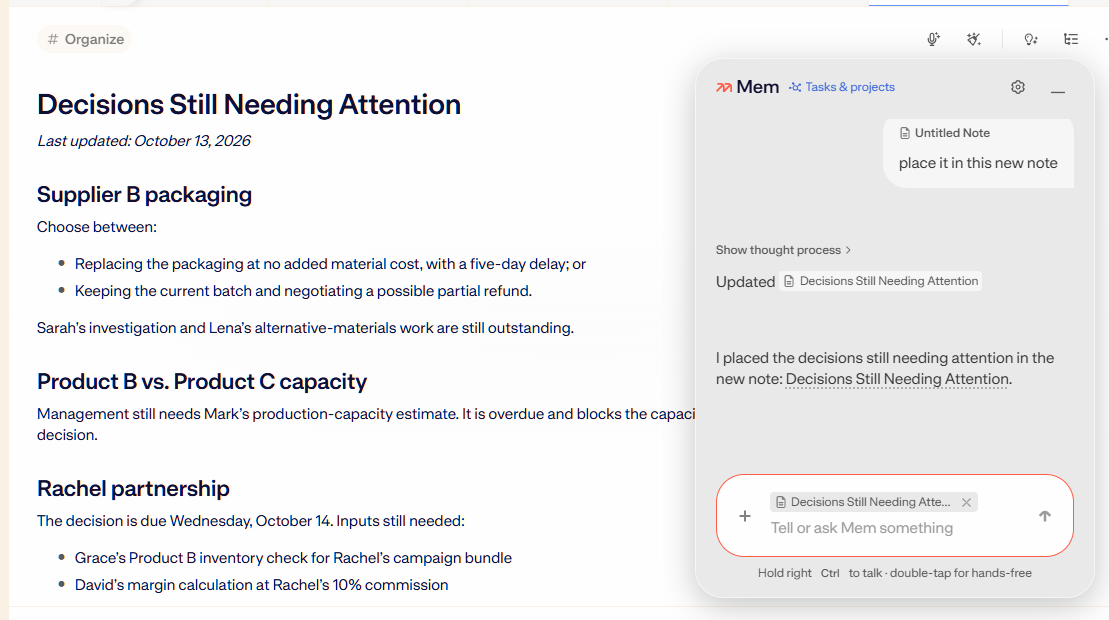
Having these details together made it easier to review unresolved decisions, identify missing information, and see what work remained outstanding without manually comparing every related note. Mem didn’t just retrieve the supplier’s email. It connected the offer to existing business problems and organized the relevant information into a note I could revisit.
Changing Decisions Didn’t Throw the Task List Off Track
Task management performed well in my testing. Mem went beyond creating and storing tasks by preserving their context and keeping related work aligned with changing decisions.
When a decision changed, Mem identified the task that needed to be closed while leaving unrelated tasks untouched. It also respected my instruction not to modify tasks yet, distinguishing between reviewing existing work and having permission to make changes.
Mem also handled task conditions and deadlines well. It kept conditional work inactive until its trigger was met, distinguished between a delay and a reason to stop production, and converted a relative deadline such as “tomorrow” into a specific date and end-of-day deadline. When checking task completion, it required evidence rather than prematurely marking work as done.
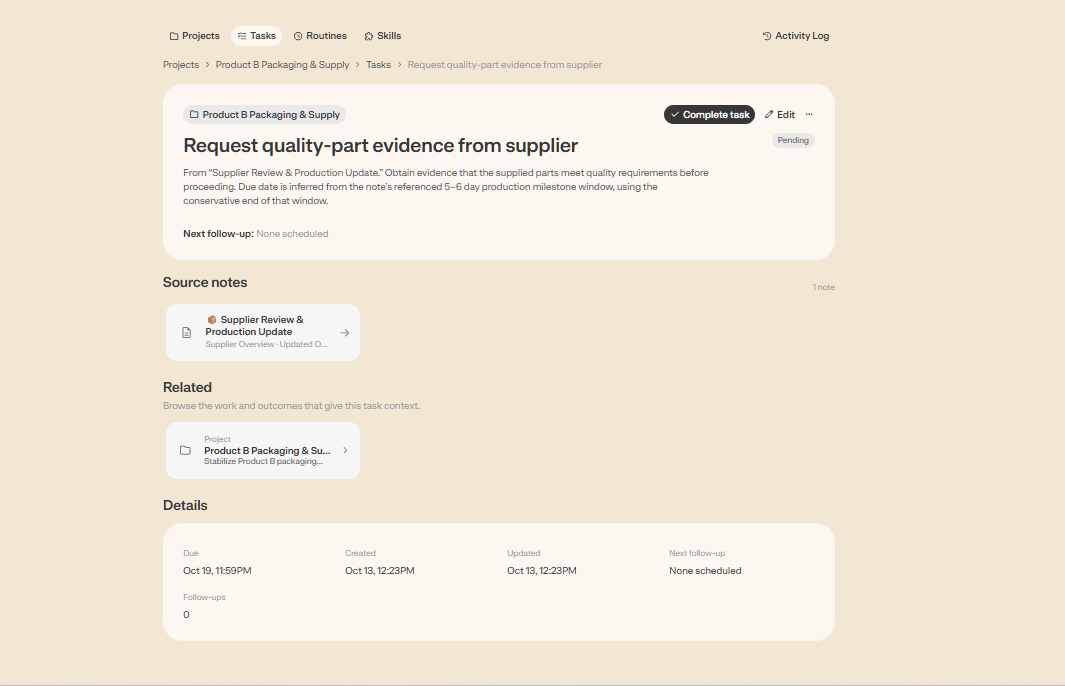
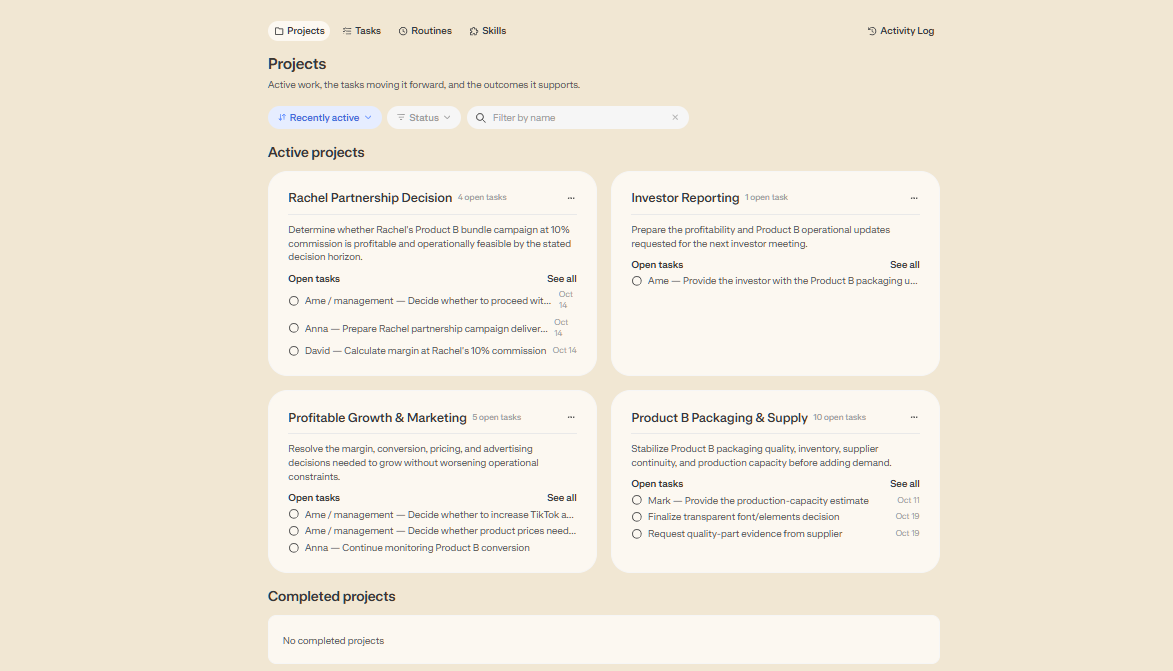
Project organization added another useful layer. In my tests, Mem grouped tasks into projects, preserved dependencies, and tracked project-level status. It could also review tasks against current business decisions to identify whether the work still matched the latest plans.
Meeting Prep Started With More of the Right Context
Beyond asking questions about individual notes, I tested the calendar integration and automatic meeting briefings. Both worked in my testing, and Mem generated a briefing without requiring me to explicitly ask the Agent to prepare one.
The briefings brought together information relevant to an upcoming discussion, including recent business updates, meeting history, open decisions, operational risks, and related people or products. Source links also let me return to the underlying notes for further review.
Instead of manually reviewing several notes before a meeting, I could use the briefing to understand the current situation and identify issues that needed attention.
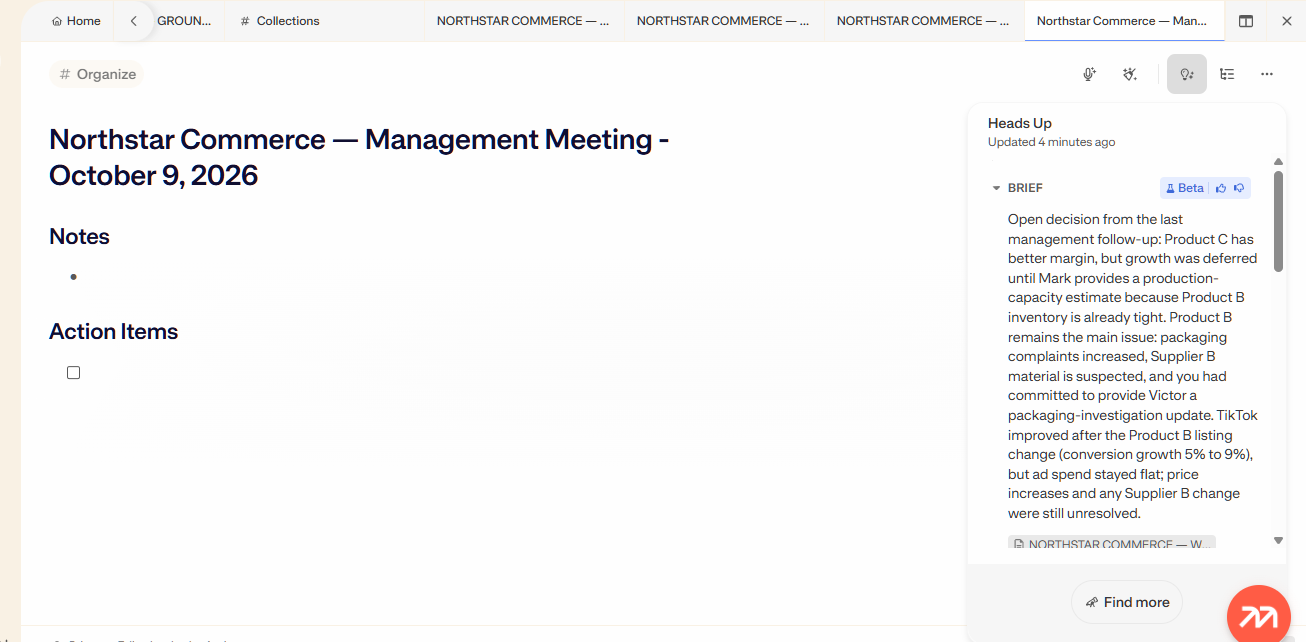
However, the results weren’t always as precise as I needed. Some information was broader than necessary, and the source links didn’t always make it clear which specific note supported an individual statement. That is a weaker trail than I got from Dovetail, which traced every claim back to the source it came from. I would therefore treat the briefing as a useful starting point for meeting preparation rather than a fully verified account of every decision or commitment. Mem labels the brief as Beta in the panel, and its March 2026 product update describes Meeting Briefings as a beta feature for Pro accounts.
The Interface Was Clean, but Finding the Next Step Wasn’t Always Easy
Getting started with Mem was not as intuitive as I expected. Although signing up was straightforward, the onboarding only partially explained the key features, and some important actions took extra effort to find.
The floating AI chat panel also felt small, and I found it difficult to navigate without a clear scroll indicator. More accessible controls for expanding or moving the panel would make it easier to use alongside other screens.
Importing content was another point of friction. Although drag-and-drop was available, the upload process was confusing, and it wasn’t immediately clear how to complete the import.
These issues didn’t prevent me from using Mem, but they made the experience less convenient than I expected from an otherwise clean interface.
Getting a Reliable Answer Sometimes Took More Than One Try
Mem didn’t always surface the information I needed on the first attempt. Broad questions sometimes missed important updates or gave more weight to older information, even when newer details were available. More specific prompts helped retrieve the relevant updates, although Mem handled changes correctly in other tests.
I also encountered requests that took several minutes to process before ending with retry errors. These weren’t frequent enough to establish a pattern, but they interrupted my workflow.
Together, these issues made the experience less consistent. I sometimes needed to narrow my questions, verify which information was current, or retry a request. That extra work reduced the convenience of using AI to manage and retrieve information.
Connected Apps Didn’t Always Find the Right Information
I tested Mem Agent’s external connections to see whether it could retrieve information directly from other sources. The results were mixed.
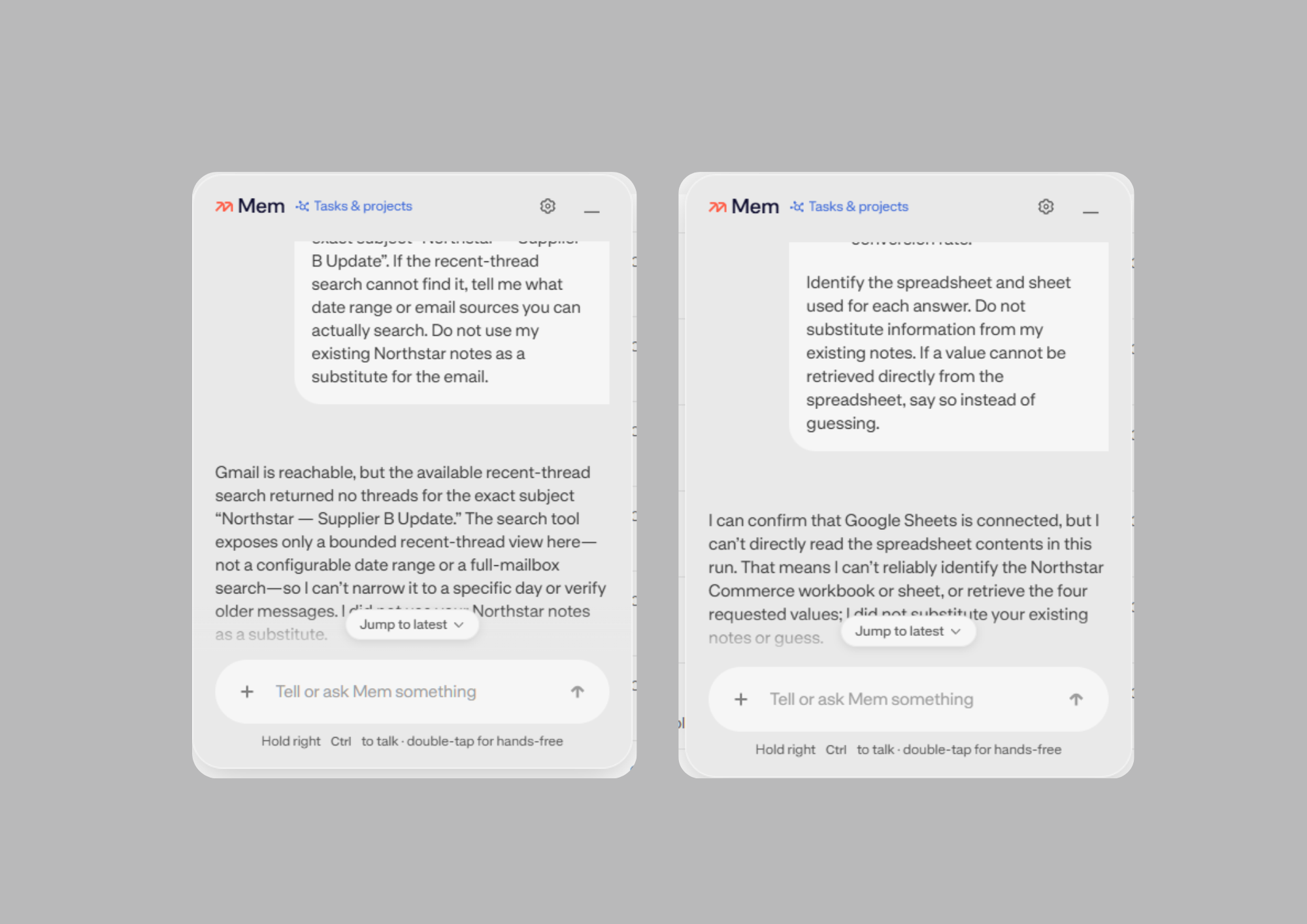
When I searched Gmail using the exact subject of my test email, Mem returned no threads. Although it reported that Gmail was reachable, it couldn’t retrieve the message through that search. The interface I tested also didn’t offer an option to configure a date range or search the full mailbox.
The result was different when I made the email’s contents available through the import workflow. Mem then connected the information to existing business problems and unresolved decisions. This showed that it could work with the information once it was available, but it didn’t resolve the earlier Gmail retrieval issue.
Google Sheets presented a similar problem. Mem Agent showed the connection as active, but Mem Chat couldn’t locate the spreadsheet I was looking for. I tried adjusting the setup, refreshing the connection, and revising my prompts, but the file still didn’t appear in the results.
I couldn’t determine the cause of either issue from my tests. However, the experience showed that connecting a source didn’t necessarily mean Mem could retrieve the information I needed. That limited how much I could rely on these connections in my workflow.
The Live Meeting Notes Looked Organized, but Important Details Went Missing
In a follow-up live-meeting test, Mem produced organized notes, but several important details were missing or generalized. The output failed to preserve key figures, assigned tasks, deadlines, and conditions surrounding unresolved decisions. It also included details that didn’t appear to belong to the discussion.
Although the notes were easy to scan, these omissions made them less reliable for follow-up work. Dropped figures have come up before in our meeting tests: tl;dv’s AI notes left out exact numbers that were sitting in its transcripts, and Grain tracked changing decisions well but got some figures wrong. Mem’s live notes lost more than the numbers, though, because owners and deadlines went missing too.
I also tested the refinement feature, which presented an edited version of a note for review before I accepted the changes. It corrected clear errors and improved the action items, but it didn’t always preserve the original meaning or urgency of every instruction.
The transcript was also messy, so I couldn’t determine whether the discrepancies originated during transcription or summarization. Regardless of the cause, I couldn’t safely rely on the generated notes without checking them against the original conversation.
I Tried the Pro Connections, but Could Only Use One Source at a Time
I used the seven-day free trial mainly to test Mem Agent’s external connections. I wanted to see whether Mem could retrieve information from Gmail and Google Sheets rather than rely only on information I had imported into my notes.
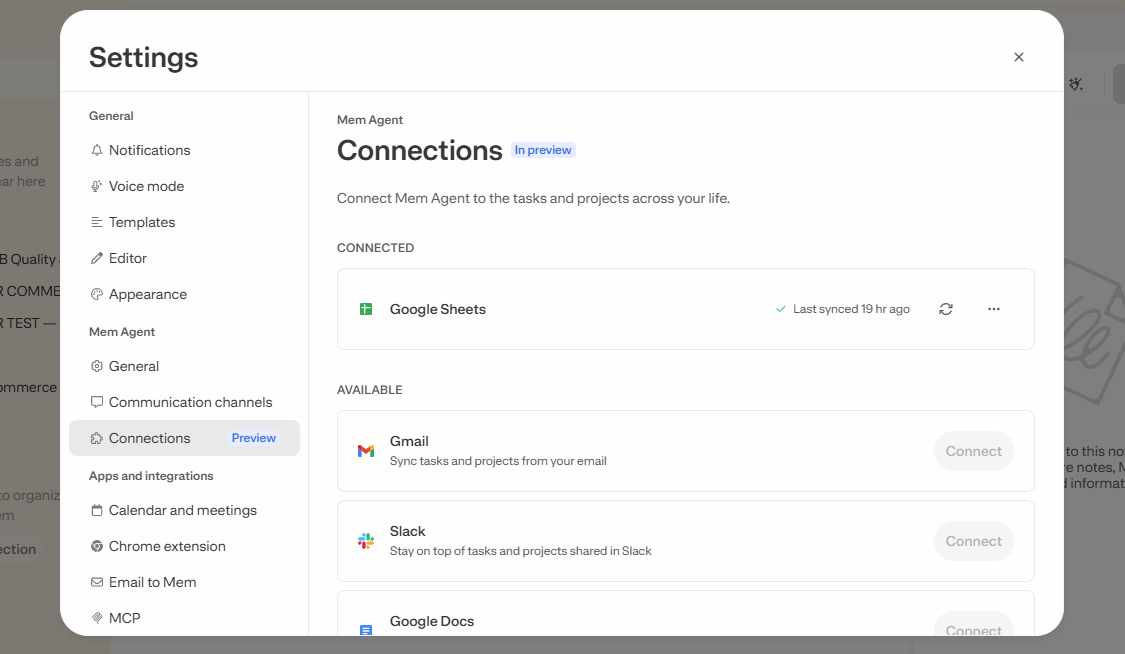
However, my account allowed only one active connection at a time. To test another source, I had to disconnect the existing connection before connecting the next one.
I could evaluate each integration individually, but I couldn’t keep both sources active simultaneously under the allowance shown in my account. Mem’s pricing page explains why: Mem Pro at $29 a month includes one connection, and more connections come with the higher Pro tiers (two on Pro 2× at $49, up to 20 on Pro 20× at $199). The Free and Plus plans include none. For someone hoping to bring information together from multiple services, this is worth checking before paying for a plan.
Promising AI Notes, but Not Yet the Workflow I Wanted
What stood out to me most was the combination of notes and AI chat. In my tests, Mem connected related information, surfaced unresolved decisions, and organized tasks into projects. These results showed how the app could make saved information more useful rather than simply giving users another place to store notes.
However, I didn’t feel that the overall experience reached that potential. Some features were difficult to discover, and I needed time to understand how the different options worked together. The connection limit made it less convenient to test multiple external sources, while inconsistent retrieval and missing details in voice-generated notes meant I still had to check the results myself.
Would I recommend trying it? Yes, especially for AI-assisted note-taking, finding related information, and managing tasks. But I wouldn’t rely on it to retrieve every important update or accurately capture every meeting detail without checking the results.
Mem shows promise, particularly when working with information already available in its notes. For now, though, I see it as a useful assistant rather than something I’d trust to manage my workflow independently. That makes it a different kind of tool from the meeting recorders in our Hands-On Reviews: it is strongest after the meeting, when the notes already exist and need connecting.